Transport Customer Portal Software: A Practical Guide
Transport customer portal software explained for hauliers and container operators. Learn features, benefits, selection and how Logivo fits.
At 09:15 on a Wednesday, the traffic office can be busy for reasons that have nothing to do with new work. Three planners are on the phone, a driver is waiting at the ramp for a release reference that hasn't been sent, and one shipment ID is being chased through email, WhatsApp and a customer call because the purchase order doesn't match the booking.
That single job quickly creates five conversations. The customer wants an ETA. The planner needs the driver to confirm collection. The driver needs the right paperwork. Accounts wants the POD before month close. Customer service logs another ticket. Without shared visibility, this isn't an exceptional breakdown. It's the normal cost of running haulage, container transport or drayage through disconnected messages, spreadsheets and attachments.
Transport customer portal software is meant to give all five parties one controlled view of the same operational record. The value isn't a prettier tracking page. It's stopping each person from rebuilding the job history from scratch.
Table of Contents
The Daily Chaos a Transport Customer Portal Is Built to Fix
The traffic office rarely struggles because nobody has information. It struggles because the information sits in different places, arrives at different times and gets repeated by different people. A planner may have the booking in the TMS, a driver may have the job instructions on a mobile device, accounts may be waiting for a scanned POD, and the customer may only see the last email someone remembered to send.
The result is a stream of low-value interruptions. “Has it collected?” becomes a phone call. “Can you resend the delivery note?” becomes an inbox task. “Which reference should appear on the invoice?” becomes a message between operations and finance. Each answer might take only a few minutes, but the work competes with planning the next vehicle, checking a failed delivery or dealing with a port delay.
One job, several versions of the truth
Shipment-status questions make up around 70% of customer service enquiries in logistics, according to TransVirtual's customer portal guidance. That figure explains why a portal that publishes collection, delivery and POD information can remove so much repetitive traffic from the office.
Customers also increasingly prefer to solve problems without contacting support. The same source cites 81% of customers preferring self-service before contacting support. For a transport operator, that preference translates into a practical requirement. If a customer can check a job milestone or download a document without calling, the planner can stay focused on exceptions.
Practical rule: If the customer still has to email the traffic office to find the POD, the portal hasn't closed the workflow.
A useful portal doesn't ask the customer to understand internal dispatch language. It gives them the status, references, documents and invoice information relevant to their account. That matters in road freight and container work, where a booking may involve a shipper, consignee, broker, subcontractor, driver and finance contact, each with a different question about the same move.
The simplest test is operational. Can the customer find the job, understand what happened, retrieve the supporting document and raise the next request without another phone call? If yes, the portal is reducing information asymmetry. If it only shows a map pin, the office is still carrying most of the burden.
What Transport Customer Portal Software Actually Is
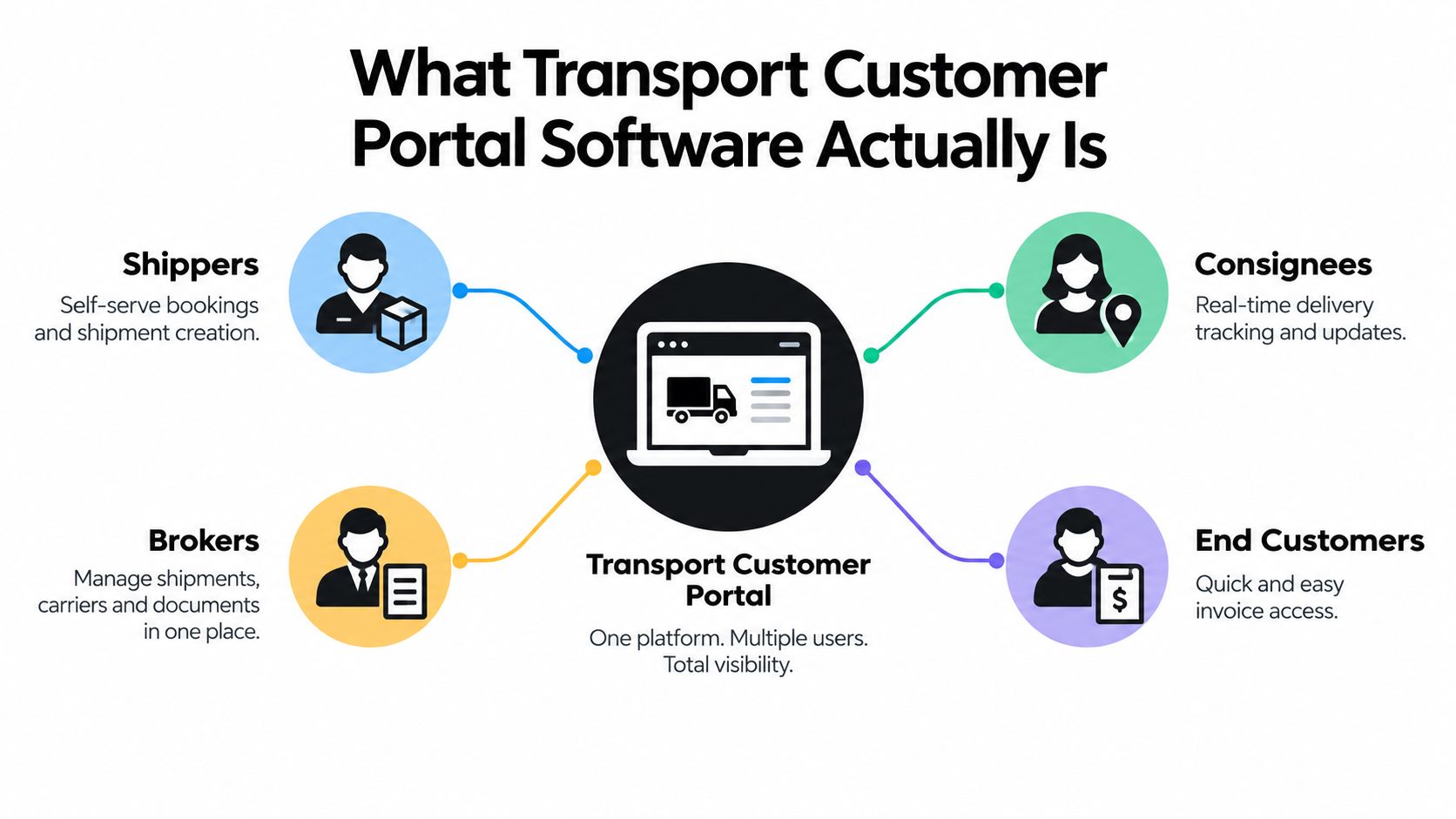
Transport customer portal software is a secure, branded workspace for external users. Shippers, consignees, brokers and end customers use it to interact with the jobs held in a haulier's or container operator's transport management system. They may book work, review job status, retrieve delivery documents or see invoice-related information, subject to the permissions assigned to their account.
The portal sits beside the rest of the transport stack. A TMS holds the operational job, planning and completion record. A fleet or telematics layer may provide vehicle position. A document store may retain PODs and bills of lading. An accounting package may hold the financial ledger. The portal gives approved customers a usable surface across the relevant information without exposing the internal system.
Portal, tracking link and telematics dashboard
These tools aren't interchangeable.
- A public tracking link usually answers one narrow question, such as where a shipment or delivery stands.
- A telematics dashboard is primarily for the operator, showing fleet and vehicle information used for internal control.
- A customer portal is account-aware. It shows the customer's own jobs, references, milestones, documents and charges in a controlled workspace.
A portal can use tracking data, but the customer usually cares more about business events than raw coordinates. “Collected”, “arrived”, “loaded”, “delivered” and “POD available” are more useful to a shipper's receiving team than an unexplained vehicle position.
The audience boundary matters. Drivers need clear briefings and a way to capture delivery evidence. Planners need the jobs grid, allocation and exception handling. Customers need restricted access to their own commercial and operational information. Combining these views without permissions creates risk, while separating them completely creates duplicate work.
For readers evaluating self-service design beyond transport, SnapDial self-service insights offers useful context on how customer-facing access can reduce avoidable support interactions. The transport-specific test remains the same: the portal must reflect the live operational record and respect who should see each job.
Core Features a Transport Customer Portal Should Expose
A feature list is only useful when each item removes a known traffic-office problem. The portal should expose the information customers repeatedly request, while feeding new information into the same workflow that planners, drivers and finance teams already use.
Status that reflects transport events
Customers need milestones tied to the job record, not a vague “in transit” label. Collection booked, vehicle arrived, loaded, delivered and POD received are operationally meaningful because they explain what has happened and what the next team should do.
This is different from presenting raw GPS data as if it were a complete customer experience. A vehicle can be near a delivery address without the job being ready for handover. The portal should make the business status clear and show relevant timestamps or exceptions where the system supports them.
Booking without rekeying
Self-service booking only helps if the customer enters the fields the operator needs. That may include collection and delivery details, container or shipment references, purchase order numbers, delivery requirements and contact information.
A free-form booking form shifts the data-cleaning burden to the planner. A structured form creates a cleaner job at intake and reduces the chance that an email reference gets mistyped into the TMS. Practical AI can assist with extracting information from documents or messages, but it should support the planner's workflow, not replace operational judgement.
Documents and invoice visibility
A customer portal should make PODs, delivery notes, reference numbers and invoice documents available against the correct job. A POD that sits in an email attachment is easy to misfile, difficult to find later and likely to trigger another request.
Invoice visibility has a similar purpose. Customers should be able to understand which completed work supports a charge and whether a query is outstanding, rather than asking the traffic office to search through delivery paperwork. Systems commonly position tracking, PODs, invoices and related documents together, as described in Logivo's guide to customer portals for logistics.
Data exchange for larger accounts
Some shippers don't want another browser tab. They want job status and delivery evidence in their WMS or ERP. APIs and webhooks can push agreed events and documents into the customer's systems, reducing manual downloads and re-entry.
| Feature |
Daily problem it removes |
| TMS-linked milestones |
Repeated calls asking whether a job has collected or delivered |
| Structured booking |
Manual rekeying and incomplete order details |
| POD and document access |
Misrouted attachments and delivery-proof chases |
| Invoice visibility |
Finance queries that operations must answer from scattered records |
| API or webhook access |
Re-entering transport events into a customer's own system |
The useful measure isn't how many features appear on the portal screen. It's how often the customer still needs to ring after using it.
How a Portal Connects to Planning, POD and Invoicing
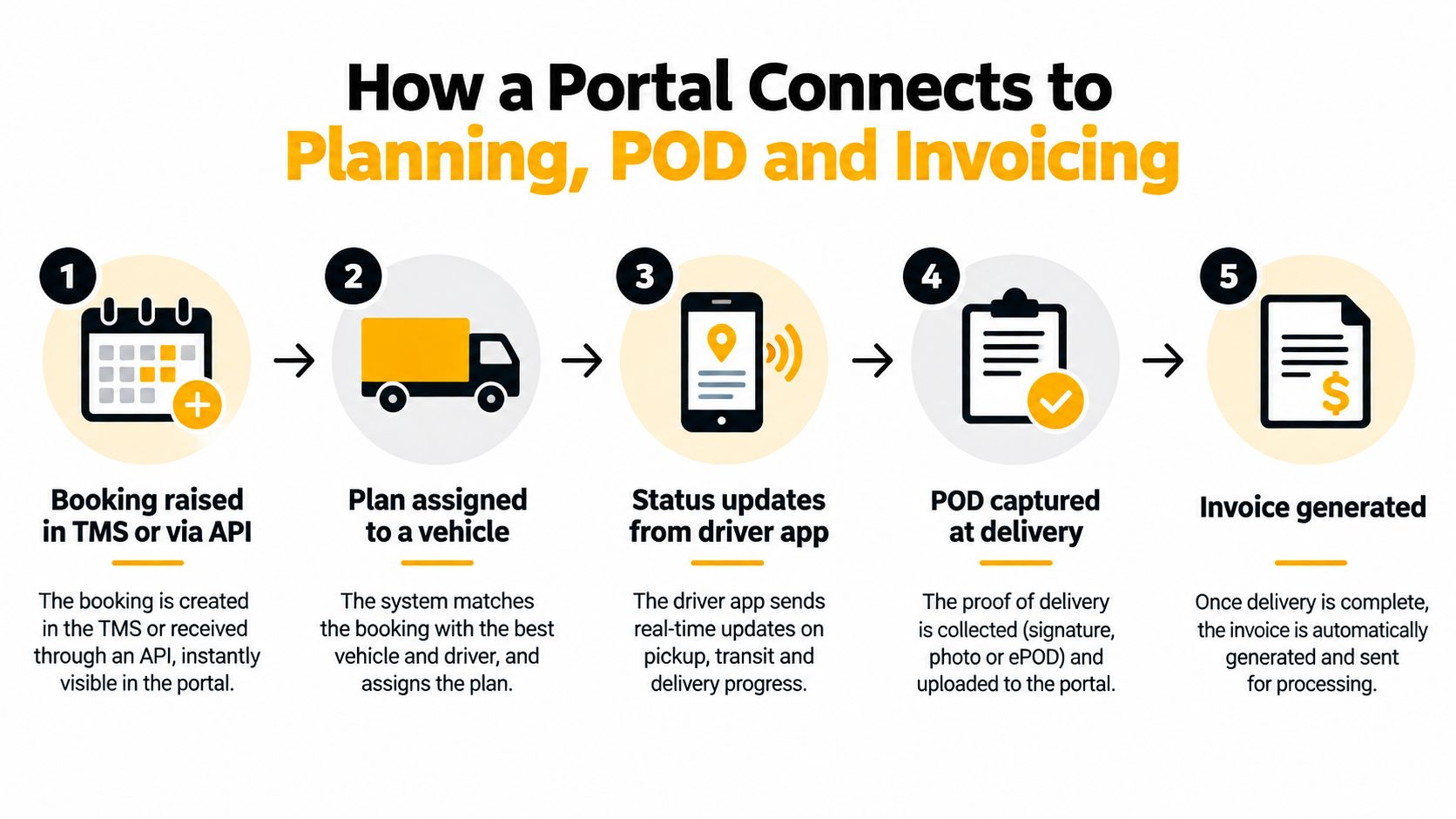
A customer books a load at 9:00, the planner assigns a subcontractor, and the traffic office starts tracking progress across separate systems. By delivery time, the customer wants the same operational record the operator uses, not a tracking widget with limited context. A useful portal connects booking, planning, driver updates, proof of delivery and billing so both sides work from consistent information.
The shared record is the control point
The portal should read from the live TMS record, rather than from a delayed copy maintained separately. The customer can then see the milestones used by the traffic office, while PODs and delivery notes stay attached to the correct job.
A practical POD record may contain an electronic signature, photographs, timestamps and, where supported, location information. Transport software guidance presents this evidence as a basis for releasing an invoice without waiting for paper dockets to return, as outlined in this explanation of transport management software development.
The connector points need checking before purchase:
- EDI or API intake: maps customer references and booking fields into the internal job.
- Driver mobile capture: sends progress events and delivery evidence back to that job.
- Document extraction: helps read POD images and reduce rekeying, with a person reviewing exceptions.
- Billing triggers: apply completion rules, required documents and approval checks before invoice release.
A portal cannot repair a weak source workflow. Duplicate job numbers produce duplicate visibility. Manual re-entry creates conflicting references. PODs held outside the TMS can leave finance waiting after delivery has finished.
Delivery completion and billing must share a clear handoff. Connected transport workflows can pass delivery updates, PODs, invoices and tracking data through one environment, with completed delivery activity feeding billing and reducing manual input, as described in Dashdoc's overview of TMS workflows.
Once completion checks pass, the job is ready for billing and the customer can retrieve its supporting documents, as explained in Logivo's guide to transport invoicing software. Finance can then ask, “Has this completed job passed the billing checks?” rather than search for a missing POD.
Security, Access Control and Integration Choices Buyers Should Weigh
A customer portal handles commercially sensitive information, so access design deserves the same attention as status screens. Start with the question, who should see which job, document and charge? A shipper with several sites may need a group view, while a broker may need access only to loads it arranged. A consignee may need delivery evidence but not the operator's full pricing history.
Access should follow the account structure
Per-customer accounts and role-based permissions provide the basic boundary. Larger shippers may ask for single sign-on or network restrictions, while an audit log helps the operator establish who viewed or downloaded a document.
Data isolation is essential. Two customers may use the same haulier, lanes or subcontractors, but neither should see the other's bookings, references or invoices. Guidance for logistics portals highlights user hierarchies, API-level scoping and secure integration as core controls, while GoFreight's customer portal FAQ addresses practical questions such as whether tracking can work without login and what an account can access.
Integration depth changes the commercial trade-off
A REST API and webhook events generally provide a cleaner route to connected systems than repeatedly exchanging flat files, but deeper integration can make a system harder to replace. Buyers should ask where the system of record lives, which fields remain portable and how historical jobs and POD images can be exported.
| Decision area |
What to confirm |
Why it matters |
| User access |
Account scope, roles and approval process |
Prevents unauthorised visibility |
| Data isolation |
Customer, site and broker boundaries |
Protects commercial confidentiality |
| Reference mapping |
Customer IDs linked to internal job numbers |
Avoids duplicate or untraceable jobs |
| Status exchange |
API fields, webhook events and retry handling |
Keeps customer systems current |
| Document storage |
POD retention, retrieval and export |
Supports disputes and billing checks |
| Portability |
Historical data and document export options |
Limits switching risk |
Don't approve an integration because a supplier says it has an API. Ask to see the fields, event rules, error handling and ownership of the underlying record.
Selecting and Implementing a Transport Customer Portal
Implementation should fit the traffic office's working rhythm. A portal that requires every planner to change process at once will create resistance, even if the feature set is sensible. Roll it out around one customer journey, then expand after the operational handoffs work.
Start with the existing job record
Shortlist two or three options that connect to the current TMS and insist on a sandbox using realistic job data. Demo screens rarely show the awkward purchase order reference, incomplete delivery instruction or amended container move that causes trouble in production.
Before choosing, walk through these journeys:
- A customer creates or submits a booking.
- A planner reviews and allocates it from the jobs grid.
- A driver receives the briefing and updates the job.
- The driver captures the POD and delivery note.
- Operations completes the job checks.
- Finance sees the record ready for invoicing.
- The customer retrieves the evidence without calling.
If the process breaks at step four, a polished login page won't help.
Pilot before broad adoption
Choose one cooperative, high-volume account and establish a baseline for status queries, POD chasing and invoice disputes. After the pilot period, compare the same operational measures rather than relying on login counts alone.
Useful signals include:
- Fewer status emails: planners spend less time repeating milestone information.
- Shorter POD chase cycles: delivery evidence appears at the job rather than in a later inbox thread.
- Cleaner invoice queries: customers can inspect the job history and supporting documents.
- Unprompted customer use: users return to the portal because it answers real questions.
Onboarding should happen in waves, starting with accounts that generate enough repetitive work to make the change visible. Give each customer a short guide showing where to book, track, download a POD and raise a query. Keep a fallback contact route during the transition, but don't let exceptions become the default process.
Measure calls deflected per week, time saved collecting PODs and the value of disputed charges reduced. Those measures connect the portal to traffic-office workload and cash collection.
Why Visibility Is Not the Whole Story
A disputed invoice can consume more time than the original delivery. The customer asks which charge covers the job, operations searches email threads for the booking and delivery note, and finance waits while someone confirms whether the work was completed. By the time the answer is assembled, three separate conversations may have replaced one usable operational record.
The durable gain from a portal is a shorter route from completed work to accepted billing. Customers need access to the evidence behind a charge, while operators need that evidence tied to the same job record used by planning and dispatch.
The billing loop is the durable gain
The portal should make the commercial record easier to verify, rather than just display a milestone. A customer can review the booking reference, delivery outcome and supporting document without asking the traffic office to reconstruct the job.
That changes several points in the billing loop:
- Bookings enter the operational record: the customer's request carries its references and requirements into the workflow used by planners.
- Delivery evidence stays attached: the driver uploads the POD against the relevant job, so finance is not matching a loose attachment to an invoice.
- Disputes use the timeline: both parties can review recorded milestones, exceptions and documents rather than relying on recollection.
- Billing follows completion: finance checks a finished job with supporting evidence instead of waiting for an incomplete email trail.
The finance impact is practical. Fewer missing documents mean fewer invoice holds, and clearer job history gives the customer a faster way to challenge a charge with a specific reason. The portal does not remove every dispute. It makes the facts easier to find and gives operations a consistent record to work from.
| Finance question |
Operational answer |
| Is the charge supported? |
The completed job includes the relevant POD and delivery details. |
| What happened during the movement? |
Recorded milestones and exceptions provide the working history. |
| Can the customer verify the invoice? |
Job references and documents are available through the same customer-facing record. |
| What should finance release? |
Checked transport work, rather than a charge assembled from disconnected messages. |
Visibility still matters because it reduces uncertainty during the movement. Its longer-term value comes from carrying trustworthy information through completion, evidence and collection. The portal earns its place when the customer-facing record reflects what the operator planned, executed and can bill.
Where Logivo Fits and How to Take the Next Step
Logivo fits as the customer-facing surface of a transport operational record, not as a standalone tracker. Its transport management workflow supports job creation, allocation, dispatch, driver briefing, completion tracking and digital POD capture, while authorised customers can access job status, delivery information, documents and invoice-related records through the customer portal.
That distinction matters for haulage and container operators. Logivo isn't fleet telematics, vehicle tracking, tachograph compliance software, workshop software, warehouse management or consumer parcel tracking. It gives the customer a controlled view of transport work while planners and drivers continue operating within the underlying transport workflow.
The sensible next step is a small test. Pick two customer accounts, map the journey from booking to POD and invoice, then compare status-call volume and POD turnaround before expanding. For teams that want to see how customer-facing workflows translate into in action examples, practical journey mapping is more useful than judging a portal from a feature list.
You can review the relevant Logivo customer portal solution, prepare a sample job journey and ask direct questions about permissions, integration, document handling and data export. A short demo should show the traffic-office workflow, not just the customer login screen.
Logivo connects customer visibility with job planning, driver briefing, POD capture and transport invoicing in one operational workflow. Visit Logivo to book a practical demo or start a trial with two pilot accounts, then measure the calls deflected and POD turnaround before rolling the portal out across your customer base.