What Is the Best Transportation Management System
What is the best transportation management system for haulage and container operators? Compare features, workflows and ROI to choose the right TMS.
It usually starts the same way.
A customer sends a booking by email. A planner copies the details into a spreadsheet. A driver phones in asking for the collection reference. Someone in the office is chasing a proof of delivery from yesterday. Finance is holding an invoice because the job shows delivered, but the signed document still hasn't turned up.
Nothing in that chain looks dramatic. It just creates drag. Jobs move, but information doesn't move cleanly with them.
That's why the question what is the best transportation management system often gets answered badly. Many buying guides turn it into a feature contest. More dashboards. More modules. More claims. In a real traffic office, the better question is simpler. Which system gets a job from booking to proof of delivery to invoicing with the fewest handoffs, least rekeying, and clearest view of exceptions?
Table of Contents
Introduction Why Best Means Best Fit for Your Operation
At 08:15, the traffic desk is already making trade-offs. A general haulage planner is swapping a timed delivery after a late-loading warehouse call. A container dispatcher is checking whether a box has cleared, whether the pin matches, and whether a return slot is about to become a problem. Different jobs, same pressure. The office needs one clear job flow that everyone can trust.
That is why “best” depends on the shape of your operation, not on who shows the longest demo checklist.
A pallet haulier, a mixed fleet, and a drayage operator do not break down in the same place. One may struggle with customer booking details arriving in different formats. Another may lose time chasing PODs before invoicing. A container team may deal with exceptions all day, such as waiting time, quay issues, rejected turns, or a container number change that has to follow the job all the way through.
Best doesn't mean the longest feature list
The transportation management system market has grown quickly. Analysts at Grand View Research on the transportation management systems market describe a fast-expanding market with far more choice than operators had a few years ago. That is useful for buyers, but it also makes comparisons harder.
A bigger market does not make selection simpler.
The practical question is not whether a system can do many things. The practical question is whether it keeps daily work in one place, from the first booking to the final invoice, without forcing planners to retype, cross-check, and chase documents across separate screens.
Practical rule: If a demo looks polished but your team would still manage bookings in one place, PODs in another, and invoicing somewhere else, it is probably not the best fit.
The decisive check is whether the job stays together
A strong TMS keeps the whole life of a job on one grid, much like a traffic whiteboard that updates instead of being rubbed out and rewritten all day.
For a normal haulage move, that means the booking comes in, the planner adds the references, allocates the driver, updates the status, attaches the POD, and passes the completed job to billing from the same record.
For a container move, the same idea matters even more. The job may need a container number, a pin, a port status check, timed slots, detention notes, and a return leg that can change at short notice. If those details sit outside the main workflow, errors creep in at the points where the office has to copy information back in.
A useful explanation of what TMS software means in day-to-day transport work helps here. The system is not being judged as a feature catalogue. It is being judged as the working board that carries a job cleanly from booking to POD to invoicing.
Judge the fit by the handoffs it removes
The best transportation management system for your business is usually the one that removes the most handoffs from your current office routine.
If planners can see live jobs, exceptions, documents, and chargeable events in one jobs-grid workflow, the office spends less time translating between tools. If finance can invoice from the same completed record that operations used to run the load, billing moves faster and fewer jobs stall over missing proof.
That standard is simple, but it is hard to fake. A system either keeps the work together or it does not.
What a Transportation Management System Actually Does
At its simplest, a transportation management system is a shared control board for transport work.
Not a map. Not just a dispatch screen. Not just a billing tool.
It's the place where one job record carries the information the business needs from the first booking through to the final invoice.
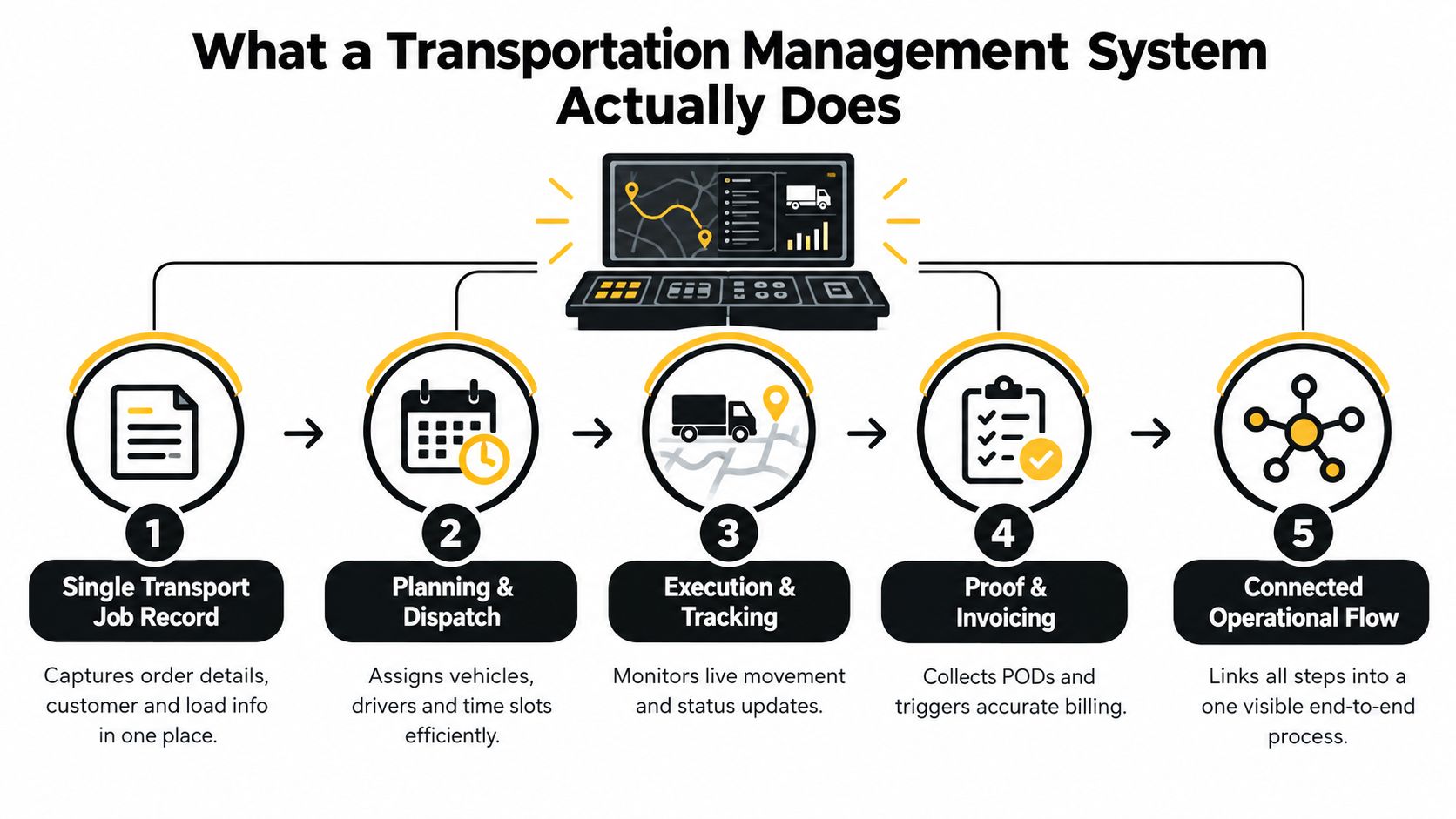
Start with one job record
Think about a collection from a warehouse to a retail RDC. The job needs customer details, collection and delivery points, dates, references, load notes, equipment needs, charges, and any instructions that must reach the driver.
If that information sits in three inboxes, a planner's notebook, and a text thread, the office spends the day translating rather than controlling.
A proper TMS keeps that record together. As the job progresses, the same record should carry allocation, status changes, attached documents, and completion evidence.
Then connect planning to execution
Transport management didn't begin with today's cloud systems. The move from manual coordination to structured digital exchange started accelerating in the 1980s with electronic data interchange and UN/EDIFACT, later followed by early TMS products, web APIs, cloud software, GPS fleet tracking, and dock scheduling tools, as outlined in this history of transport management systems. The reason that history matters is simple. Modern TMS software is expected to connect the whole operational flow, not just store shipment records.
That expectation shows up in daily work.
A planner should be able to allocate a job and know the driver has the right details. The office should be able to see whether the work is accepted, in progress, delayed, complete, or waiting on paperwork. Finance should be able to pick up the completed record without asking operations to re-explain what happened.
A spreadsheet can list jobs. A TMS should manage them.
A spreadsheet is useful for seeing rows. It isn't built to manage status, attachments, communication, and billing readiness as one moving process.
A messaging app is useful for quick contact. It isn't a controlled job record.
Paper notes are useful until someone else needs them.
When people ask what a TMS actually does, the plain answer is this. It keeps the job, its documents, its status, and its billing path tied together.
Five things it should do in plain terms
Create the work clearly
The booking becomes a job with usable operational detail, not just a line in a diary.
Support allocation
The planner can assign work and keep timing, references, and instructions attached to it.
Show live job status
The office can see what still needs action and what has moved to the next stage.
Collect proof and documents
Delivery notes and PODs stay linked to the job they belong to.
Prepare the billing handoff
Completed jobs can be checked and moved toward invoicing without rekeying the basics.
Why haulage and container work need more than routing
Routing matters, but it's only one part of transport control. A container movement may depend more on status handling, document attachment, reference accuracy, and exception visibility than on route logic alone.
That's why the best transportation management system for haulage usually looks less like a pure optimisation tool and more like a disciplined workflow system. If the office can trust the job record, fewer things get lost between booking and cash collection.
Core Modules That Define a Capable TMS for Haulage and Containers
It is 8:10 a.m. Two import containers need booking slots confirmed, one driver is asking for the delivery reference, and yesterday's completed job still has no POD attached. At that point, the best TMS is the one that keeps the whole chain visible in one working view, from booking to proof to invoice.
That is the lens to use here.
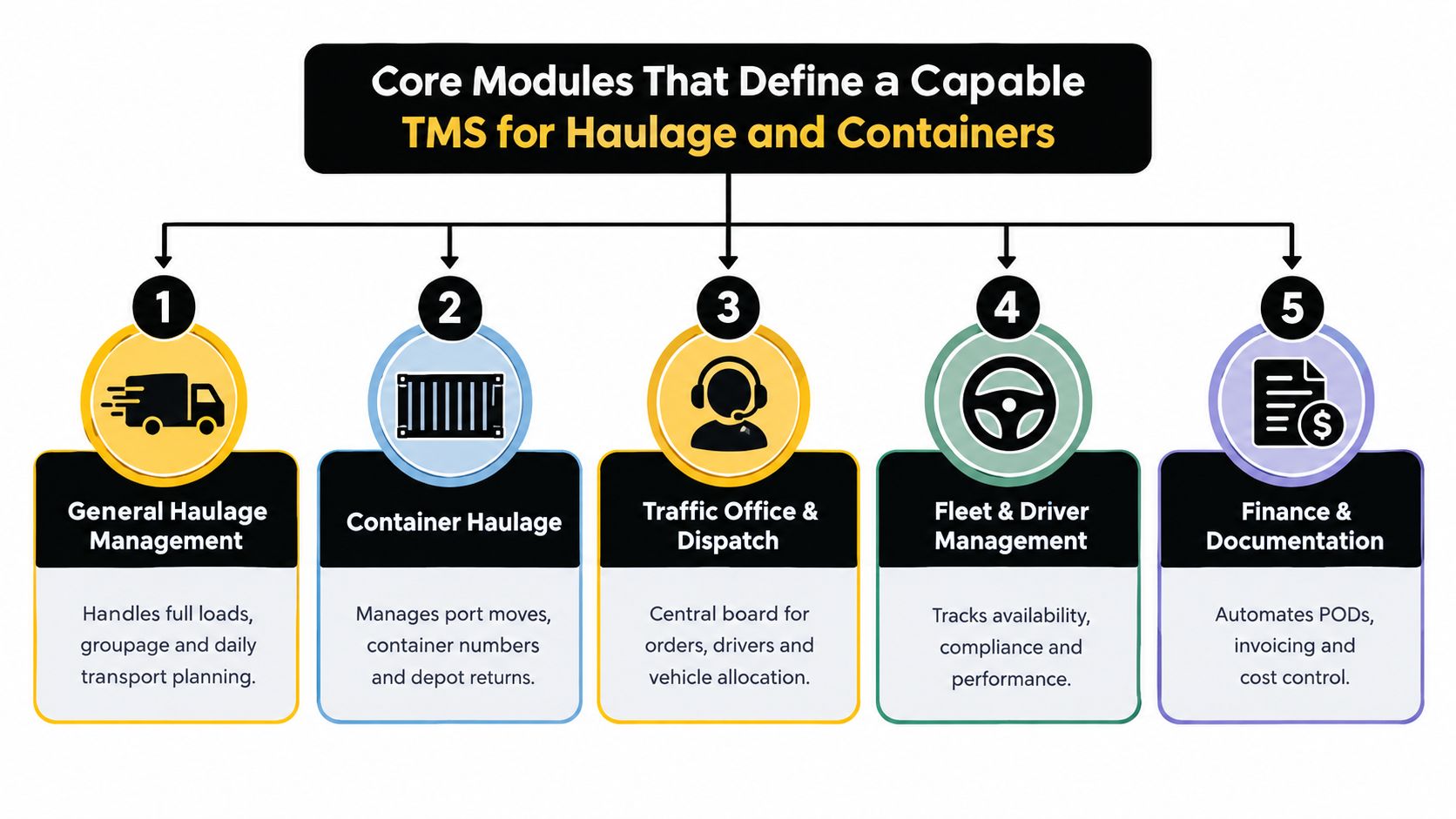
Selection guides often talk about carrier connectivity, planning logic, integration options, freight settlement, and scale under peak demand, as explained in this guide to choosing a transportation management system. In a haulage office, those ideas show up in a smaller set of modules that planners and traffic staff use all day.
Job intake and order creation
Many offices lose time at this stage.
A booking might arrive by email, PDF, portal entry, or a call followed by paperwork. If someone has to copy every address, reference, container number, and note into the system by hand, the first mistake often starts here.
Good job intake should turn an incoming booking into a clean live job record with the right fields already in place. For general haulage, that means collection, delivery, times, references, and charge basis. For containers and drayage, it also means container number, move type, port or depot detail, and any hold, release, or status note that will affect execution.
Document capture tools can help with that first step. Klippa's logistics document processing overview describes extracting data from documents such as waybills and proofs of delivery into downstream systems, and iCaptur's logistics workflow page notes that incoming transport orders from email or PDF can be processed with address data passed into the TMS.
Used well, that kind of automation cuts rekeying. The planner still checks the job before it goes live.
The jobs grid and dispatch board
The jobs grid is the traffic office wallboard in software form. It should let a planner scan the day and answer the practical questions straight away.
- What is still waiting to be planned
- What has been allocated
- What is late or at risk
- What is complete but missing POD
- What is checked and ready for invoice review
That matters more than a long feature list. If booking sits in one area, POD in another, and invoice status somewhere else again, the office spends the day stitching the story together. A good TMS keeps the story in one grid, with clear exceptions called out.
Container work makes this even more important. A normal pallet delivery and a quay collection do not fail in the same way. A quay collection may be blocked by release status, cut-off timing, or the wrong container reference. The system should surface those exceptions inside the same jobs view, not hide them in a side module.
One example of that approach is Logivo, which is built for hauliers and container operators around a single jobs-grid workflow covering planning, driver briefing, POD capture, and invoice linkage. A fuller explanation appears in Logivo's guide to transport management system modules.
A short product walkthrough helps make that workflow concrete:
Driver briefing and job dispatch
Drivers need one clear set of instructions tied to the live job.
That includes collection and delivery points, booking times, references, load notes, contact detail, and any document requirement. For a container move, it may also include container number, PIN or release reference, VBS slot, depot instruction, or whether the job is a collect, return, or swap.
If those details travel outside the system by phone calls, scraps of paper, or separate messages, the office creates extra checking work for itself. A practical workflow shown in HawkLane's proof of delivery workflow example illustrates the chain from booking and allocation through driver receipt of the job, document attachment, and office review.
Clear dispatch reduces avoidable calls. It also gives the office a better record when something changes mid-move.
Container-specific control
Container jobs need their own handling inside the main workflow.
A haulage operator doing drayage work often has to manage move types, container IDs, status changes, depot steps, and port-related timing. Those are not side notes. They change how the planner allocates the job, what the driver needs, and whether the move can be invoiced without dispute.
A capable TMS should let the planner work those exceptions from the same job record used for the rest of the day's traffic. If container status is tracked in one place and the financial handoff happens in another, errors creep in during the handover. The cleaner setup is one record, one grid, one billing path.
Digital proof of delivery and attachments
A job is not really finished until the proof is attached to the right record.
In practical terms, that means the signed POD, delivery note, gate ticket, or site paperwork sits on the completed job, ready for the office to check. Document Logistix on proof of delivery management explains how proof of delivery tools can link confirmations with transport and finance records.
That link matters because POD is part of the commercial workflow, not just filing. If a customer queries a delivery, the office needs the evidence on the job. If finance is waiting to bill, the same evidence needs to be there without another chase.
Buyer check: If POD still lives outside the TMS, the gap between completed work and invoice-ready work is still there.
Completed-job checks and transport invoicing
The strongest final module is the one that closes the loop cleanly.
Once the job is marked complete, the office should be able to confirm the POD is present, check the references, review the charge basis, and pass the job toward invoicing without rebuilding anything from emails or driver notes. That is the test of fit. Can the same workflow carry the job from booking to POD to billing with only exception handling where it is needed?
This also helps separate a TMS from adjacent systems. A TMS is not fleet telematics, workshop software, tachograph compliance, warehouse management, or consumer parcel tracking. Those tools may sit beside it. The transport system's job is to control the operational record and keep the handoffs clean.
How to Judge the Best TMS for Your Operation
A good buying process starts by ignoring the “all-in-one” pitch and looking at the points where your office loses time today.
If jobs are getting booked correctly but PODs arrive late, score POD workflow heavily. If container references are causing mistakes, weight that. If the office keeps planning in spreadsheets because the system board is clumsy, that's the issue to test.
A peer-reviewed evaluation model built from input from 13 logistics experts defined five top-level criteria for TMS selection: technological competence, service, functionality, cost, and vendor, with 16 sub-criteria beneath them, as reported in the MDPI study on TMS selection criteria. That broad framework is useful, but in day-to-day haulage buying, it helps to reduce it to operational fit.
Score the handoffs, not just the features
The best transportation management system is often the one that removes the most manual handoffs between teams.
Ask practical questions such as:
- Can booking details move into the live job without retyping?
- Can planners see exceptions from one grid?
- Can drivers receive clear job instructions without extra calls?
- Can POD attach directly to the completed job?
- Can finance trust the job is ready before invoicing?
If a vendor spends most of the demo on reporting while these basics feel awkward, the fit may be wrong.
TMS Fit Evaluation Matrix for Haulage and Container Operators
| Evaluation Criterion |
What Good Looks Like |
Why It Matters Operationally |
| Workflow from booking to billing |
One job record carries details, status, documents, and billing readiness |
Fewer handoffs mean less chasing between ops and finance |
| Jobs-grid visibility |
Planners can see planned, active, delayed, complete, and exception jobs in one board |
The office spots gaps before customers do |
| Container and drayage fit |
Container references and operational statuses sit inside the same workflow |
Dispatchers don't need side spreadsheets for port-related work |
| POD to invoice linkage |
Completed jobs hold the proof needed for billing review |
Finance can invoice from evidence, not assumptions |
| AI help for intake and documents |
The system assists with extracting and validating booking or document data |
Less rekeying reduces avoidable admin and input errors |
| Cloud delivery and updates |
Access is browser-based and maintenance doesn't rely on local infrastructure |
Smaller teams avoid heavyweight IT overhead |
| Onboarding effort |
Setup is clear, structured, and based on standard workflows rather than major custom build |
Faster adoption usually means better staff uptake |
| Pricing clarity |
Subscription, onboarding, support, and extra workflow costs are understandable upfront |
Buyers avoid surprises after sign-off |
| Scalability |
The workflow still works when job volume, territories, or subcontractor use grows |
The system doesn't need replacing at the first stage of expansion |
Questions worth asking in every demo
Rather than asking “Can your system do POD?” ask “Show me a completed job that is still blocked from invoicing because POD is missing. What does the office see, and what happens next?”
Rather than asking “Do you support container moves?” ask “Show me how container-specific references and statuses are handled inside the same daily board as general haulage work.”
Rather than asking “Do you use AI?” ask questions like these:
- How does the system reduce manual job entry from emailed or attached booking documents?
- What document types can be attached and checked against the job record?
- Where does a planner still need to intervene manually, and where is that a good thing?
That last point matters. You want assistance, not a black box.
Match the weighting to your operation
A mixed general haulage firm may care most about daily planning visibility, driver communication, POD capture, and billing flow.
A container operator may push container references, operational statuses, and exception handling much higher.
That's why a requirements list should reflect your own work patterns. A useful reference point for building that list is this checklist of transportation management system requirements, but the scoring only works if you weight the pain points your team deals with.
Don't buy the system with the best headline. Buy the one your planners and finance team can both use without inventing workarounds.
Watch for hidden complexity
Some tools look affordable until every usable workflow needs tailoring. Others look broad but handle only the happy path cleanly.
A better test is to ask vendors to run your awkward jobs. The late collection. The incomplete POD. The subcontracted leg. The container move with changing references. The returned paperwork that doesn't match the original note.
If the system stays orderly there, you're getting closer to the right fit.
Implementation Onboarding and Pricing Without Heavy Setup
Choosing a system is one step. Getting the office live without months of disruption is the next one.
Many operators become cautious, and reasonably so. Research into TMS adoption barriers highlights high implementation cost, integration complexity, limited resources, and data-quality issues as recurring problems. One 2025 expert study found 11 of 15 experts flagged high implementation costs and technical complexity as major obstacles, according to this study on transport management system adoption barriers.
That doesn't mean change should be avoided. It means the rollout has to be practical.
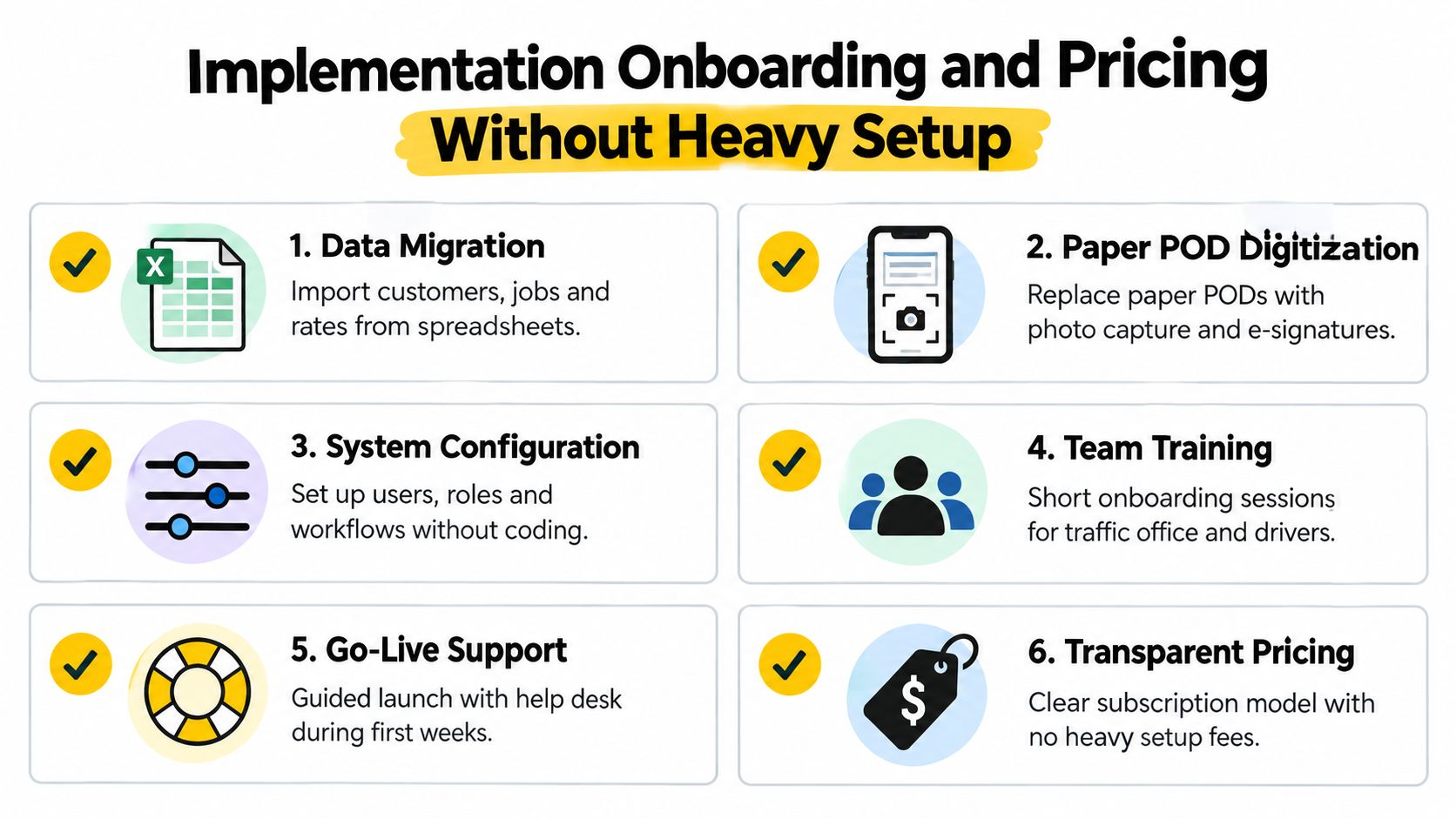
Start with the live data you actually use
Many operators don't need a massive migration exercise. They need the current customer list, active rates, standard references, user roles, and enough recent job data to work confidently from day one.
A clean start usually includes:
- Customer records with the names, contacts, and standing instructions the office already relies on
- Rate structures that finance can verify before invoices are produced from the new workflow
- Job templates or common movement types for repeated traffic patterns
- Driver and user setup so the right people can act on the right parts of the process
Messy source data is common. The key is to clean the essentials first, not attempt to perfect every historical record.
Replace paper friction in the right order
A common mistake is trying to digitise every process at once.
It's often better to stabilise the booking and planning flow first, then tighten the completed-job and POD checks, then refine finance handoff. If drivers are still returning paper PODs late, the office won't feel the benefit of cleaner planning for long.
Field advice: Don't call the project complete when planners can schedule jobs. Call it complete when finance can invoice from completed records without chasing paper.
Train by role, not by software menu
Traffic planners, dispatchers, drivers, and finance staff don't need the same training.
A planner needs to understand job creation, allocation, exception handling, and board discipline. A driver needs to understand where job details appear and what must be captured at completion. Finance needs to know which completed-job checks make a record invoice-ready.
That role-based approach usually helps adoption more than a broad system walkthrough.
Cloud delivery changes the setup conversation
By the 2010s, cloud deployment made TMS more affordable to a wider range of businesses, as noted in the earlier history section. The practical point for buyers today is that cloud delivery usually avoids on-premise infrastructure and shifts maintenance away from the operator's own server burden.
That doesn't remove the need for onboarding discipline. It does reduce one layer of technical overhead.
When evaluating pricing and setup, ask for plain answers to these points:
| Pricing and onboarding question |
Why ask it |
| What is included in initial setup? |
Helps separate standard onboarding from paid extras |
| Which workflows are standard and which require custom work? |
Prevents surprises later |
| How are updates and maintenance handled? |
Shows whether the system stays current without local IT effort |
| What training is included for office users and drivers? |
Adoption fails when training is too thin |
| How does the team handle poor source data? |
Most operators have it, so the answer matters |
| What support is available at go-live? |
Early issue handling shapes user confidence |
Keep the first go-live narrow enough to control
Some teams benefit from launching one branch, one traffic desk, or one workflow first. Others can move in one go if their process is simple and well understood.
The important thing is to define what “working” means before launch:
- Bookings are entered consistently
- Planners can allocate from the main board
- Drivers receive clear instructions
- Completed jobs include the required POD or delivery note
- Finance can review and invoice without chasing the same information elsewhere
If those basics hold, the system is earning trust.
Common Pitfalls and Misconceptions to Avoid
A TMS can look convincing in a demo and still create new admin once real jobs start flowing through it.
The usual reason is simple. Buyers assume the software problem is mainly about features. In transport, it's often about exceptions.
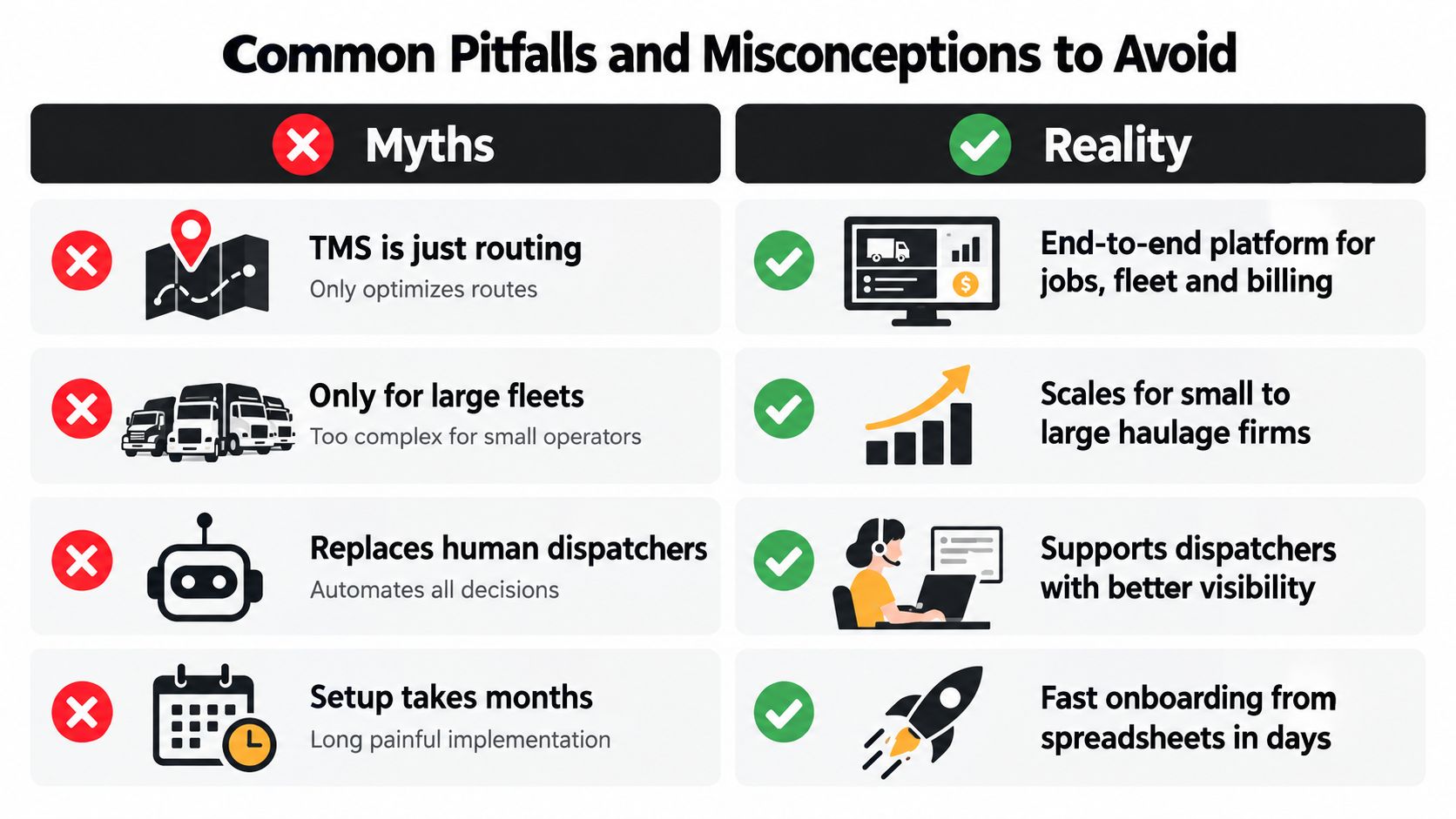
Misconception one. A TMS is just routing
Routing can matter, but many haulage and container businesses feel more pain from missing paperwork, disconnected job status, and poor handoff to billing than from route choice alone.
If a system handles routes neatly but leaves POD outside the main job flow, the office is still patching the process together.
Misconception two. More features means a better fit
A longer brochure often means a more crowded product, not a cleaner workflow.
Operational quality now gets judged as a multi-criteria problem, not a surface checklist. That means architecture, implementation fit, and total cost of ownership matter alongside functionality, as noted earlier from the peer-reviewed selection framework. In plain terms, a simpler product that fits the traffic office well can outperform a broader product that requires constant workarounds.
Misconception three. AI will replace planners
It shouldn't.
The useful role for AI in this context is practical support with routine intake, document extraction, and reducing manual rekeying. That's valuable because planners should spend time resolving issues, sequencing work, and communicating clearly, not copying data from attachments all day.
If a vendor talks about removing the planner from the loop entirely, be careful. Transport work changes too quickly, and local judgement still matters.
A strong TMS supports dispatchers with cleaner information. It doesn't remove the need for dispatch.
Misconception four. Any invoicing tool solves transport billing
General invoicing software can raise an invoice. That isn't the same as making a transport job invoice-ready.
Transport billing depends on completed-job checks, POD presence, charge basis, and operational exceptions being visible before finance presses send. If that logic isn't tied to the job record, the office will continue to chase operations for confirmation.
The hidden problem is exception handling
A 2025 survey of Dutch and Belgian companies found 55% could not link inbound shipments to dock and warehouse planning, 51% could not reroute shipments in time or resolve carrier issues early, and only 55% had a full real-time link with other systems. The same study reported barriers including integration problems at 50%, data quality and availability at 42%, and high implementation and consumption costs at 41%, according to Warehouse Logistiek's report on TMS shortfalls.
Those findings matter because they describe the exact places where transport systems often disappoint. Not in the basic record creation. In the messy parts where the plan changes.
Warning signs to spot early
- Disconnected POD handling so proof arrives outside the main job workflow
- Fragmented statuses where planners, drivers, and finance see different job states
- Heavy dependence on customisation for ordinary haulage tasks
- Weak container handling that pushes dispatchers back to spreadsheets
- Vague answers on data migration when the source data is known to be imperfect
If you spot those signs early, you avoid buying a system that digitises the admin but doesn't improve the operation.
Putting It Together Workflow Examples and How Logivo Fits
A good way to answer what is the best transportation management system is to follow a real working day.
A customer books a general haulage job by email with collection details, delivery window, purchase order reference, and a rate. The office creates the job. The planner sees it on the main board, allocates it, and sends the driver the instructions needed to complete it properly. After delivery, the POD and any attachments return against that same job. The office checks the completed record, and finance invoices from it.
That's not glamorous. It's what good transport control looks like.
Example from container and drayage work
The same logic matters even more in container operations.
A dispatcher needs the move recorded with the right reference details, visible among the rest of the day's work, and updated cleanly when the status changes. If there's a hold-up, the exception needs to be visible from the same board the office uses to manage the rest of the plan. When the move completes, the proof and supporting notes need to stay attached so the back office can close the file correctly.
The best-fit system is the one that keeps those stages connected, especially when the day stops going to plan.
What buyers should carry forward
The strongest buying decisions usually come from three habits:
- Judge the daily workflow first instead of the broad feature list
- Test awkward exceptions in the demo instead of only the happy path
- Plan adoption around data quality, driver briefing, and POD discipline instead of software screens alone
For teams moving away from spreadsheets and paper PODs, the practical migration path is often steadier than expected when the focus stays narrow. Start with live jobs, clear statuses, complete driver instructions, and disciplined completed-job checks. Build from there.
That's also where a jobs-grid system such as Logivo fits naturally for hauliers and container operators. It supports job intake, planning, driver briefing, POD capture, and invoice linkage in one connected workflow, with practical AI assistance for document handling and reducing rekeying. The value isn't in making transport look futuristic. It's in making ordinary daily execution cleaner.
If your team is weighing what the best transportation management system looks like in real haulage terms, Logivo offers a workflow built around planning jobs, briefing drivers, capturing POD, and getting completed work ready for invoicing. It's worth a closer look if you want one connected process instead of separate tools for dispatch, paperwork, and billing.