Transport Software UK: A Buyer's Guide for Hauliers
Discover the best transport software UK hauliers in 2026. Compare features, pricing, and benefits to streamline your fleet operations.
If you're still running the traffic office on a spreadsheet, a wall planner, driver phone calls and a tray full of paper PODs, you already know the problem isn't lack of effort. It's that the same job gets touched too many times by too many people in too many places. A booking lands by email. Someone types it into a sheet. The planner copies key details into a message for the driver. The driver rings in with an issue. Finance waits for a POD. Monday morning turns into a hunt for signatures, waiting time notes and missing references before anyone can invoice.
That setup works until it doesn't. One wrong container number. One missing delivery note. One driver sat outside a depot waiting for a verbal update because the brief didn't include the right access note. The cost shows up in late departures, missed slot times, customer chasing and invoices that slip another day.
For UK hauliers, container operators, drayage teams and small to mid-sized 3PLs, good transport software isn't another app to bolt on. It should be the operating system for the whole job. Booking to planning. Planning to driver briefing. Delivery to proof. Proof to invoice.
Table of Contents
The Traffic Office Problem This Guide Solves
A lot of transport software buying starts in the wrong place. Buyers look at maps, tracking screens and dashboards before they fix the ugly bit in the middle. The ugly bit is the traffic office itself.
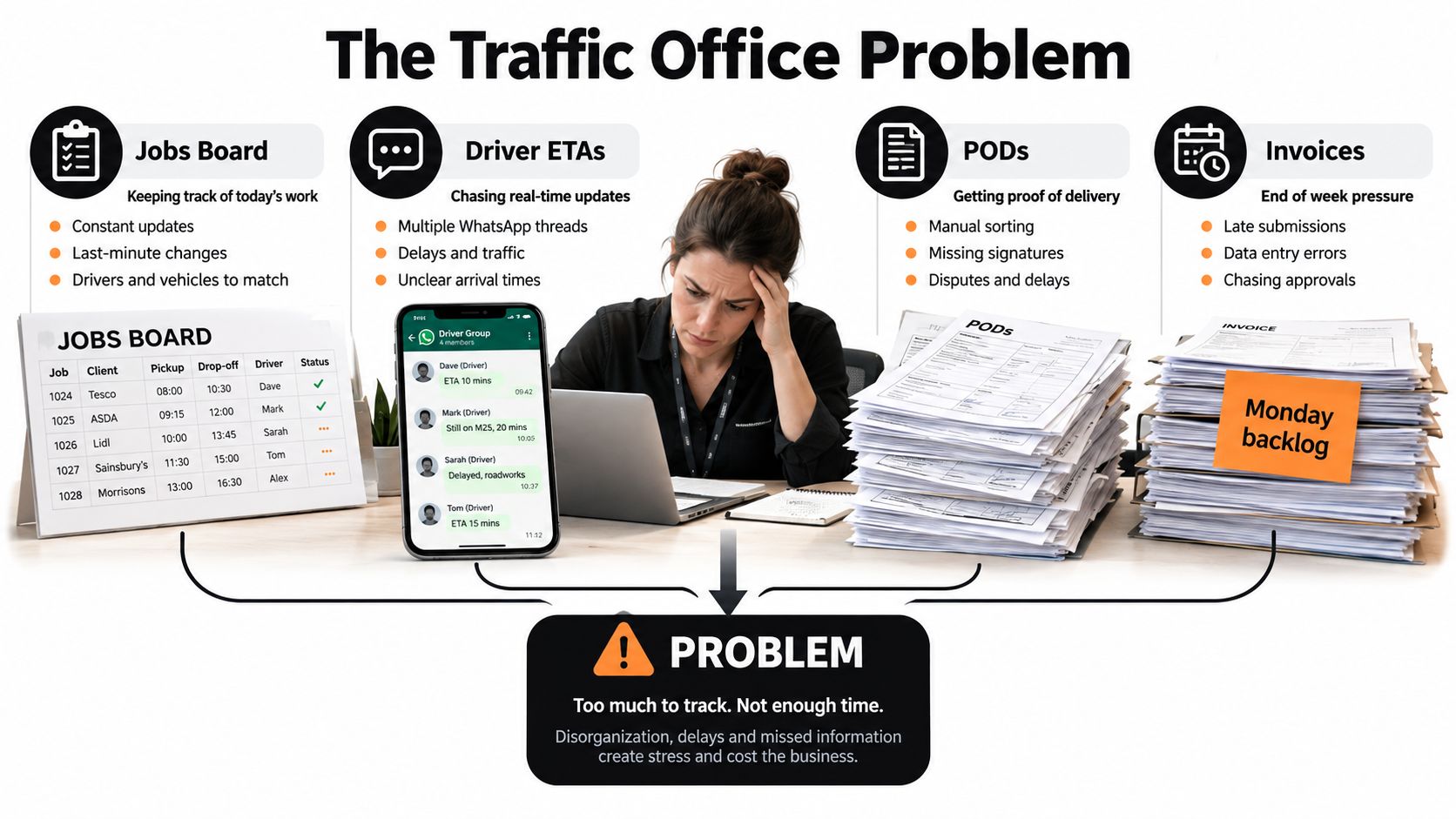
One planner has a printed jobs board. Another has updates in WhatsApp. PODs come back in a stack, unless a driver forgets one in the cab. Finance has a backlog because completed work can't move into invoicing until someone matches the paper to the right job. That's the routine in plenty of UK haulage firms.
Where the day starts going wrong
The first problem is rekeying. The same booking details get entered into email folders, spreadsheets, driver messages and invoice notes. Every retype creates another chance to get the address, time window or reference wrong.
The second problem is fragmented visibility. Dispatch thinks the job is covered. The driver thinks the collection reference has changed. Finance doesn't know whether the POD is back. The customer gets an ETA based on guesswork because nobody has one clean record of the job as it stands now.
Practical rule: If your planner, your driver and your invoice clerk are each looking at different versions of the same job, you don't have a software problem. You have a workflow problem.
For container work, the damage is sharper. A transposed booking or container reference can mean gate issues, rejected entry or a wasted run. Near ports, poor signal makes matters worse. If the proof process still depends on stable connectivity or paper floating back to the office, you'll keep losing time at the exact point where the margin is already under pressure.
Why this guide takes a different view
The UK market is moving hard toward proper transport systems. The UK Transportation Management System market was valued at about USD 1,003.6 million in 2025 and is projected to reach roughly USD 2,158.5 million by 2030, a 115% increase with a 16.6% CAGR, according to UK transportation management market data. That same data says freight and order management led revenue in 2024, while reporting and analytics was the fastest-growing segment. That's exactly where traffic offices are heading. Less isolated scheduling. More connected operational control.
This guide treats Transport Software UK buyers the way they should be treated. Not as shoppers for another point solution, but as operators trying to connect job intake, the jobs grid, driver briefing, status, proof and invoicing into one flow.
Who this is for
This is for operators moving off spreadsheets and paper. In particular:
- General haulage firms that need tighter planning and fewer handoffs
- Container and drayage operators that can't afford bad references or weak offline POD handling
- Transport planners and dispatchers who need one jobs view, not three side systems
- Operations managers and finance teams who want completed jobs checked and invoiced without the usual chase
What Transport Management Software Actually Does
A proper transport management system for haulage isn't a tracking map with some admin wrapped around it. It's the control point for the life of the job.
If the system doesn't help your team from booking through to invoice, it's not owning the operation. It's just observing it.
The operational definition that matters
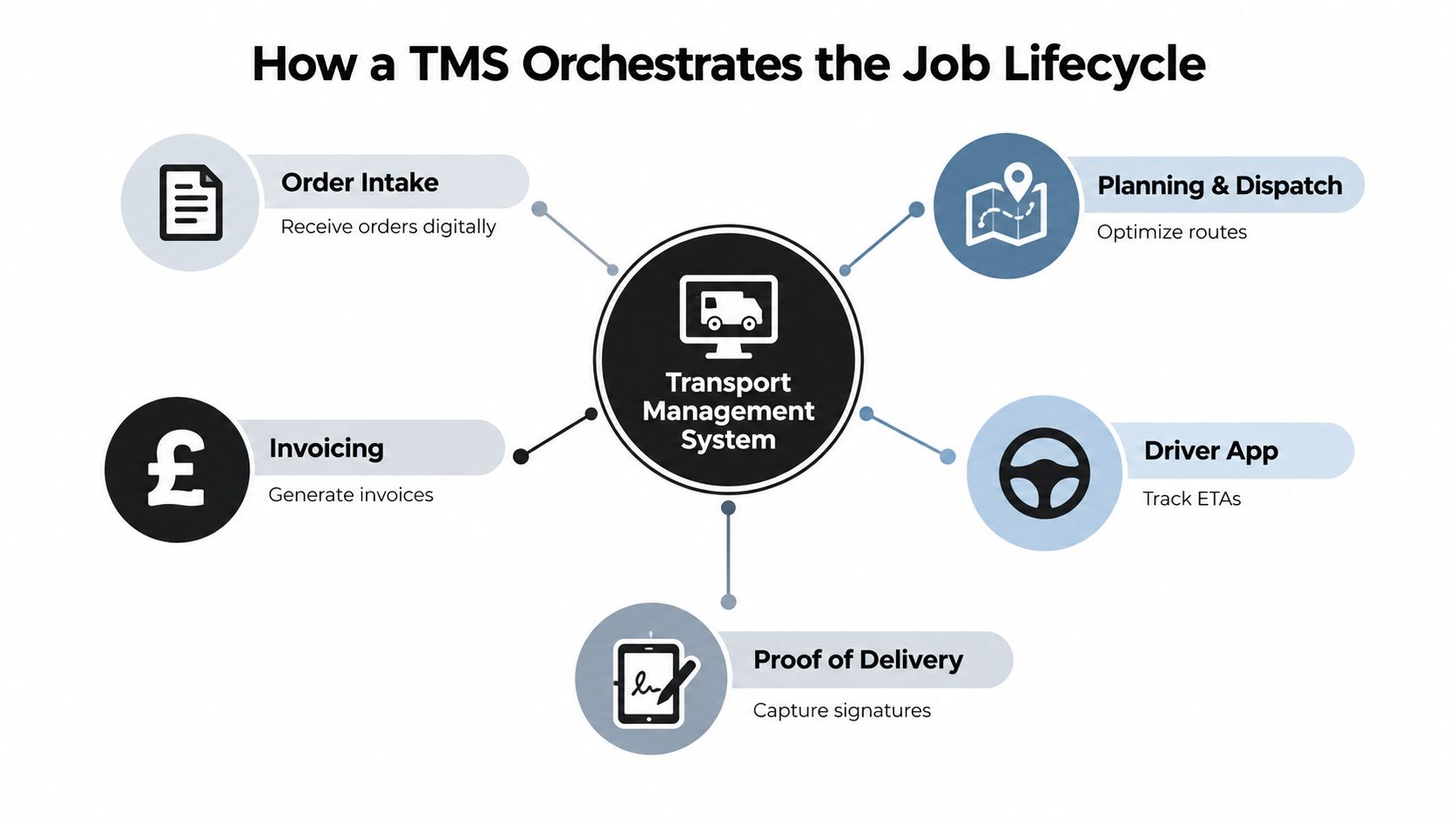
In a haulage business, a TMS should do these jobs in one connected workflow:
- Take in the work from email, phone or customer instruction
- Create and structure the job with the right references, timings and commercial terms
- Show planners a live jobs grid so they can allocate, move and check work
- Brief the driver with the full job pack, not a half-complete message
- Track job status updates as the work progresses
- Capture proof of delivery against the correct job record
- Hand completed work into invoicing with the commercial evidence attached
Digital proof of delivery is central here. Digital POD systems capture structured records at delivery, typically including signature, photo, GPS location, timestamp and recipient details, then sync that data back to a central system. In practice, that gives you an auditable line from completed handover to invoice issue, while cutting down the usual lost paper and query chasing.
What it isn't
Buyers get muddled. A TMS isn't the same as adjacent tools.
| System type |
What it mainly does |
What it doesn't own |
| Fleet telematics |
Vehicle tracking, driver behaviour, tachograph-related data |
Job intake, dispatch workflow, POD to invoice flow |
| Workshop software |
Maintenance, defects, service planning |
Daily transport planning and customer job control |
| Warehouse management |
Stock, locations, picking, warehouse processes |
Road movement execution for haulage jobs |
| Accounting software |
Ledger, VAT, payroll, management accounts |
Live traffic-office operations |
| Consumer parcel tracking |
End-customer shipment visibility |
Haulier-grade job management and proof controls |
A good TMS can sit in the middle of these systems. It shouldn't pretend to be all of them.
The software that owns the vehicle isn't automatically the software that owns the job.
What UK buyers should insist on
The UK transport and storage sector is digitising quickly. Independent logistics research reported that the share of firms using artificial intelligence rose from 16% to 27% in the first quarter of 2026, while a separate 2024 report found 86.5% of logistics operators planned to digitally transform at least one part of operations within two years, 69% expected to facilitate digital trade documents as standard, and 82.6% had faced technology challenges affecting operations in the prior 12 months, according to UK logistics digital adoption findings.
Those figures matter for one reason. Buyers aren't digitising for appearances now. They're doing it because manual handoffs are slowing dispatch, document flow and cash collection.
So the buying rule is simple. Choose software that owns the operational workflow, not just the asset, the map or the report.
Must-Have Features in a UK Haulage TMS
Most demos look tidy. That's not the same as being useful at half six on a wet Tuesday when jobs are moving, drivers are ringing, and finance wants yesterday's PODs cleared.
For a UK haulage TMS, four modules do the heavy lifting. Miss one and the rest of the workflow starts leaking.
The jobs grid
The jobs grid is the planner's working surface. It should show allocated and unallocated work, current status, exceptions and enough key detail to make changes without opening ten screens.
A weak jobs grid forces planners back into side spreadsheets. That's the fastest way to kill adoption.
Driver briefing
A driver brief should be structured, complete and acknowledged. If the send-out still depends on copy-pasted text messages, you've not solved anything.
For container work especially, the driver needs the right references, trailer details, addresses, access notes and any return document requirements before wheels turn.
Digital POD
Proof has to be captured at source, attached to the correct job, and usable by the office straight away. A signature alone isn't enough. Exceptions, photos and notes matter because they decide whether finance can invoice cleanly or has to query the job.
Invoicing handover
Invoicing isn't a separate admin chore. It should be the last stage of the job flow. Once work is complete and checked, the commercial record should be ready for finance with rates, waiting time notes, attachments and subcontractor cost visibility where needed.
Here is the table buyers should keep in front of them during demos.
| Module |
What it must do |
Common buyer miss |
| Jobs grid |
Give planners a live operational board for allocation, reassignment, status checks and exception handling |
Buying a nice-looking schedule view that can't cope with daily changes, conflict handling or practical dispatch work |
| Driver briefing |
Send a full job pack with references, timings, address details, access notes and return-document requirements |
Accepting systems that still rely on free-text messages and don't prove the driver received the brief |
| Digital POD |
Capture signatures, photos, notes and delivery evidence against the right job, including exception handling |
Choosing ePOD that looks fine in a demo but doesn't handle weak signal properly or doesn't flow into billing |
| Invoicing |
Move completed and checked jobs into billing with the right charge basis and supporting evidence |
Buying dispatch software first, then discovering invoicing still lives in spreadsheets and email chains |
The trade-offs buyers miss
The first miss is buying for screen design instead of workflow depth. If the jobs grid can't support real reallocations, customer changes and late-running jobs, planners will work around it on day two.
The second miss is treating ePOD as a mobile bolt-on. If proof doesn't feed completed-job checks and invoicing, you're still doing the expensive bit manually.
The third miss is weak commercial logic around UK haulage realities. Waiting time, failed deliveries, return docs, subcontractor purchases and customer-specific rules need to sit close to the operational record. If they live outside the TMS, invoice speed suffers.
Where Logivo fits
One example in this category is Logivo. Its live site describes it as transport management software for hauliers that lets teams plan jobs, keep drivers and customers updated, collect PODs, manage compliance, and move completed work into invoicing from one connected TMS. It also states that photos, scans, uploaded files, signatures and notes are linked to the relevant job so traffic teams can approve proof before invoicing or sharing, as shown on the Logivo transport management platform site.
That's the right shape for small and mid-sized operators. One connected workflow. Not a planning screen on one side and an invoice scramble on the other.
UK and Port-Specific Considerations for Operators
Generic TMS advice usually falls apart at the port gate. Container haulage isn't forgiving. If the software treats key references as loose notes rather than proper fields, your team ends up reconciling jobs manually against terminal portals and customer instructions.
That isn't admin detail. It's operational control.
Container references must be first-class data
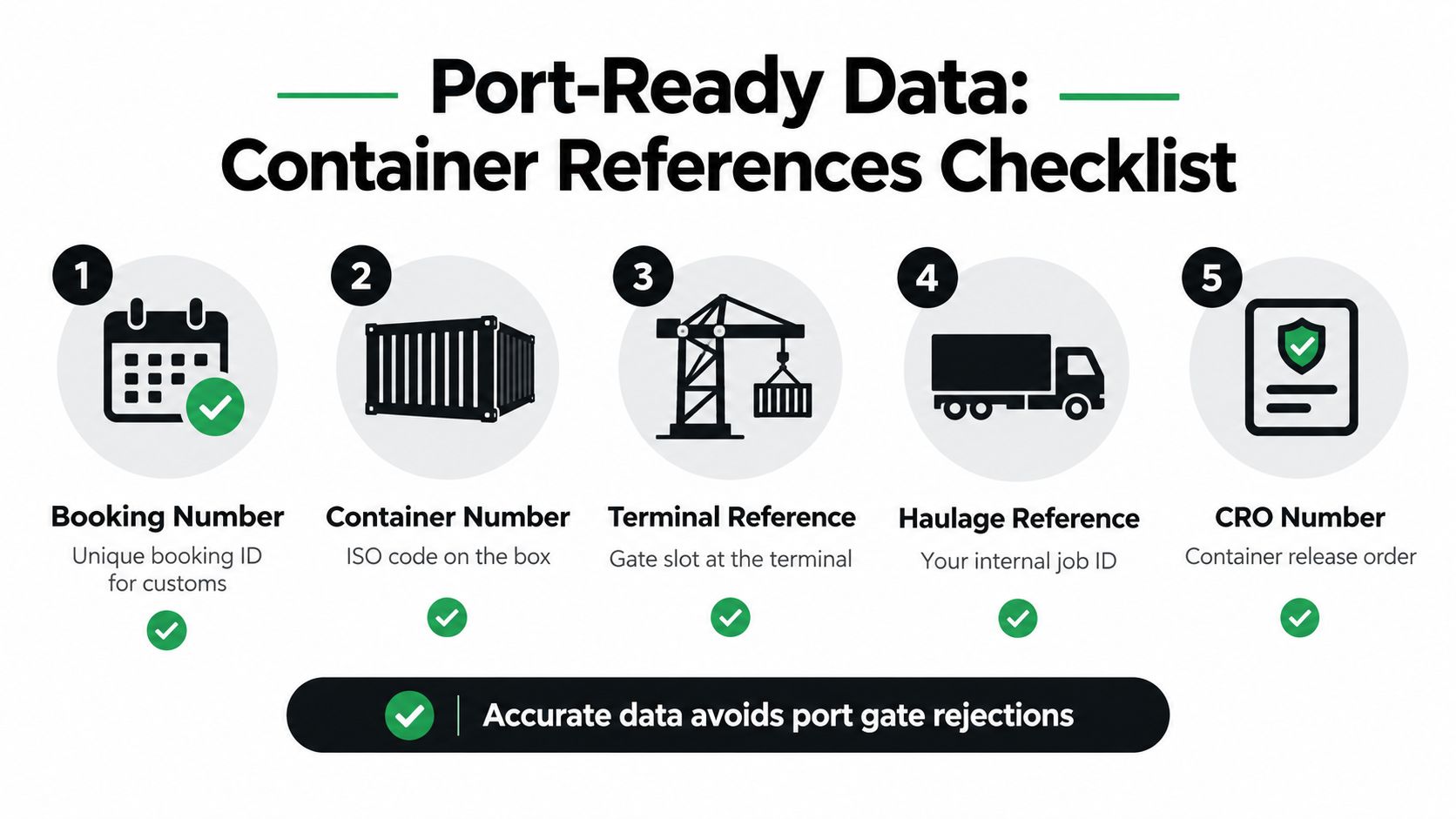
A port-ready transport system should hold the core references in structured fields. At minimum, that means the booking number, container number, terminal reference, your own haulage reference and the CRO or release reference where relevant.
If those values sit inside a free-text note, planners can't filter cleanly, dispatch can't check quickly, and the office wastes time chasing avoidable mistakes.
For operators dealing with quay, dock and terminal workflows, this matters as much as any map view. A fuller breakdown of these operating demands sits in this guide to port operations management software for hauliers.
Offline proof near terminals isn't optional
Port-adjacent areas can have poor connectivity. That's a real-world issue, not an edge case. Recent industry material on haulage POD tracking stresses that driver apps need to store proof locally and sync automatically when signal returns because weak coverage around ports can interrupt live processes, as covered in haulage POD tracking guidance.
So ask blunt questions during evaluation:
- Can the driver app capture signatures offline? It should queue them and sync later.
- Can it hold photos and timestamps locally? That's your fallback when coverage drops.
- Can the driver photograph a printed POD or stamped document? Port and container work still produces physical paperwork that matters commercially.
- Does the office see sync state clearly? Planners and finance need to know whether proof is captured but pending upload, or missing entirely.
If a vendor treats offline POD as a niche feature, they haven't spent much time around terminals.
Status ownership and invoice-ready extras
ETA communication in UK haulage often becomes a free-for-all. The customer rings traffic. Traffic rings the driver. Someone sends a text. Nobody is sure what the official update is. Better systems assign clear ownership for status updates and let customers see progress through a controlled status feed or job update process rather than endless calls.
Port work also creates extra charge lines and compliance touches that need to be captured close to the job record. Think weighbridge notes, ferry booking references, and clean air or low emission zone charges where applicable. The point isn't to create more data entry. It's to make sure those operational details survive the trip from dispatch to invoice.
Practical AI Inside a Transport Workflow
Most AI talk in transport is fluff. Small and mid-sized hauliers don't need a lecture on machines replacing planners. They need less rekeying, fewer duplicate jobs and cleaner document handling.
That's where AI earns its keep.
The use cases worth paying for
The best AI features in a TMS are boring on the surface. That's a compliment. They save office time on repetitive admin and push cleaner data into the normal workflow your team already uses.
| AI use case |
Practical value |
Questions to ask vendor |
| Booking detail extraction from emails and PDFs |
Cuts manual typing during job intake and reduces missed fields |
What document formats does it read, and what happens when it can't confidently extract a field? |
| Document handling for attached booking files |
Keeps customer instructions, references and paperwork tied to the job record |
Does the output land directly in the jobs grid workflow or in a separate inbox someone must monitor? |
| Duplicate job flagging |
Helps stop the same booking being created twice under pressure |
What signals count as a duplicate, and can planners override the warning cleanly? |
| Reference checking against job data |
Catches obvious mismatches before dispatch |
How are exceptions shown to planners, and who can correct them? |
| Reading POD images for admin support |
Helps office staff confirm whether key proof elements are present before invoicing |
Does it identify uncertainty clearly, or does it guess and leave your team to discover mistakes later? |
A useful reference point is this article on AI transport management software for hauliers, which focuses on AI inside live haulage workflows rather than abstract promises.
The claims to challenge hard
You should be sceptical when a vendor leads with autonomous dispatch, planner replacement or broad optimisation claims before they've shown how the basics work. If your intake data is messy and your proof process is inconsistent, smarter automation just scales the mess.
Ask to see failure modes. If OCR misreads a container number, where does that error land? Can the planner catch it before dispatch? Does the system force review when confidence is low? Those answers matter more than polished buzzwords.
Buy AI that reduces office friction. Leave the grand claims to conference stages.
The right role for AI in Transport Software UK
For most buyers, AI should assist the planner, not bypass the planner. It should take drudge work out of job creation, document reading and admin checks. It shouldn't become a separate dashboard that nobody in the traffic office opens after week one.
If the feature doesn't make the live jobs workflow cleaner, it probably isn't worth paying for.
Pricing Models and Implementation Trade-Offs
Most buyers focus on the monthly number first. That's understandable, but it's where plenty of poor decisions start. In transport software, price only means something once you know what part of the workflow you're buying.
A cheap planning tool with weak POD and invoicing often costs more in office work than a broader system with a higher licence fee.
How pricing usually shows up
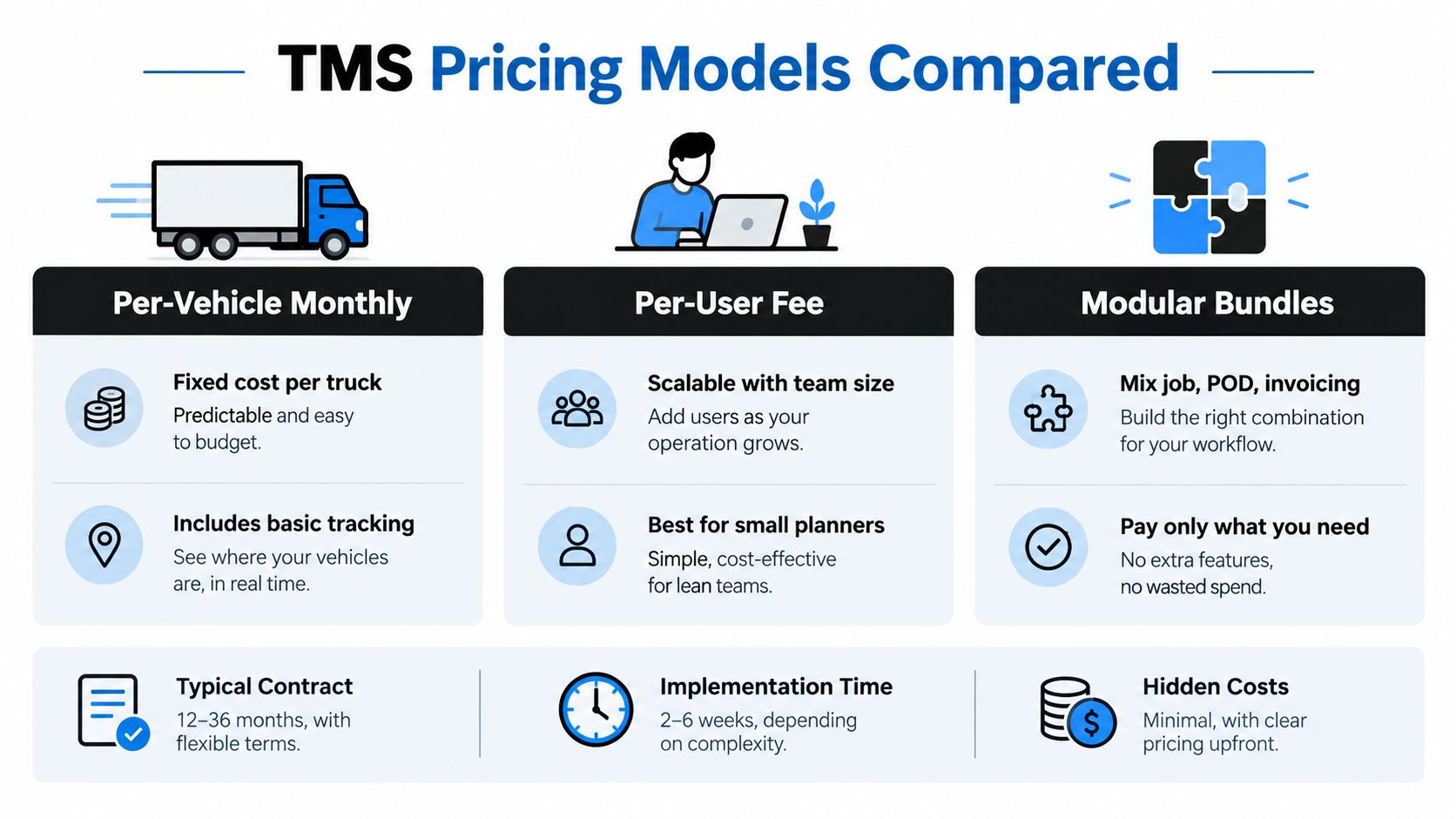
In the UK haulage market, pricing tends to fall into three broad models.
- Per-vehicle monthly works well when the fleet size is stable and the software usage is tightly linked to trucks on the road.
- Per-user pricing can suit smaller operations with a few planners and office staff, though costs rise as more people need access.
- Modular bundles usually split planning, POD and invoicing into separate priced components.
None of these is automatically better. The issue is what gets excluded.
Hidden costs that catch buyers
Before you compare suppliers, ask about these items specifically:
- Driver app licences because some vendors price office users and drivers separately
- Document storage limits because POD photos and attachments add up
- Support cover because after-hours issues matter in transport
- Custom fields and workflow changes because some systems treat basic adaptation as paid consultancy
- Contract length because a lower monthly figure tied to a long term can be the more expensive commitment
This short video is useful if you're trying to think about software cost as an operational decision rather than just a line-item negotiation.
For a more detailed commercial lens, this guide to transport management system pricing and logistics investment is worth reading before you start vendor calls.
Cloud versus legacy deployment
Here the trade-off is usually straightforward.
Cloud-based haulage TMS platforms fit most operators better when they want practical onboarding, quicker change and less internal IT burden. Legacy enterprise TMS deployments can make sense, but usually for larger organisations with multiple sites, heavier process variation and the appetite for a longer project.
The market direction backs that view. The UK fleet management software market was valued at USD 590 million in 2025 and is projected to reach about USD 1.24 billion by 2031, implying a 13.2% CAGR, according to UK fleet management software market data. Buyers are clearly still investing in digital tools around transport operations, but that doesn't mean every operator needs a heavy enterprise programme.
A five to seventy vehicle operator usually needs usable workflow software, not a consultancy project dressed up as a platform.
Evaluation Checklist and Migration Playbook
Buying well matters. Migrating well matters more. Plenty of firms choose sensible software and still have a rough rollout because they rush the data cleanup, skip proper pilot discipline, or expect planners to run the live desk while redesigning the process on the fly.
Treat the move as an operational change project, not a software installation.
The evaluation checklist
Score each vendor against practical traffic-office criteria. Keep the scoring simple. Red, amber, green works fine if your team will use it.
- Jobs grid usability. Can planners allocate, move and review jobs quickly without losing context?
- Driver app offline behaviour. What exactly happens when signal drops during collection or delivery?
- POD capture depth. Can the driver capture signatures, photos, notes and exceptions against the right job?
- Container reference handling. Are booking, container and release references structured fields or buried in notes?
- Completed-job checks. Can the office review proof before handing the work to finance?
- Invoicing depth. Does billing follow from the job record, or does your team still rebuild the commercial side manually?
- Accounting and adjacent system fit. How cleanly does the output move into the rest of your admin stack?
- UK operational fit. Does the terminology and workflow suit road freight and port work?
- Total cost of ownership. Include training, support, storage, driver access and change requests
A four-phase migration that actually works
First, run a process audit and data cleanup. Map how a booking arrives, how it gets planned, how proof returns, and what finance needs to invoice. Clean customer names, common references and rate logic before import. Bad source data will poison the rollout.
Second, pilot on one customer, lane or depot. Pick work that is live enough to test the software properly but contained enough that errors won't destabilise the whole operation.
Third, run a parallel period. Keep the old spreadsheet or paper fallback active for a short, controlled window while the team proves the new flow from booking through invoice. Don't let this drag on forever or staff will sit in two systems and trust neither.
Fourth, cut over and decommission. Close the old routines. Remove duplicate trackers. Decide where PODs now live, how drivers are briefed, and how completed jobs move to finance.
Common rollout mistakes
These are the ones I see most often:
- Rushing training. Drivers and planners need scenario-based practice, not a quick login email.
- Ignoring driver feedback. If the app flow is awkward in the cab, you'll feel it in missing proof and phone calls.
- Leaving paper POD loops open too long. Once both methods survive in parallel, office staff revert to habit.
- Underestimating invoice reconciliation. The finance handover needs testing with real completed jobs, not just demo data.
Assign one internal owner. Protect planner time during go-live. Judge the rollout by operational evidence such as whether POD-to-invoice time is improving and whether your team is spending less effort on empty admin chasing. That's how you know the system is helping.
Short Vendor Sketch and Your Next Step
By the time you shortlist suppliers, most of what you'll see falls into three vendor types. Knowing the type helps you avoid buying the wrong shape of software, even if the demo looks polished.
Three common vendor archetypes
| Archetype |
Deployment |
UK Port Fit |
Invoicing Strength |
Best-Fit Buyer |
| Cloud-native haulier TMS |
Cloud platform with operational workflow focus |
Usually stronger where container and haulage references matter day to day |
Often strong if POD and completed-job checks sit close to billing |
Sub-20 vehicle container haulier or mixed-work haulier moving off spreadsheets |
| Broader logistics suite with TMS modules |
Wider logistics platform with transport components |
Can work well, though port workflows may need closer checking |
Variable, depending on how finance and execution modules connect |
Mid-sized general haulier or 3PL with broader logistics needs |
| Legacy enterprise TMS |
Heavier deployment, more formal project structure |
Can be deep on process coverage if configured thoroughly |
Often commercially capable, but may demand more setup effort |
Multi-depot groupage operator or larger business with more complex governance |
How to choose without wasting weeks
Don't ask vendors to show their best demo. Ask them to run your work. Use your own booking email, your own container references, your own awkward delivery note and your own invoice edge cases.
Also borrow a wider procurement lens when you compare suppliers. This checklist on criteria for evaluating transit suppliers is useful because it pushes buyers to look past feature lists and judge reliability, fit and operating discipline.
A sensible next step looks like this:
- Build a shortlist of two or three vendors using the checklist above
- Book scoped demos based on your own jobs, not generic sample data
- Test the weak spots first such as offline proof, driver briefing quality and invoice handover
- Run a paid pilot before signing long term if the vendor allows it
That's the difference between buying software and improving an operation.
Logivo gives hauliers and container operators one connected flow for planning jobs, briefing drivers, collecting POD and moving completed work into invoicing without the usual spreadsheet and paper gaps. If that's the part of your operation you need to tighten up, visit Logivo and assess it against your own live jobs, not a canned demo.