Transport Management System Features for Haulage
Discover the transport management system features that matter most for haulage and container operators, from jobs grid to digital POD and faster invoicing.
Three phones are ringing, a driver is asking for the correct postcode, and a customer wants to know why the proof of delivery still hasn't arrived. Meanwhile, yesterday's container moves are sitting in someone's inbox, waiting-time notes are scattered across messages, and finance can't invoice until somebody finds the right document.
That's the operating reality a transport management system has to handle. The useful features aren't the longest items on a vendor checklist. They're the controls that keep a booking moving from intake to planning, dispatch, delivery, completed-job review and billing without forcing the traffic office to rekey the same information at every handover.
For haulage, container transport and drayage operators, the strongest TMS is built around execution after dispatch as much as planning before it. The jobs grid, driver briefing, job status, digital proof of delivery, exception records, subcontractor controls and invoice checks all belong to the same workflow.
Table of Contents
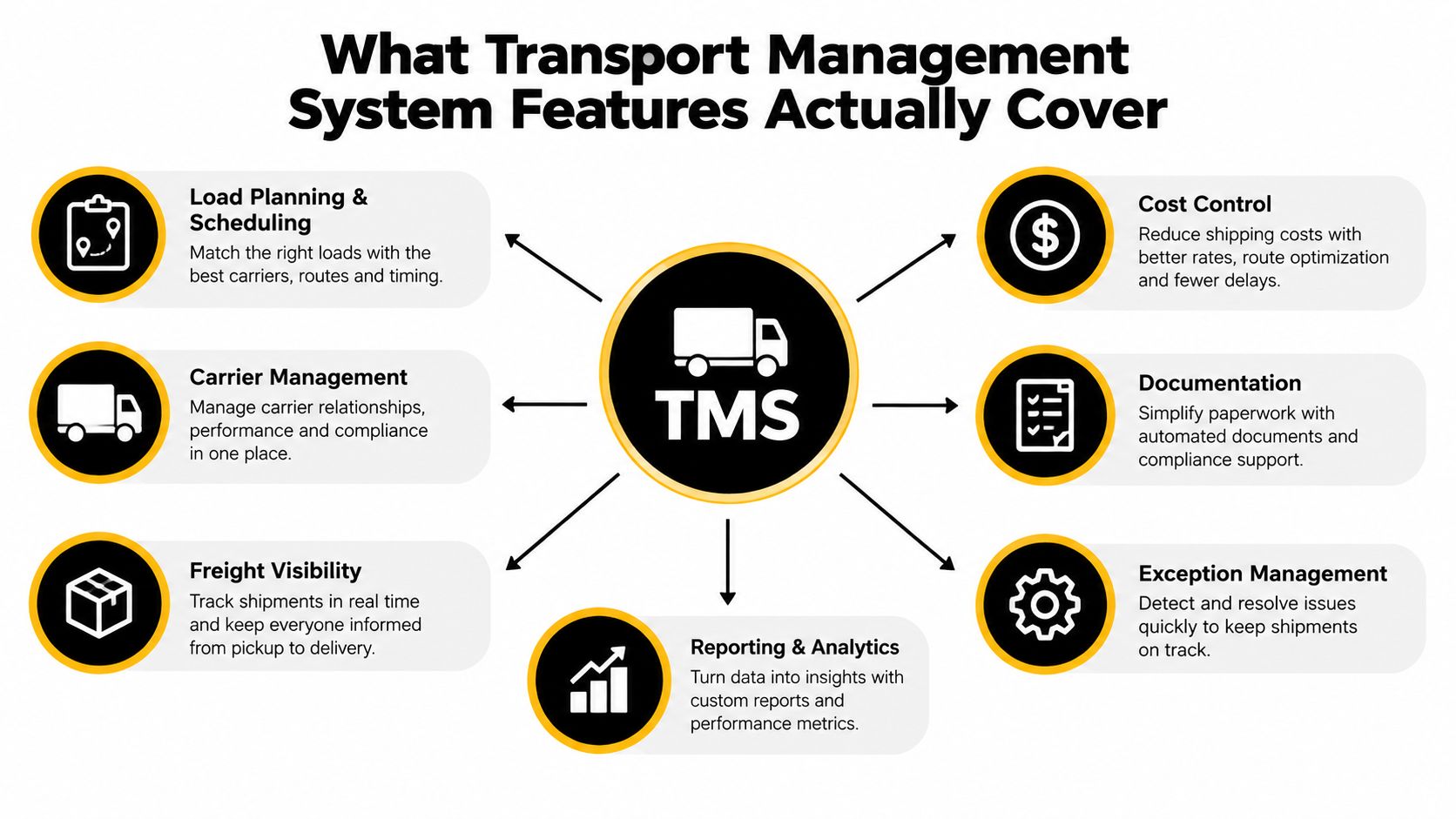
What Transport Management System Features Actually Cover
A transport management system starts with a confirmed job. It should hold the customer reference, collection and delivery details, timing requirements, vehicle or container information, agreed charges and operational notes in one record. The planner then uses that record to allocate the work, brief the driver, monitor progress, attach delivery evidence and prepare the completed movement for billing.
That sounds straightforward, but many operators still split those actions between spreadsheets, email, paper job sheets and separate invoicing tools. Each handoff creates another opportunity for a postcode to be mistyped, a waiting-time charge to be missed or a POD to arrive without enough context for finance to approve the invoice.
Core features versus expensive extras
Core transport management system features should support the full operational lifecycle. Industry guidance commonly places order management, planning, carrier management, execution, tracking, freight audit, payment and analytics at the centre of TMS functionality, with the system covering a load from planning and booking through status updates, settlement, billing and KPI reporting. Manhattan Associates' overview of TMS modules describes that broad lifecycle clearly.
For a small or mid-sized haulier, the essentials are practical:
- Job intake: Create a reliable job record from customer instructions.
- Planning and allocation: Place work on a jobs grid and assign the right resource.
- Dispatch: Give the driver clear references, addresses, contacts and timing notes.
- Execution control: Record progress, delays, failed movements and returned work.
- POD capture: Attach signatures, photos, notes and timestamps directly to the job.
- Completed-job checks: Confirm that the movement is ready to invoice.
- Billing handover: Pass clean, approved information to finance without rekeying.
Advanced route optimisation, autonomous planning or complex network modelling may suit particular operations, but they don't compensate for weak job completion controls. A TMS that helps a planner choose a route yet leaves PODs in email hasn't solved the whole transport problem.
Planning, Jobs Grid and Driver Briefing
The day often begins with work that has already started. A planner opens the jobs grid and finds yesterday's jobs still marked as dispatched, while new orders are arriving for the active shift. The first task is to separate genuine live work from incomplete administration, then place both the carry-over movements and new jobs where the team can act on them.
A useful jobs grid shows more than a list of references. It should let the planner understand workload by driver, vehicle type, container size and customer, with assignments, progress and exceptions visible together. That view makes it easier to balance work and spot an overloaded driver or an unassigned movement before the phone starts ringing.

Plan from the operational record
Planning begins with the details that affect whether a job can run. The traffic office needs the collection and delivery addresses, customer contacts, job references, vehicle requirements, container details where relevant and any timing or access restrictions. If that information is buried in an email thread, the planner has to rebuild the job mentally. If it's structured in the jobs grid, the allocation decision is made against the same information the driver and finance team will later use.
Driver briefing is the next control point. A dispatch view should bring the instructions, contacts, addresses and timing requirements onto one screen. The office can then hand over the job sheet or digital brief with access notes, port slot information, delivery references and flags raised during the previous shift.
The driver may know the route, but that doesn't mean they know the latest customer instruction, a changed gate process or the reason a job was held over. A consistent briefing prevents the cab from becoming a separate information system.
Keep dispatch connected to progress
The briefing shouldn't end when the vehicle leaves. Driver-side updates give the planner a working view of assignments, progress and exceptions while the job is underway. That's useful operationally, but it isn't the same as fleet telematics, vehicle tracking, tachograph compliance or workshop software. A transport management system coordinates the job workflow. It doesn't need to replace every other transport application.
The practical test is simple. Can a new planner see what's due, what's allocated, what's moving and what needs intervention without opening several spreadsheets and message threads? If not, the jobs grid is only a calendar with a different name.
Job Status, Digital POD and Exception Handling
The margin often disappears between delivery and invoice. A vehicle can complete the movement, but the office still needs to know whether the job was delivered in full, whether waiting time is chargeable, whether a document is missing and whether the customer can challenge the charge.
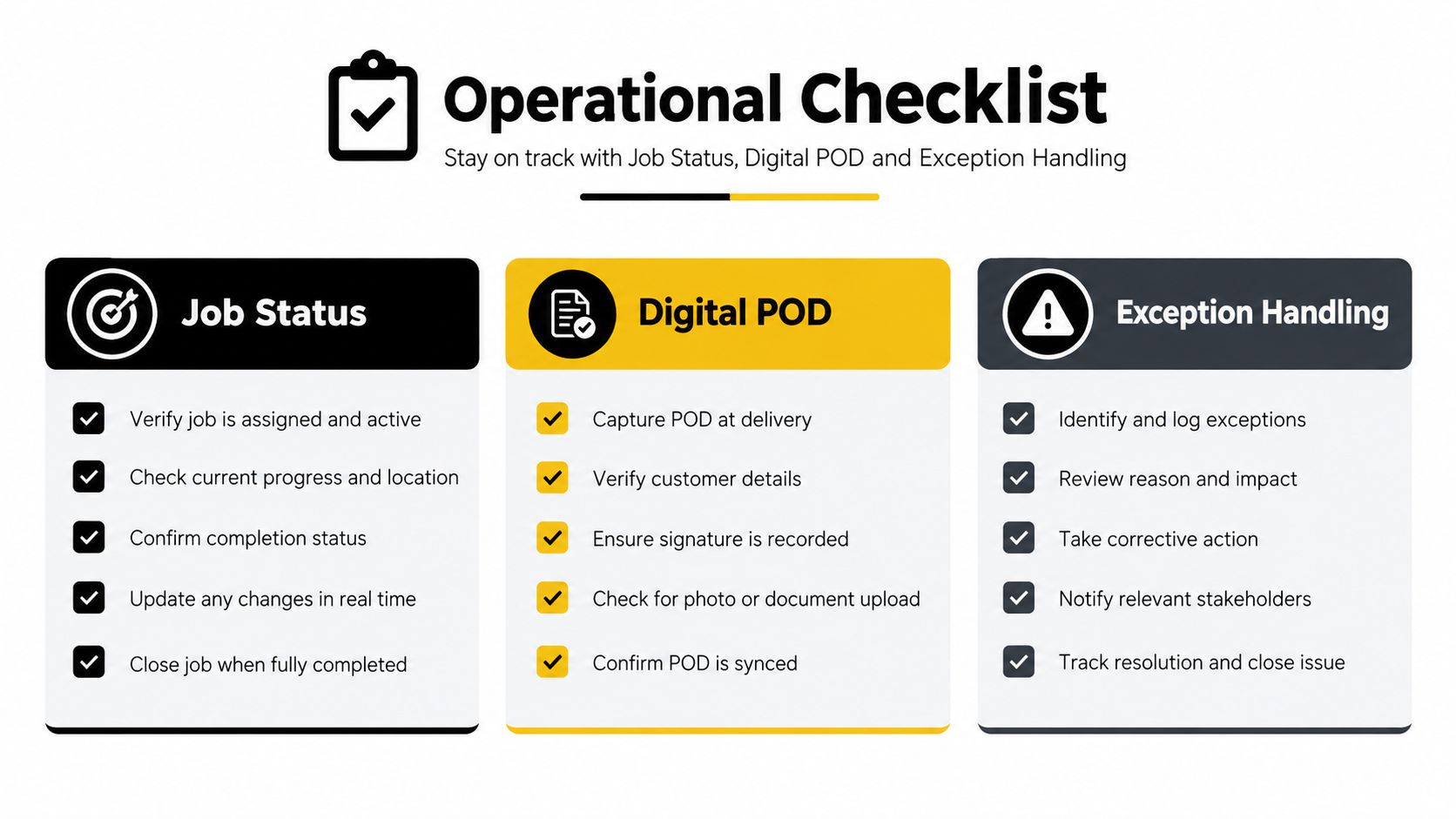
A useful status trail should distinguish operational events such as en route, on site, offloaded, waiting, returned and failed. Each update should sit against the job with a time, and location evidence where available. The point isn't to create more administration. It's to give the traffic office a shared version of what happened.
POD is an operational event
Digital proof of delivery should capture the evidence at source. That can include a recipient name, signature, delivery photographs, timestamps and notes about damage, shortages or other conditions. Systems such as PTV Axylog's digital POD workflow describe this model, where delivery evidence feeds back into billing rather than remaining as a separate attachment.
A driver taking a photograph through the cab app is only useful if that photograph is attached to the correct job. An emailed image creates another manual match, especially when several movements share a customer or location.
The billing effect can be significant. Logistics guidance reports that digital POD has been adopted by about 67% of European carriers, alongside claims of 18% faster invoice processing and DSO reductions of 3 to 10 days. The logistics commentary on digital POD and billing cycles provides those figures. The same source reports transport cost reductions of 5% to 15%, freight-spend recovery of 2% to 5% through freight audit and payment automation, and on-time delivery improvement of 10% to 25% after TMS implementation. Those are benchmark claims, not guarantees for an individual operator.
Exceptions need reasons, not just comments
Failed deliveries, late port arrivals, waiting time, cancelled jobs and partial loads should have a structured reason attached. A free-text note may explain the event to the person who wrote it, but it won't reliably support a completed-job check or a customer query later.
Practical rule: If an exception can affect the invoice, it needs a status, a reason and supporting evidence on the job record.
That structure lets operations review what happened before finance raises the invoice. It also keeps customer communication factual. Instead of searching through messages, the team can explain the latest status, the recorded delay and the document supporting the charge.
For a closer look at the process, see digital proof of delivery software for transport teams.
Container and Subcontractor Workflows
Container transport exposes weak TMS design quickly. A general freight screen may record a collection and delivery, but a port desk also needs booking references, container numbers, depot and terminal details, seal numbers, VGM information, port identifiers, slot requirements and empty-return instructions.
At 06:00, the useful workflow starts with the booking. The operator checks the pre-advice, confirms the container reference, records the relevant terminal or depot fields and makes sure the driver has the access information needed for the movement. At delivery or discharge, the office updates the job with the actual status, documents and any issue that changes the next action.
Capture the details that drive the movement
Container jobs need their own control points:
- Reference accuracy: Store the booking, container and customer references against one job.
- Terminal requirements: Keep slot, PIN, depot and access information visible to the assigned driver.
- Equipment detail: Record seal numbers, container characteristics and any relevant handling notes.
- Return control: Track where the empty container must go and whether the return has been confirmed.
- Delay evidence: Attach waiting, failed-slot or depot-related information to the movement.
The aim isn't to claim live port integration where none exists. It's to make sure the information the traffic office receives is captured once, checked and passed to the people who need it.
Subcontractors need a record of responsibility
Subcontractor control starts when the operator decides who gets the work. The job should show the assigned haulier or owner-driver, the accepted rate, the instructions issued and the documents returned after completion. If a subcontractor reports a delay or sends a POD, the information needs to come back to the same movement rather than into a separate mailbox.
That record matters when liability or cost is disputed. The office can see who accepted the job, what instructions were provided, which events occurred and what evidence was returned.
Empty returns deserve particular attention because a missed depot instruction can lead to avoidable charges and extra calls. A TMS should make the return requirement visible during dispatch and retain confirmation during the completed-job review. The container haulage workflow should be judged on those details, not just on whether it displays a map.
Completed-Job Checks and Faster Invoicing
The vehicle stopping doesn't finish the administrative work. The job is complete only when the office has checked that the status is correct, the POD is present, the customer and movement references match, and every chargeable event has been reviewed.
Digital POD records can include signatures, photographs, delivery notes and timestamps. Those documents should feed directly into the completed-job record, where the team can check the agreed rate and any accessorials before finance receives the movement. Guidance on completed-job controls highlights the practical checks: confirm the job is complete, confirm the POD is present, and attach the correct references and chargeable events before invoicing.
Build the invoice from controlled evidence
A TMS-linked billing flow should catch anomalies before they become customer queries. Examples include missing PODs, unapproved waiting time, weekend charges, incomplete references or a mismatch between the planned and completed work. The system shouldn't invent a charge, but it should flag the item for a person to review.
| Data Source |
Captured By |
Effect on Invoice |
| Customer booking and PO |
Job intake or planner |
Connects the invoice to the requested movement |
| Agreed rate or contract reference |
Commercial setup and job record |
Supports the base transport charge |
| Container number and movement details |
Planner, dispatcher or driver |
Identifies the specific job being billed |
| POD, signature and delivery notes |
Driver at completion |
Confirms delivery and supports invoice release |
| Waiting, detention or failed-delivery evidence |
Driver and operations team |
Gives finance a basis to review accessorials |
| Subcontractor rate and completion documents |
Dispatcher and back office |
Supports cost control and margin review |
The result is an audit pack per job, not a loose collection of files. It can include the customer PO, rate reference, container number, driver and vehicle details, delivery evidence and approved exceptions.
POD-to-invoice automation earns its place. It reduces rekeying, lets the team release clean jobs promptly and surfaces disputed items while the movement is still fresh. The operational benefit is straightforward: fewer invoice queries, faster cash collection and fewer margin leaks hidden in completed work.
Practical AI Without the Replacements
AI has a useful role in transport operations, but it shouldn't be presented as a substitute for an accountable planner. Haulage decisions involve safety, access restrictions, customer commitments, driver-hours considerations and commercial consequences. A system can assist with the routine work while a planner remains responsible for the decision.
The strongest applications reduce typing and rekeying:
- Document extraction: OCR can read addresses, times, signatures and references from PODs or signed delivery notes.
- Job intake: AI can turn an emailed or PDF booking into a draft job for review, rather than making the planner re-enter every field.
- Search across records: A planner can search notes and messages using ordinary language instead of remembering which file contains the answer.
- Anomaly flags: The system can highlight a completed job missing a photograph, showing unusual detention or lacking a required document.
- Planning assistance: Suggestions can consider vehicle location, HGV driver hours and historic task performance, while the planner approves the allocation.
A plain-language question such as “which containers are overdue at Felixstowe” can be useful if the answer comes from the operator's own job records and the result is clear enough to verify. It's much less useful if the team can't see the source events behind the answer.
AI should reduce the number of fields a planner types, not remove the planner from the control loop.
Be cautious with claims about fully autonomous planning, dynamic pricing or unsupervised customer chat. Those capabilities can introduce risk when source data is incomplete or a local operational rule isn't represented in the system. Practical AI works best as assistance for job intake, document handling and completed-job review.
For a haulier, the buying question is therefore not “does this TMS have AI?” Ask which workflow it assists, what information it uses, what the planner can override and how the system records that decision.
Cloud Delivery, Pricing and Onboarding
Cloud delivery changes the operating model, but it doesn't remove the need for careful selection. A browser-based system can avoid on-premise infrastructure, provide managed updates and let planners, drivers and finance work from the same current version. A legacy installed TMS may offer deep customisation, but it can also leave the operator responsible for upgrades, local infrastructure and costly changes.
| Aspect |
Cloud TMS |
Legacy TMS |
| Access |
Browser and supported mobile access |
Often tied to installed environments |
| Updates |
Managed by the software provider |
Planned and funded by the operator |
| Infrastructure |
Hosted outside the traffic office |
May require local servers or IT support |
| Commercial model |
Usually subscription-based |
Licence, maintenance and custom work may be separate |
| Configuration |
Templates and settings should handle common workflows |
Bespoke development may be used for operational changes |
| Integration |
APIs or supported connectors may be available |
Older endpoints can require specialist work |
| Scaling |
Costs should be clear as users, vehicles and integrations change |
Additional licences and customisation may complicate growth |
Pricing needs more scrutiny than the headline subscription. Ask whether subcontractor jobs are charged like owned vehicles, whether driver access is included, whether integrations carry separate fees and whether support is measured in hours or days. A low entry price can become expensive if every workflow adjustment requires consultancy.
Treat onboarding as an operational project
A realistic migration covers the data the traffic office uses.
- Map the current process: Document how bookings arrive, how jobs are planned, how drivers receive instructions and how finance approves invoices.
- Clean the source data: Remove duplicate customer records, standardise references and identify the port, terminal and depot codes that need configuring.
- Load working information: Migrate customer details, rates, vehicle and driver records, historic job references where useful and operational templates.
- Provision driver access: Test devices, permissions, offline behaviour and the process for sending documents when signal is poor.
- Run live checks: Use real jobs to test booking intake, dispatch, POD capture, exception handling and invoice readiness.
Verify uptime commitments in the contract rather than relying on a sales statement. Ask for relevant security evidence such as SOC 2 or ISO 27001 documentation, and test how much the team can configure without paid consultancy.
Implementation should be measured in weeks, not quarters, when the workflow is standard and the data is prepared. The provider should explain exactly what the monthly cost includes and how it changes with vehicles, users and integrations.
Choosing a TMS and Getting Started
Select a TMS by operational impact, not by the number of modules in the brochure. For a haulage or container business, the priority order should reflect where work is lost and where billing slows down.
Start with the controls people use every day
First, test the jobs grid. Can a new planner understand unallocated, dispatched, live, delayed and completed work without opening separate files? Can the team filter by driver, vehicle, customer and container detail?
Next, test driver briefing and POD capture. Send a real job to a driver, include the references and access notes, then complete it with a signature, photograph and delivery note. Check what happens when the driver loses signal and how the evidence reconnects to the job.
Then, test container workflows and subcontractors. Ask how the system records container numbers, depot instructions, empty returns, subcontractor rates and returned documents. Use a realistic drayage movement rather than a simple point-to-point example.
After those essentials, evaluate:
- Invoice readiness: Can finance see missing PODs, waiting-time records and incomplete references before billing?
- Customer communication: Can the team provide a reliable status update without searching several channels?
- AI assistance: Does it extract booking or POD data for review, and can planners correct it easily?
- Data export: Can you retrieve your jobs, documents and commercial records if you change systems?
- Support: What does the contract include, and who responds when a live operation is blocked?
A short paid pilot with a defined volume of real jobs is more useful than a polished demonstration. Move a week of live work through booking, planning, dispatch, delivery, completed-job checks and invoicing. Compare the result with your current process time, missing-document rate and invoice accuracy, without accepting unsupported performance guarantees.
Ask how quickly a new planner becomes productive, how port and terminal codes are maintained, what happens during signal loss and which roadmap commitments are shared with customers. A TMS should fit the traffic office you operate today, while leaving room for controlled growth.
Book a guided trial with Logivo, move a week of live haulage or container jobs through its planning, driver briefing, POD and invoicing workflow, and compare the result with your current process time and invoice accuracy. Use that evidence to decide whether the system belongs in your longer-term transport operation.