Port Operations Management Software for Hauliers
Port operations management software guide for hauliers. Learn core modules, workflows, and selection criteria for container transport and drayage operations.
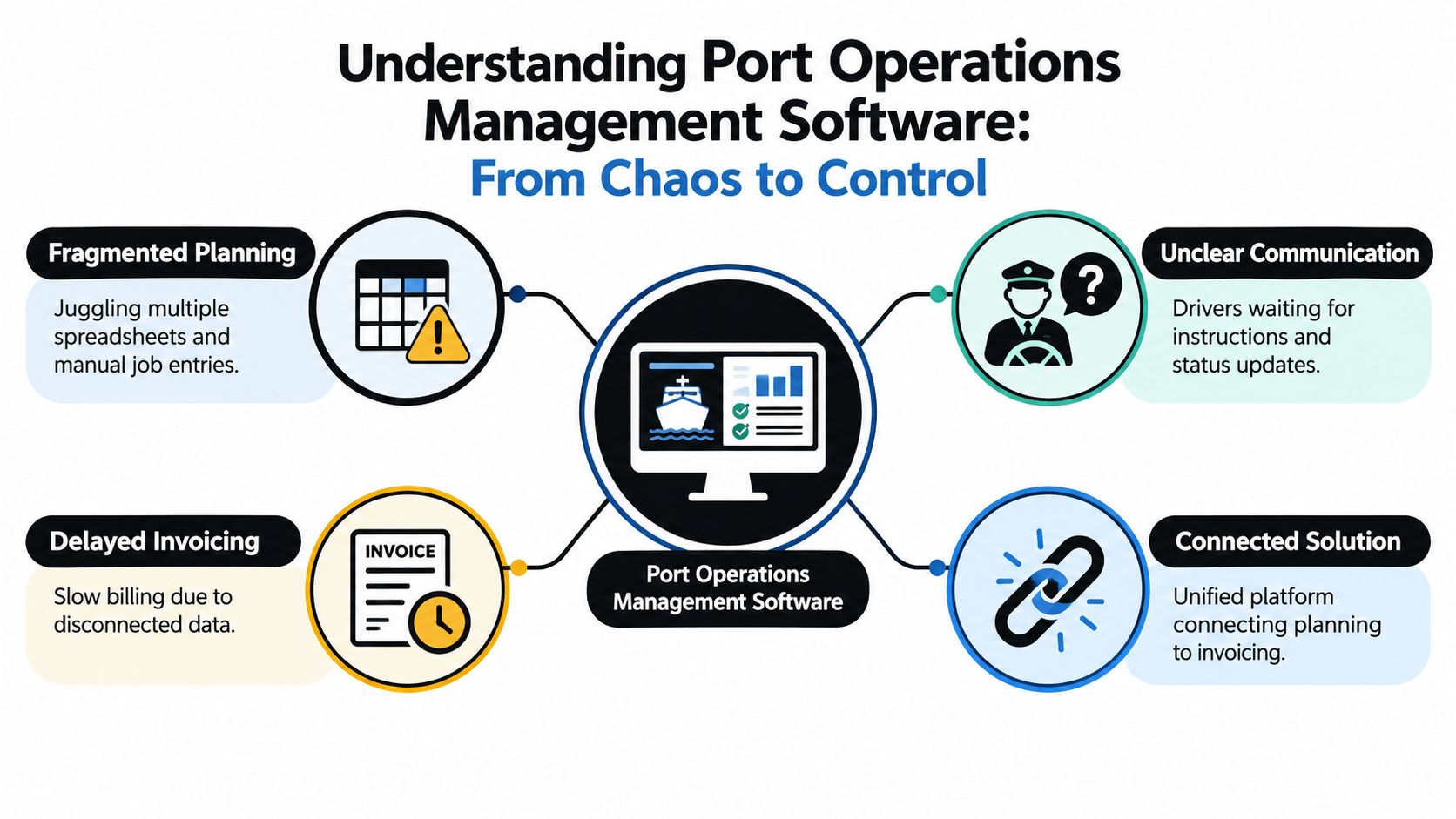
By 9 a.m., the traffic office can already feel behind. One planner has bookings in email, another has delivery notes on a desk, a driver is calling for the right reference number, and finance is waiting on proof that yesterday's container landed before they can raise the invoice.
That mess usually isn't caused by one bad process. It comes from the same job being touched in too many places. A booking starts in one system, gets copied into a spreadsheet, passed to a driver by phone or message, then comes back as a photo, a PDF, or a paper POD that someone has to chase. If you run haulage, drayage, or container transport work around ports, that pattern is probably familiar.
Table of Contents
Understanding Port Operations Management Software
For hauliers, port operations management software isn't about controlling cranes, berths, or yard stacks inside the terminal. It's about controlling the road-side workflow around port work so the office, the driver, and the billing team are all working from the same job record.
A lot of confusion starts because the phrase sounds broad. In the port world, software can mean terminal systems, customs connectivity, gate tools, or community platforms. Those are real layers, but they solve different problems. Port Community Systems are described by UNCTAD as a neutral electronic platform connecting public and private stakeholders, built to support single submission of data and reduce duplicate entry across the port and logistics chain (UNCTAD on Port Community Systems). That matters, but it's not the same thing as a haulage planner getting jobs out, PODs back, and invoices raised.
What it controls in a haulage office
From the haulier's side, the software should handle the live movement of information around a transport job:
- Job intake from customer bookings, emails, or uploaded documents
- Planning and allocation in a jobs grid that shows what's unassigned, in progress, complete, or stuck
- Driver briefing with the details that matter, such as collection point, delivery point, container references, timings, and notes
- Job status updates so the office can see what's moving and what needs attention
- Proof of delivery capture with signatures, photos, notes, timestamps, location details, and status changes, which are common elements of electronic proof-of-delivery records (electronic POD record details)
- Completed-job checks and invoicing so finance doesn't have to rebuild the job from scratch
Why general tracking tools don't solve it
A vehicle tracking screen can tell you where a truck is. It usually can't tell you whether the driver received the latest delivery instruction, whether the POD is attached, or whether the invoice is ready to go.
Practical rule: If your planner still has to rekey the same booking into a second place before the driver can move, you don't have a connected process yet.
This distinction matters more now because port digitalisation is still uneven. A World Bank report says over 90% of ports in low- and middle-income countries haven't yet implemented Port Community Systems, and a 2021 IAPH survey across 111 countries found only 34% of participating ports had an EDI system compliant with the IMO FAL mandatory requirements, while another 35% were only at design or implementation stage (World Bank digital port adoption findings). For hauliers, that means you can't assume every stakeholder around the port is working from one smooth digital standard. Your own transport workflow still has to stand up on its own.
Core Modules in Port Transport Management
The cleanest way to assess port operations management software for hauliers is to ignore the broad marketing and look at the working modules. If the software can't support the traffic office from first booking through to invoice, it won't remove much admin.
The jobs grid and planning layer
The jobs grid is the operational board. It should show the team what's booked, what hasn't been allocated, what's running, what's complete, and what's waiting on an exception. That matters more than a pretty dashboard because planners make decisions from the grid.
On the terminal side, software is complex. Fraunhofer describes terminal operating systems as integrated systems that manage and monitor operative tasks across five modules: planning, operations, CFS operations, operational support, and management (Fraunhofer TOS study excerpt). For a haulier, the lesson is simple. Good transport software also has to behave like an integrated control layer, not a collection of disconnected screens.
A practical planning view should let dispatchers answer questions quickly:
- What still needs allocating
- Which container moves are active
- Which jobs are missing instructions or documents
- What can be invoiced today
Driver briefing and execution control
Driver briefing is where many offices still lose time. If planners brief by phone, text, email, and paper in parallel, details drift. A reference changes. A note gets missed. A driver turns up with half the information.
The better approach is structured dispatch. The job record should carry the instructions, references, timing requirements, and notes in one place so the driver sees the same version the office sees.
For container operators, that includes the specifics general haulage systems often miss:
| Workflow area |
What the software should hold |
| Collection detail |
Port, quay, booking references, container information |
| Delivery instruction |
Site notes, timing, contact details, document requirements |
| Execution status |
Clear progress updates and exceptions |
| Completion record |
POD, notes, attachments, timestamps |
Logivo is one example of a tool built around that workflow for container haulage operations, with planning, driver briefing, POD capture, and invoicing kept in the same operational flow.
POD, billing, and practical AI support
The value of digital POD isn't just getting a signature on a screen. It's tying the completion record back to the job so the office doesn't have to chase separate proof later.
A transport management system can connect completed delivery activity directly to billing by flowing delivery data into invoicing, applying pricing consistently, and reducing manual input, billing delays, and errors (transport management and invoicing workflow).
AI has a practical role here, but it's narrower than some vendors imply. In logistics document automation, AI extraction tools are used on documents such as bills of lading, commercial invoices, packing lists, customs forms, and PODs. One logistics-specific system says it handles more than 40 document types (logistics document intelligence example). For a haulage office, that's useful when it cuts rekeying on intake and document handling. It doesn't replace planner judgement, and it doesn't remove the need for someone to manage exceptions.
How Connected Workflows Move from Planning to Invoicing
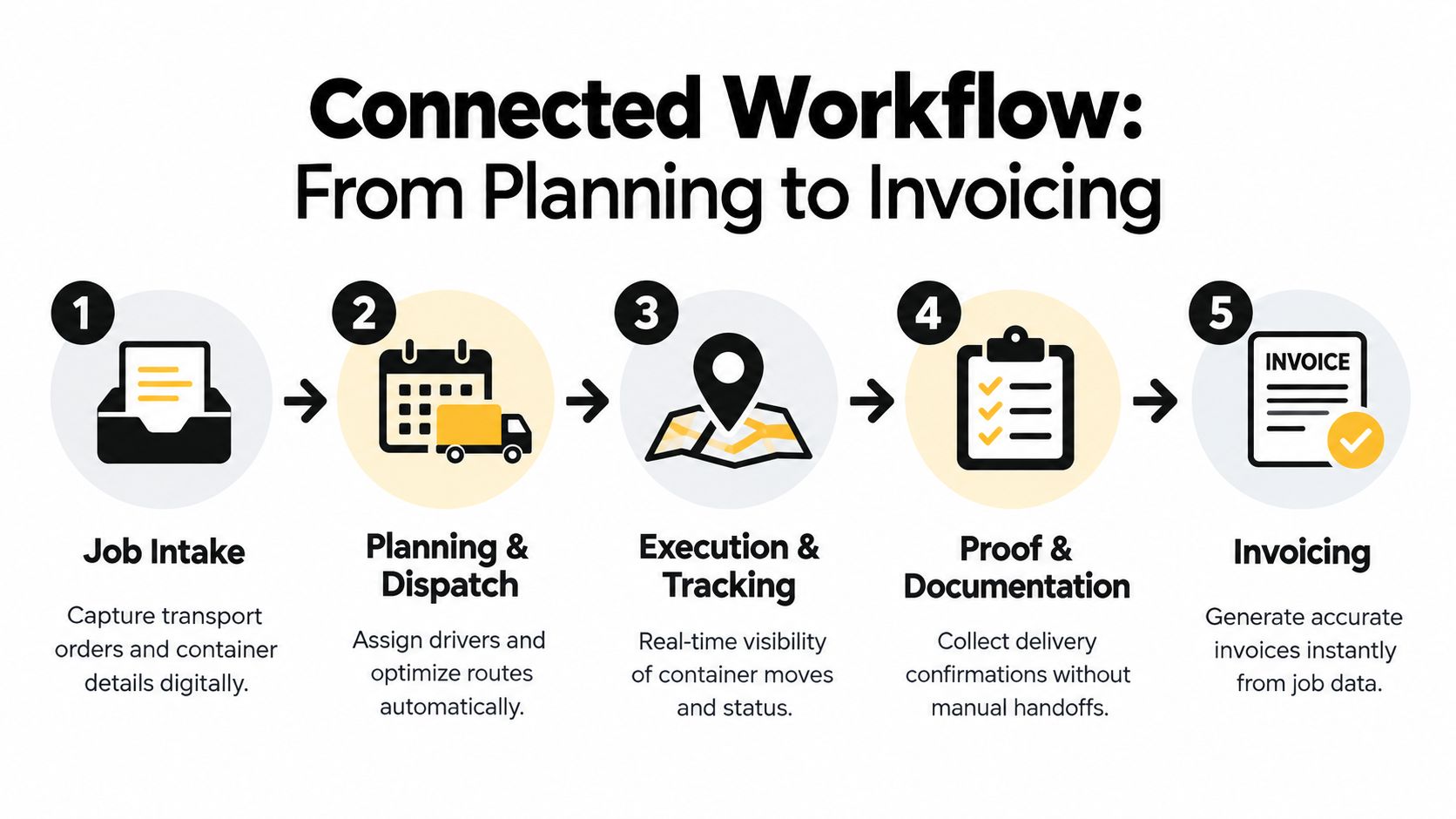
A connected workflow is easier to judge if you follow one job from start to finish. If the same details have to be typed, emailed, and checked again at every stage, the system isn't really connected.
Start with job intake, not dispatch
The workflow begins when the booking lands. That might come in by email, portal, message, or uploaded document. The important part is that the job details become a usable transport record without somebody copying the same fields across multiple tools.
AI document-processing workflows in logistics are commonly used to extract structured fields from documents and push them into downstream systems such as TMS or WMS, without manual sorting or pre-processing (AI document extraction in logistics workflows). In practice, that helps when booking information arrives in mixed formats and the office wants to avoid repeated data entry.
Then move through the operating flow
Once the booking is in the system, the rest should follow in sequence.
Plan the job in the grid
The planner sees the new move alongside current work, then allocates vehicle, driver, and timing.
Brief the driver from the same record
Instructions, references, and notes should flow out of the live job. No separate retyping. No separate sheet.
Update status as the move progresses
The office needs to know whether the job is underway, delayed, completed, or held on an issue.
Before you look at any sales demo, it helps to watch the workflow in motion. This walkthrough shows the shape of a booking-to-invoice transport workflow in practical terms.
Capture POD at completion
The delivery record should attach to the job with the supporting notes or files needed for queries later.
Push the completed job into invoicing
Finance should be reviewing and issuing, not rebuilding the movement from paper and inboxes.
When information travels with the job, billing becomes an operational follow-on task instead of a separate admin exercise.
What usually breaks the chain
Most delays happen in handoffs. The planner knows the job changed, but the driver doesn't. The driver completed the move, but the POD sits in a phone gallery or inbox. Finance has the customer rate, but not the confirmed delivery evidence.
That's why software choice matters less than workflow design. The strong setups don't try to impress with extra screens. They make sure the original booking, the live job, the completion proof, and the invoice all belong to one continuous record.
Operational Benefits and Measurable Outcomes
The test of port operations management software is whether it removes daily friction that people feel. In haulage offices, the friction usually shows up in three places: admin load, customer queries, and invoicing lag.
Faster invoicing starts with cleaner completion
Finance rarely has a pricing problem first. It usually has an evidence problem. The job looks done, but the signed note isn't attached, the delivery photo is in someone's email, or the exception note never made it back from the driver.
When POD is captured at source and linked to the completed movement, billing can move as soon as the office has checked the job. That shortens the gap between execution and invoice issue without adding another clerical step.
A useful side effect is cleaner dispute handling. If a customer questions arrival, paperwork, or delivery condition, the team can refer back to one record rather than piecing together calls, messages, and scanned notes.
Fewer office interruptions
Connected software also changes the rhythm of the day. Planners and dispatchers spend less time repeating details because the same job record is doing more of the work.
That usually reduces:
- Repeated phone clarification because drivers have structured instructions
- Inbox chasing because completion evidence comes back into the same workflow
- Manual rekeying because booking and document data can be captured once, then reused
- Back-office checking because job status and attachments are visible before invoicing starts
For firms that still rely on mixed spreadsheets and paper, even this level of improvement can be significant in practice.
Better visibility without pretending every system is integrated
One common misconception is that visibility only arrives after a large integration project. In reality, many operators get useful control just by connecting their own internal process first.
Buying advice: Ask whether the software gives dispatch, drivers, and finance the same live view of the job. If the answer is no, you'll still be chasing updates.
There's also a market reason to stay practical. Industry research estimates the Terminal Operating Systems market at USD 2.3 billion in 2025, with projected growth at a 10.5% CAGR to about USD 5.6 billion by 2034, and says Asia Pacific accounts for about 38.2% of 2025 revenue, or roughly USD 879 million (industry TOS market estimate in MDPI paper). That tells you investment in port software is real, but it doesn't mean a haulier needs a terminal-scale project to fix delayed PODs and slow billing.
If your team also needs customer-facing visibility, it's worth separating that from transport execution and reading how a container tracking system fits alongside, rather than replacing, the traffic-office workflow.
What Port Operations Software Is Not
A lot of buying mistakes happen because different categories get bundled together under one software discussion. For a container haulier, that usually leads to a tool that does part of the job well and misses the operational core.
Side-by-side comparison
| Software type |
What it mainly does |
What it usually doesn't solve for hauliers |
| Transport management software |
Job intake, planning, dispatch, POD, completed-job control, invoicing workflow |
Deep engine diagnostics, workshop maintenance, tachograph records |
| Fleet telematics |
Vehicle location, utilisation, driving behaviour, asset visibility |
Booking-to-billing workflow, customer rate handling, POD-driven invoicing |
| Tachograph compliance software |
Driver hours, legal records, compliance review |
Container job planning, driver briefing, customer document flow |
| Workshop software |
Maintenance jobs, inspections, parts, repair planning |
Day-to-day transport allocation and billing readiness |
| Warehouse management software |
Storage, picking, stock control, warehouse task execution |
Port drayage moves, delivery confirmation tied to haulage billing |
| Consumer parcel tracking |
Last-mile event visibility for parcel recipients |
Traffic-office control of container work and haulage document handling |
Why the distinctions matter
A tracking map might look useful in a demo, but if your problem is that invoices wait on missing delivery notes, it won't solve much. In the same way, warehouse software may be excellent for stock movement and still be the wrong fit for a road transport team serving ports.
This matters more because implementation continuity is a real operational risk. Independent market coverage of port management software says upgrades and migrations are highly sensitive because disruption can affect vessel scheduling, cargo handling, customs clearance, and logistics coordination, which makes phased rollout, rollback planning, and continuity one of the most important buying questions (port software migration risk and continuity concerns). For hauliers, that's a reminder not to buy a broad system that forces unnecessary change into live operations.
The practical test
Ask a basic question before you buy anything: does this tool help the traffic office get a container move from booking to invoice with fewer handoffs?
If it doesn't, it may still be valuable elsewhere in the business. It just isn't the right answer to port operations management software from the haulier's point of view.
How to Choose Port Operations Management Software
Selection usually goes wrong when buyers start with features instead of workflow. The safer approach is to take a normal day in the traffic office and test whether the software supports it without workarounds.
Start with operational fit
If you run container haulage or drayage, the software should comfortably handle the sequence your team already lives with: booking intake, jobs grid planning, dispatch, driver briefing, status updates, POD capture, completed-job checking, and invoicing.
Use a short scorecard during demos:
| Decision area |
What to ask |
| Workflow coverage |
Can the same job move from booking to invoice in one connected record? |
| Planning control |
Does the jobs grid show unallocated work, live progress, and exceptions clearly? |
| Driver communication |
Are instructions structured, consistent, and easy to update? |
| Completion handling |
Can PODs, delivery notes, and attachments sit against the job without side processes? |
| Billing readiness |
Can finance work from completed jobs instead of rebuilding them? |
Keep implementation risk low
Heavy projects sound fine in procurement meetings and feel very different in live transport. Smaller and mid-sized operators usually benefit from cloud-based delivery, lower setup overhead, and less bespoke development.
That's especially important in a market where interoperability still causes trouble. Coverage of Port Community System modernisation points to coexisting formats and protocols across EDI, API, XML, JSON, FTP/SFTP, and legacy systems, while also noting a shift toward more event-driven and API-first approaches (PCS interoperability and standardisation challenges). The practical lesson is that you shouldn't buy a system on the promise of endless custom connectivity if your main gain will come from fixing internal workflow first.
For operators that rely on owner-drivers or external haulage support, process discipline matters beyond software as well. A useful reference point is MA Hydraulics Ltd vendor management, which is worth reading for its broader thinking on how supplier relationships stay controlled when multiple parties are involved in delivery.
Questions that expose weak systems
Use plain questions. They tend to reveal more than feature lists.
- Show me a job from booking to invoice. If the demo jumps between modules with manual steps in the middle, expect friction later.
- Show me how a late POD gets handled. That's where weak workflows surface fast.
- Show me pricing and onboarding clearly. Hidden setup costs usually appear when “configuration” starts to mean custom work.
- Show me what planners still do manually. Every transport team will keep judgement-heavy tasks. The issue is whether the software cuts routine rekeying and admin.
A good buying process doesn't look for magic. It looks for fewer handoffs, cleaner records, and less avoidable office work.
Next Steps for Container Transport Operators
If you're still running port work across spreadsheets, messages, paper PODs, and delayed billing checks, the first priority isn't a grand digital programme. It's getting one dependable transport record that follows the job from intake to invoice.
A practical shortlist
Before you commit to any platform, check these points against your current process:
Workflow match
Does it fit container haulage and drayage work as your planners and dispatchers run it?
Jobs grid quality
Can the team see unallocated, active, completed, and exception jobs without building side spreadsheets?
Driver briefing and POD flow
Do instructions and completion evidence move through the same record?
Billing handoff
Can finance invoice from confirmed job data rather than wait for separate paperwork chasing?
Setup overhead
Will the software simplify operations quickly, or will it create another project for the office to manage?
Software should remove clerical loops. It shouldn't give your planners a second system to maintain.
How to move without disrupting the day job
The safest migration approach is usually narrow first. Start with the workflow that causes the most friction, often booking intake, POD collection, or invoice delay. Get that stable, then expand.
That matters because transport teams don't have spare time for long change programmes. The best early sign is simple: fewer calls for missing details, fewer end-of-day document chases, and fewer invoices waiting on proof.
When you speak to vendors, ask for a live walkthrough based on your own work type. Container collections, port deliveries, subcontracted legs, exceptions, and proof handling all expose whether the system fits or whether it's just a generic TMS with port language added on top.
If you're reviewing options, Logivo offers transport management software for hauliers and container operators that connects job planning, driver briefing, digital POD, and invoicing in one workflow. It's a sensible place to start if you want to replace fragmented traffic-office processes without turning the change into a heavy systems project.