Job Planning Software for Haulage: A Practical Guide
Discover how job planning software helps haulage and container operators cut admin, speed invoicing, and run jobs from booking to billing in one connected flow.
A booking arrives while the traffic office is already dealing with a failed collection, a driver asking for revised instructions and finance chasing yesterday's proof of delivery. The job may exist in an inbox, a WhatsApp message, a spreadsheet and someone's memory before it reaches an invoice. By then, a missed port slot, an incomplete POD or an unconfirmed rate can turn a straightforward movement into a long administrative tail.
Job planning software is most useful when it connects the whole chain, from booking and allocation to driver briefing, delivery confirmation and billing. It isn't just a digital jobs board. For haulage, container transport and drayage operators, it should provide one operational record that planners, drivers, customers, subcontractors and finance can use without repeatedly rekeying the same details.
Table of Contents
The Daily Reality Behind Late PODs and Slow Invoices
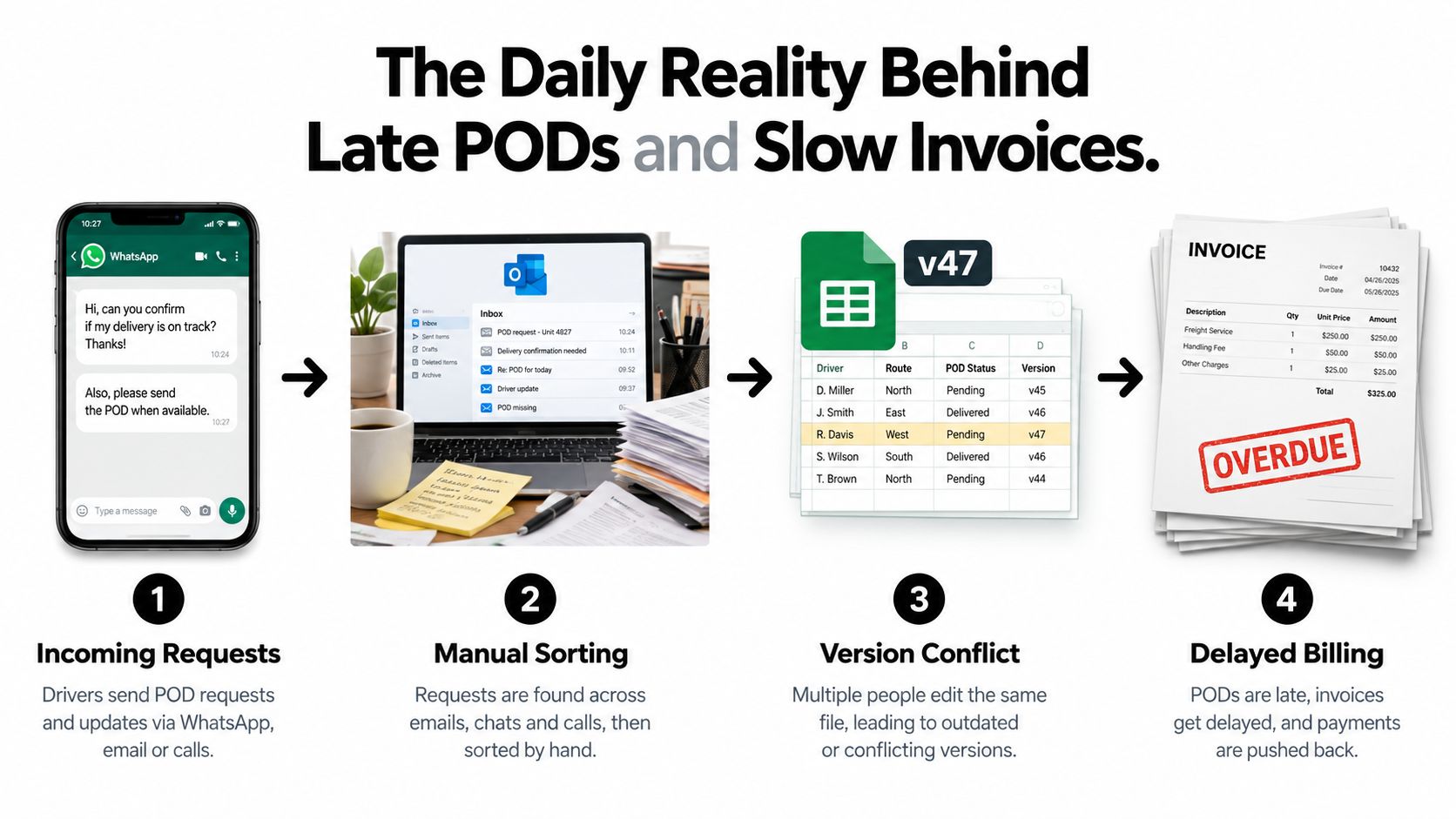
At 7:30 on Monday morning, three planners are turning new work into a workable day. Booking confirmations sit in an Outlook inbox, driver updates arrive through WhatsApp groups, and a shared spreadsheet is open in several places. The filename includes “v47” because earlier versions are already circulating.
A container movement shows how control starts to weaken. A shipping line release reference arrives by email, followed by a port slot time and container number in an attachment. The planner rekeys the booking into the spreadsheet, copies the collection and delivery details, adds the agreed rate, then calls a driver to check whether the movement fits around existing work. The driver asks for the slot time again because it was buried in the original message.
The movement may be routine, but the office still has several risks to manage. The planner must record the container reference accurately, monitor the port appointment and consider detention exposure if the vehicle is delayed. The driver needs clear instructions and enough information to complete the job without another call. A late change can force manual reallocation when the day is already full.
Where the delay starts
A delivery can finish on time while the administrative work falls behind. A paper POD remains in the cab or at the consignee's reception desk. The office chases a scan, matches it to the booking reference, and passes cost lines to the accounts package. Finance then waits for rate confirmation before preparing the invoice.
Every handover can introduce a missing field, duplicated reference or misunderstood instruction.
Practical rule: If the person preparing an invoice has to ask which job a POD belongs to, the workflow has already lost control of its source data.
A connected workflow captures the booking once, keeps the job visible through dispatch and delivery, and links the POD to the completed movement. Guidance on POD-to-invoice automation describes this closed loop as a way to match delivery confirmation with shipment and invoice records, reducing reliance on physical paperwork and supporting faster billing.
The transport management software market is large and expanding. One estimate values the category at USD 17.1 billion in 2025 and projects it to reach about USD 69.0 billion by 2035. Another estimates USD 18.50 billion in 2025 rising to USD 37.04 billion by 2030. The figures differ, but both estimates place planning, execution, dispatch and tracking within a substantial software category. (Mordor Intelligence, Grand View Research)
For an operator, the practical test is straightforward. Can the system keep the booking reference, driver instruction, delivery evidence, exception and invoice line connected until the job is financially closed? That requires a shared operational record, not separate telematics, tracking and accounting tools that leave staff to join the information themselves.
What Job Planning Software Actually Does
A late collection changes the whole day. The planner updates the booking, calls the driver, revises the customer promise, records the exception and later explains the charge to finance. Job planning software keeps those decisions on one operational record, following the movement from booking to billing.
The system gives planners a structured place to create work, allocate vehicles and drivers, monitor progress, capture completion evidence and prepare the financial handover. Its value is workflow control. It reduces the need to reconstruct a job from emails, spreadsheets and separate status screens after conditions change.
A spreadsheet can hold many of the same fields, but it becomes difficult to control once jobs change during the day. Multi-leg movements, subcontractor assignments, revised collection times and customer-specific rates create version risks. A formula can calculate a value. It cannot reliably show which instruction a driver received or whether that instruction was later changed.
Legacy TMS platforms may cover a wider enterprise footprint, but configuration and support can be demanding. Modern job planning tools sit closer to the traffic office. They focus on the records and decisions planners handle repeatedly, without requiring a smaller operator to adopt every function in a large enterprise suite.
The four working areas
The jobs grid acts as the operational register. It should show planned, dispatched, in-progress, completed and exception jobs so a planner can find problems quickly. For a container operator, the record may include the shipping line release, container reference, port appointment, collection point, delivery address and agreed rate.
The dispatch view turns the job list into a workable day. Planners can group work by driver, vehicle or assignment status, then brief the person carrying out the movement. The benefit is a clearer answer to three practical questions: who is doing what, where the job stands and which details need attention before departure.
The POD workflow records completion evidence at the point of service. A digital POD can include a signature, photo, timestamp and status detail linked to the job. PTV Logistics describes POD capture in these practical terms, with delivery information tied to the completed stop and exception handling.
The invoicing workflow uses the completed job and its evidence to prepare billing. Finance can review missing information, waiting time, additional charges and rate exceptions without rebuilding the movement from email threads.
What it should not be confused with
Job planning software is different from fleet telematics and vehicle tracking. It may receive driver updates or operational statuses, but live GPS location remains the responsibility of a tracking or telematics system unless the planning product documents that capability.
It also differs from tachograph compliance, workshop management, warehouse management and consumer parcel tracking. Those tools address separate operational needs. A job planning platform manages the transport job as a commercial and operational unit, including instructions, status, evidence and billing readiness.
Practical AI can help with the handoffs. It may extract container numbers, dates or rates from booking emails and create a draft for planner review. The planner still checks the result, resolves exceptions and decides whether the movement is feasible. This reduces rekeying without replacing operational judgment. Accounting software can then receive the invoice-ready information, while the planning system remains the record of how the job was carried out.
Core Modules and How Jobs Move Through Them
A well-designed transport workflow follows the job in the same order that the traffic office does. Information starts with the booking, becomes a planned assignment, travels with the driver, returns as delivery evidence and ends as an invoice-ready record.
Intake creates the working record
The first test is job intake. A booking may arrive as an email, PDF or structured electronic message. The system should create a draft record containing the customer, booking reference, container number where relevant, collection and delivery addresses, dates, timing requirements and rate information.
That structure matters because a planner shouldn't have to copy the same reference into separate fields for planning, driver instructions and billing. AI can assist with extracting container numbers, port details, dates and rates from booking emails or documents, but a planner should review the draft before it becomes an active job.
The transport management system modules should connect rather than behave like separate screens with separate records. Intake is successful when the next user can understand the movement without reopening the original email.
Planning turns data into a feasible assignment
The jobs grid gives planners a consolidated view of planned and active work. From there, the dispatch view should support assignment by driver, vehicle and relevant operational constraints, including vehicle type, location, availability and driver hours.
This isn't the same as handing control to an algorithm. A planner still decides whether a short-notice job is commercially sensible, whether a driver can manage a port delay and whether a customer needs to be called before the plan changes. Software can surface conflicts and suggest a slot. It can't take responsibility for the relationship or the operational judgement.
For container work, the planner may need to keep several linked details visible at once, such as the release reference, port timing, container number, delivery instruction and return requirement. The record should remain usable when a collection fails, a slot changes or a subcontractor takes over.
Driver briefing carries the right detail forward
A driver briefing should provide the details needed to execute the job, not force the driver to search through a message history. That may include collection and delivery addresses, references, timing requirements, customer notes and any documents required at the stop.
A driver app or mobile workflow can send the assignment and return status updates from the road. It should support practical conditions, including limited connectivity and the need to attach delivery evidence without returning to the office.
POD closes the operational loop
At delivery, the driver captures the signature, photo, timestamp or exception reason against the job. A clean POD should change the job's status and make the record available for completion checks. Digital evidence is stronger when it's bound to the job ID rather than stored as a loose image in a mailbox.
AI can help match a received document to the correct job, identify missing fields or flag a discrepancy. It should not approve an unusual charge or override a planner's decision about a disputed delivery.
Invoicing handles completion, not reconstruction
Once the completed job has the required evidence and rate information, the invoicing workflow can prepare a draft invoice or invoice-ready record. Finance then focuses on exceptions, such as a missing POD, waiting time, an unconfirmed rate or an additional charge.
AI document processing can extract structured data from invoices, PDFs, photos and transport paperwork, with validation steps that flag discrepancies before export to finance systems. (Dijit)
The strongest design principle is simple: capture once, validate at the next handover and preserve the job record through billing.
Job Planning Software vs Spreadsheets and Legacy TMS
The familiar spreadsheet is often the first planning system because it's available, flexible and understood by everyone. It can remain useful for analysis or temporary contingency work, but it becomes risky when several planners edit jobs while drivers, subcontractors and finance teams depend on current information.
A legacy TMS offers more coverage, but coverage can come with a heavy operating burden. Configuration, integrations, user permissions and specialist support may all be necessary before the system reflects the way a particular traffic office works.
Modern job planning software aims for a narrower centre of gravity. It's transport-shaped, connected across the main job lifecycle and usually easier for operational teams to adopt than an enterprise platform built for a much broader technology estate.
| Criteria |
Spreadsheets |
Legacy TMS |
Job Planning Software |
| Real-time job visibility |
Depends on file access and disciplined updates |
Usually broad, but may require configuration across modules |
Built around a shared jobs grid and dispatch workflow |
| Planner onboarding |
Familiar at first, but process knowledge stays informal |
Often requires formal training and system-specific support |
Focused on transport jobs, dispatch and completion |
| Handoffs from booking to invoice |
Multiple manual copies and messages are common |
Can be connected, but workflows may be rigid |
Designed to carry the job record through POD and billing |
| Container references and rate cards |
Easy to add, easy to mistype or overwrite |
Strong where configured correctly |
Structured around transport-specific job information |
| Subcontractor control |
Often managed through separate tabs, email or messages |
Available in capable systems, sometimes as a configured module |
Should keep assignments, rates, status and evidence together |
| Reporting |
Flexible but dependent on clean data and formulas |
Usually deep, with a higher setup burden |
Focused on operational status, exceptions and completion |
| Licence and setup cost |
No separate software licence in many offices |
Often higher total implementation overhead |
Positioned between spreadsheets and enterprise TMS complexity |
Score the workflow, not the brochure
Ask each vendor to demonstrate a real movement. Give them a booking email, a container reference, a timed collection, a revised instruction, a driver update, a POD and an invoice exception. Watch how many times the user re-enters the same data.
Measure the points that affect the office directly:
- Visibility: Can the planner see work assigned to employees and subcontractors without asking around?
- Change handling: Can a revised slot or failed collection be recorded without losing the original context?
- Billing readiness: Does finance see why a job is not ready to invoice?
- Reference accuracy: Can the system validate or flag inconsistent container numbers, booking references and rates?
- Reporting depth: Can managers review outstanding PODs, exceptions and completed jobs without rebuilding a report?
Spreadsheets often win on flexibility. Legacy TMS platforms often win on breadth. Job planning software is a better fit when the priority is a focused, connected transport workflow with less operational overhead. A useful comparison of the trade-offs is set out in transport workflow software versus spreadsheets.
Transport Workflows for Haulage and Container Operators
The right workflow depends on the movement, but the control points stay recognisable. A planner needs to know what has been booked, who owns the job, what the driver has been told, whether the work was completed and whether finance has enough evidence to bill.
General haulage
A customer booking email becomes a structured job with collection and delivery postcodes, required timing, customer references, the haulage rate and any waiting-time rule. The planner allocates the movement to a driver or approved subcontractor, then sends a briefing containing the addresses, references and service requirements.
During execution, the job status should show whether the vehicle has been assigned, dispatched, delayed or completed. At the delivery point, the driver captures the POD with the signature, photo and timestamp. The completed-job check confirms that the evidence matches the correct job and that any waiting time or additional charge has supporting information before the rate moves into invoicing.
Container transport and drayage
Container work needs more than a generic collection and delivery record. The job should retain the shipping line release reference, container number, port or terminal details, appointment information, interchange requirements and return instruction.
The planner records the movement from release through allocation, port handover, gate activity, delivery and container return. If the driver reports a failed collection or a changed slot, the exception belongs on the job record, alongside the customer communication and revised instruction. Demurrage and detention rules still require commercial judgement, but the system should keep the relevant events and documents together so finance isn't searching across unrelated files.
Subcontractor control
Subcontractor work introduces another layer of reconciliation. The operator needs approved partners, agreed rate sheets, job assignments, status updates and delivery evidence in one view.
A planner can allocate a movement to the appropriate partner, send the required references and monitor the returned status. The POD check should happen before the subcontractor invoice is reconciled. If the rate differs from the agreed sheet or the evidence is incomplete, the system should present that as an exception rather than letting a questionable line pass unnoticed.
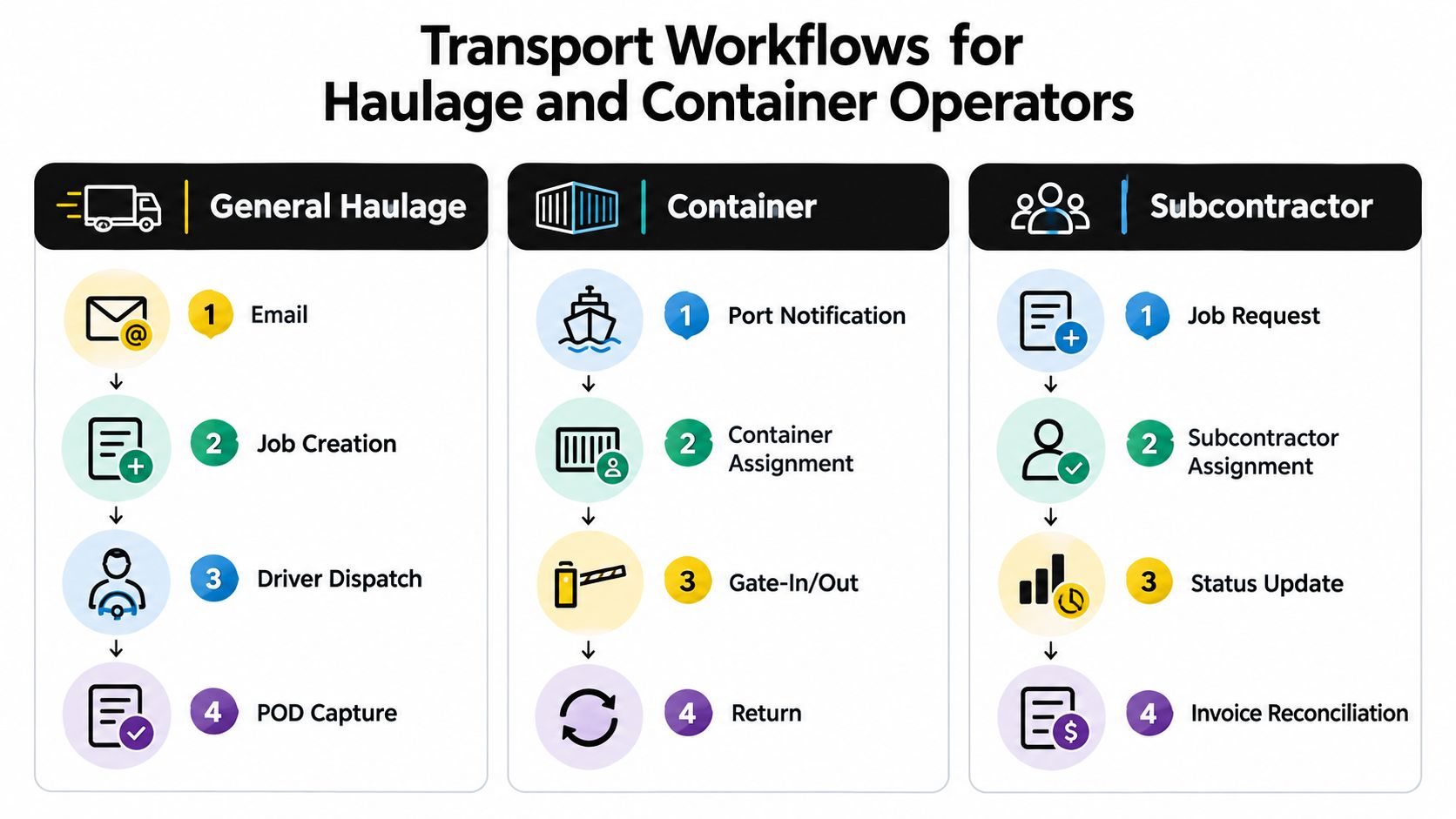
A connected transport management flow can link planning, dispatch, POD and invoicing so the completed delivery triggers the next administrative action instead of starting another round of rekeying. (Klipboard)
For container operators: Keep the container number, port handover, job status and customer rate on the same operational record. Separating them across tabs and inboxes makes disputes harder to resolve.
The process should also handle ordinary disruption. Short-notice work, driver shortages and failed collections can't be removed by software. The benefit comes from recording the change once, updating the people who need to act and preserving a clear audit trail for the final invoice.
Practical AI, Common Misconceptions and Where Humans Still Lead
AI is useful in job planning when it removes repetitive classification and rekeying. It becomes a distraction when vendors use it as a label for ordinary automation or imply that a dispatcher can be removed from the process.
A practical workflow starts with an incoming booking. AI can read an email or PDF and extract a container number, port, date, address, customer reference or rate into a draft job. The planner checks the fields, resolves ambiguity and confirms the movement. The system has reduced typing, but the planner still owns the decision.
Useful assistance can include:
- Document extraction: Read transport paperwork and place structured values into the relevant job or invoice fields.
- Matching: Link a POD, attachment or customer document to the most likely job while flagging uncertainty for review.
- Conflict detection: Highlight duplicate references, inconsistent dates or a rate that doesn't match the expected customer rule.
- Briefing support: Summarise a long email thread into the instructions a driver needs, with the planner confirming the final wording.
- Planning suggestions: Suggest potential vehicle or driver slots based on available operational information, without making an unchecked dispatch decision.
The adoption challenge is commercial as much as technical. Evidence in freight technology reporting identifies unclear ROI and capability gaps as important blockers, while nearly 80% of shippers and logistics service providers cite cost reduction and efficiency as main reasons to adopt AI. (Freight Times) The useful buying question is therefore not “Does it have AI?” but “Which manual step does it remove, and how will a planner verify the result?”
What AI doesn't replace
Telematics remains distinct from job planning software. A telematics platform may be the source for vehicle location, driving behaviour or vehicle data. Job planning software manages the movement, assignment, instructions, status, POD and invoice readiness.
The ERP remains distinct as well. Finance systems own the nominal ledger and broader accounting controls. A transport platform can prepare accurate invoice information and pass it into the finance process, but that doesn't make it an accounting system.
Human judgement remains essential for driver welfare, customer negotiation, port exceptions, service recovery and commercial approval. A planner may decide to split a movement, change a subcontractor or accept a cost to protect a customer relationship. Those decisions need context that a document extractor or matching model doesn't possess.
Evaluating Vendors and How Logivo Fits
A useful vendor evaluation starts with your actual traffic-office workflow, not a feature list. Ask each supplier to demonstrate a general haulage booking, a container movement and a subcontractor assignment using the references, changes and documents your team handles every day.
Use this checklist:
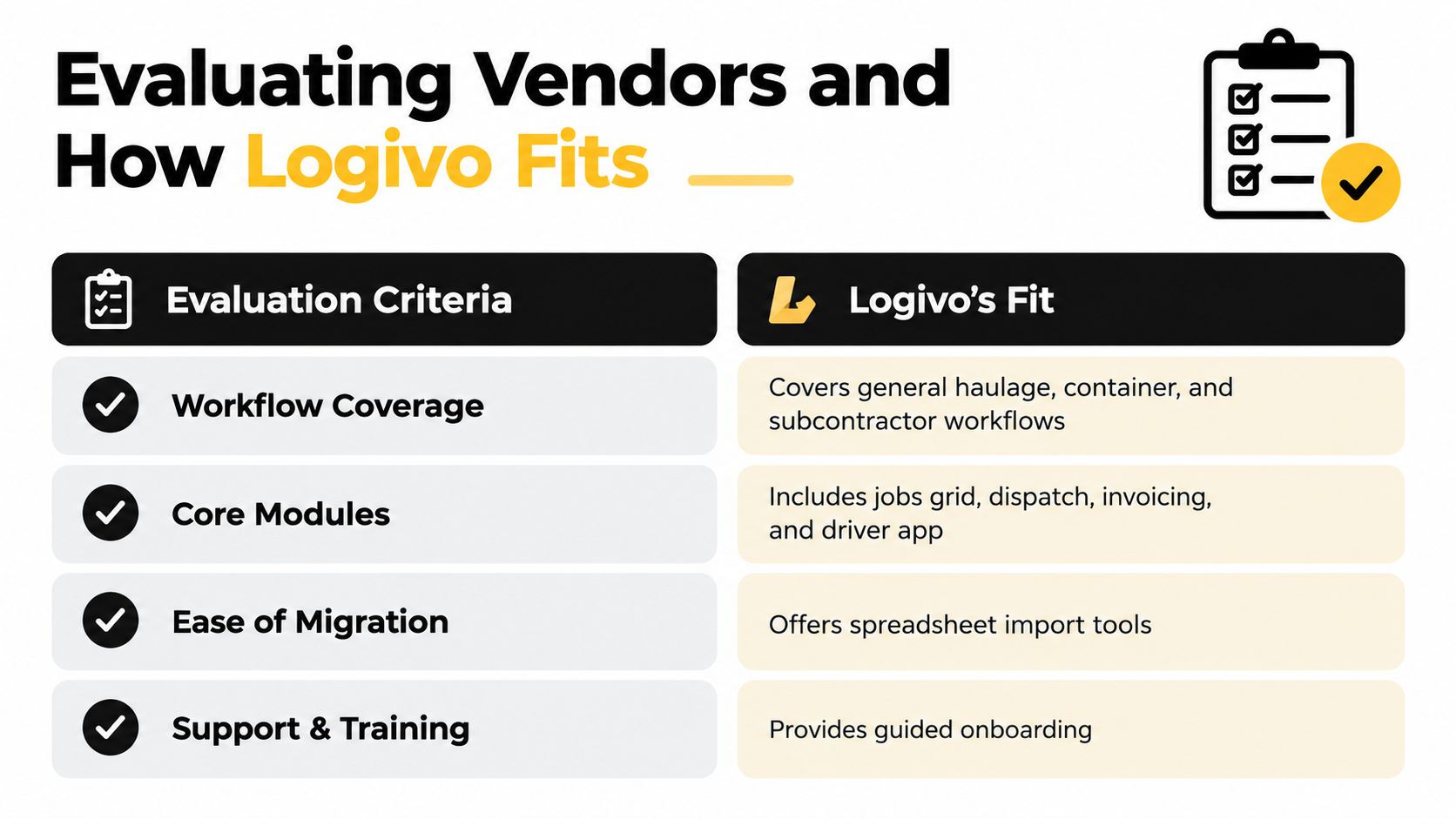
- Workflow coverage: Can the system support general haulage, container work and subcontractor control without forcing each process into an unrelated template?
- Core modules: Is there a jobs grid, dispatch view, driver briefing workflow, digital POD capture and invoicing handover?
- AI scope: Does AI reduce rekeying, extract documents or flag anomalies while leaving approval and dispatch decisions with your team?
- Migration: Can you import existing jobs, customer records and rate cards in a structured way?
- Pricing: Are the costs clear on the day, including users, drivers, support, data migration and any optional features?
- Support: Is onboarding guided, and can the provider support planners and finance users as well as technical administrators?
Logivo fits this evaluation as a transport management option built around a connected booking-to-billing flow. Its documented workflows cover job planning, driver briefing, digital POD capture and invoicing handover, with transport-specific records for haulage and container operations. Practical AI supports routine data capture and document handling rather than positioning the system as a replacement for planners.
Check the product against your own operating detail. Confirm how container references and port handovers are recorded, how subcontractor rate cards are applied, how drivers capture PODs and how finance reviews a completed job before billing. Also ask for a clear explanation of onboarding, support, data import and export, and how exceptions appear to users.
The strongest fit is the platform that matches your real movement types and reduces handovers without creating a larger administration project.
Migrating from Spreadsheets and Choosing Your Next Step
A spreadsheet migration should protect daily operations, not turn the rollout into another planning project. Start with the records and handovers that create the most friction. Leave unusual historical exceptions until planners have used the new workflow on live jobs.
A staged migration
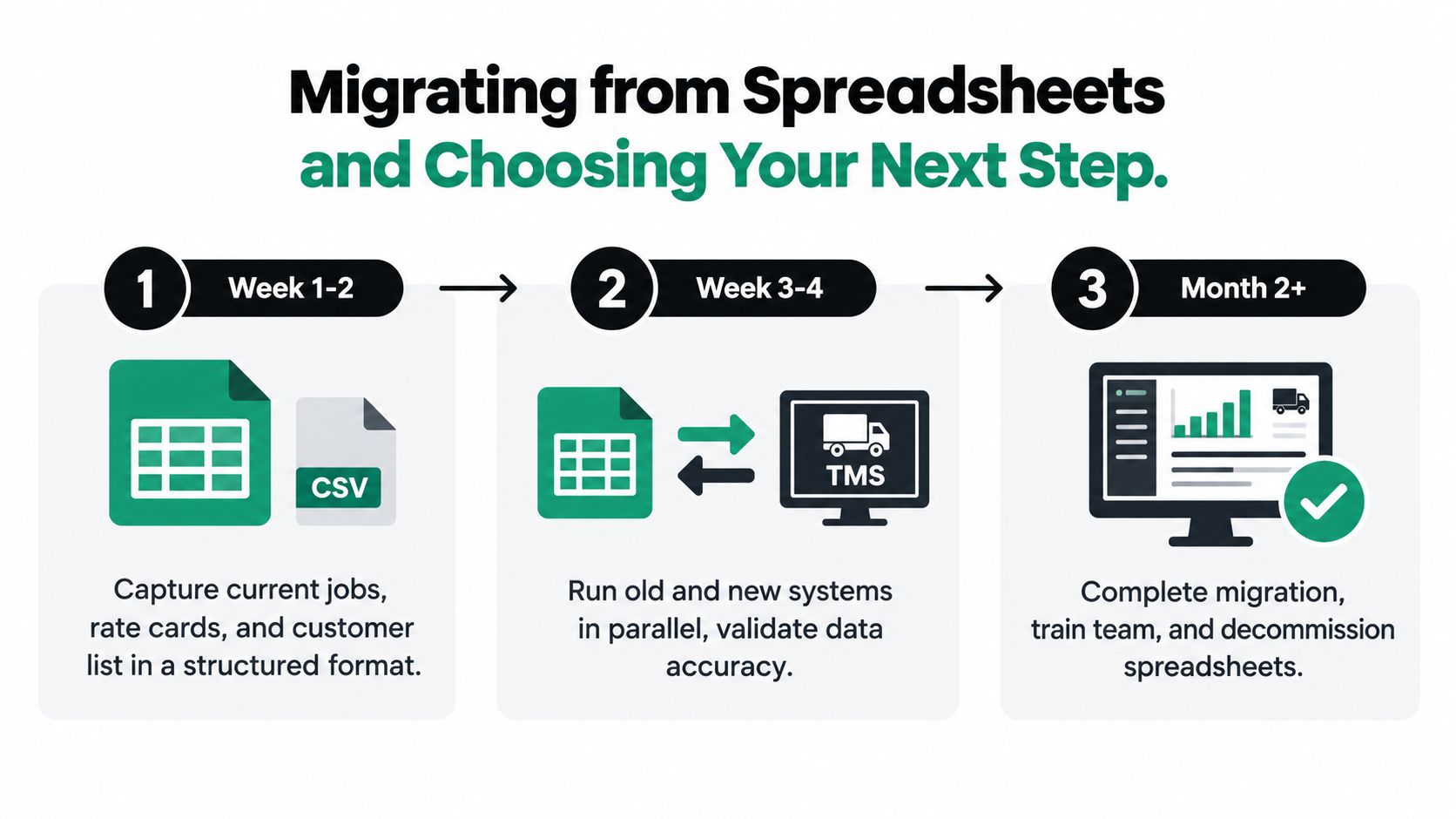
- Audit the current data. Gather open jobs, customer records, container references, rate cards, driver details and the fields finance needs before raising an invoice. Remove duplicates and agree which fields are mandatory.
- Pilot planning first. Use the jobs grid and dispatch board for one depot, customer or movement type. Run the spreadsheet in parallel for a fortnight, then compare assignments, status changes and exceptions.
- Move POD capture. Ask drivers to submit mobile PODs for the same pilot group. Reconcile digital records with paper during the transition, and record where instructions or connectivity need attention.
- Activate billing checks. Turn on the invoicing workflow for jobs with complete PODs and confirmed rates. Finance should review exceptions while the old spreadsheet remains available as a controlled reference.
- Expand deliberately. Add container movements, subcontractor workflows and reporting after the first group is stable. Close the spreadsheet version when the team can retrieve the required job and billing information from the system.
A paid pilot often reveals more than a polished demonstration. Ask the vendor for references from operators with a similar mix of general haulage, container transport or subcontractor work. Include a clear data export clause in the agreement, so job and commercial records remain usable if you change systems later.
Cloud delivery can support access across the operation, but it does not guarantee adoption. Judge the migration by practical results: fewer repeated entries, clearer driver instructions, faster POD availability and less reconstruction before invoicing.
If the spreadsheet is still the only place where the full job is visible, map one real booking from intake to invoice. Mark every handover that requires a second entry, then test whether the new workflow removes it.
Logivo provides a connected workflow for planning jobs, briefing drivers, capturing digital PODs and preparing completed work for invoicing, with practical AI assistance for routine document and data handling. Visit Logivo to request a walkthrough or trial against your own haulage, container and subcontractor jobs.