Dispatch Software for Small Trucking Companies Explained
Learn how dispatch software for small trucking companies connects jobs, drivers, POD and invoicing to cut admin and speed up billing.
The morning board is already out of date. One container job is in a spreadsheet, another sits in an email thread, a driver is waiting for a quay instruction, and finance is asking whether yesterday's POD has arrived. The dispatcher knows most of the answers, but only after making several calls and checking several places.
That pattern is common in small haulage and drayage operations. A few trucks can be managed with phone calls, paper notes and spreadsheets, but the handoffs become fragile as the job count, customer requirements and subcontractor activity increase. A booking may be entered twice, a driver may receive an incomplete briefing, and a completed delivery may remain unbilled because its evidence is still in a cab.
Dispatch software for small trucking companies should solve that operational gap, not create another isolated log. The useful system acts as a shared control layer for job intake, planning, driver briefing, status updates, proof of delivery and invoicing. The traffic office sees what needs attention, drivers receive the information required to execute the work, and finance can check whether a completed job is ready to bill.
The difference matters particularly in container transport. A planner may need to record a container number, booking reference, collection or delivery instruction, gate evidence, scale ticket or timing detail. Those records support the job after the truck leaves the site, especially when the team needs to review detention, chassis days or another accessorial charge.
This guide is for haulage operators, container transport companies, dispatchers, transport planners, operations managers and finance teams choosing their first connected workflow or replacing a spreadsheet-based process. It focuses on the practical movement of information from booking to delivery to billing, with the jobs grid as the central operational view.
If your current process depends on whiteboards, shared files and repeated phone updates, the practical problems are described in this guide to replacing whiteboards and spreadsheets in the traffic office. The aim isn't to promise that software will remove every exception. It's to show how a small team can make each handoff clearer, easier to check and less dependent on memory.
Table of Contents
Introduction Why Small Trucking Companies Outgrow Spreadsheets
At 07:00, the planner opens the jobs spreadsheet and starts matching work to vehicles. A customer has changed a delivery window, one driver has reported a delay, and a subcontractor wants the full collection details by phone. The spreadsheet still shows yesterday's allocation because nobody has updated the shared copy.
By mid-morning, the traffic office has several versions of the truth. The driver has one set of instructions in a text message, dispatch has another in an email, and finance is working from a folder of scanned delivery notes. The work may still get completed, but every correction requires another call, another rekeyed field or another manual check.
Practical rule: If a dispatcher must ask three people to establish whether a job is planned, active, delivered or ready to invoice, the process needs a shared operational view.
A spreadsheet is useful for lists. It's less effective as a live workflow because it doesn't naturally carry the same job record through each stage. Someone may add a booking, someone else may assign a truck, and a third person may create an invoice from a paper POD. Each handoff introduces room for missing references, duplicated entries and delayed updates.
The phrase dispatch software for small trucking companies can be misleading. Dispatch isn't only the act of assigning a driver. In a working traffic office, dispatch connects the customer order to the driver briefing, the execution status, the delivery evidence and the billing check. If those stages remain separate, the office may gain a digital planning screen without fixing the delay at the end of the job.
The jobs grid as the office control board
A jobs grid gives the team one place to view the active workload. It should help a planner distinguish new work from allocated work, work in progress, delivered work with an exception, jobs awaiting POD and jobs ready for invoicing. The value comes from the shared status and the attached information, not from making the screen look busy.
Consider a container movement from a depot to a consignee. The planner creates the job with the customer, locations, container reference and timing requirements. The driver receives a structured briefing, completes the movement and sends delivery evidence. Finance then checks the completed record instead of chasing a separate paper trail.
That sequence reduces the number of times staff must copy the same information between systems. It also gives operations and finance a common conversation. Rather than asking, “Has that run been done?”, they can ask, “Is the job delivered, is the POD attached, and is it ready to invoice?”
Small and medium enterprises with 5 to 499 vehicles account for $1.82 billion, or 37.9%, of the global truck dispatch software market, according to DataIntelo's global truck dispatch software market overview. The same source values that market at $4.8 billion in 2025 and projects $10.2 billion by 2033, with the small and medium segment growing at 12.4% annually, compared with 8.2% for fleets with 500 or more vehicles. Those figures don't tell an operator which product to buy, but they do show why smaller fleets deserve workflows designed around lean teams rather than enterprise administration.
What Dispatch Software Is and How It Connects the Job Lifecycle
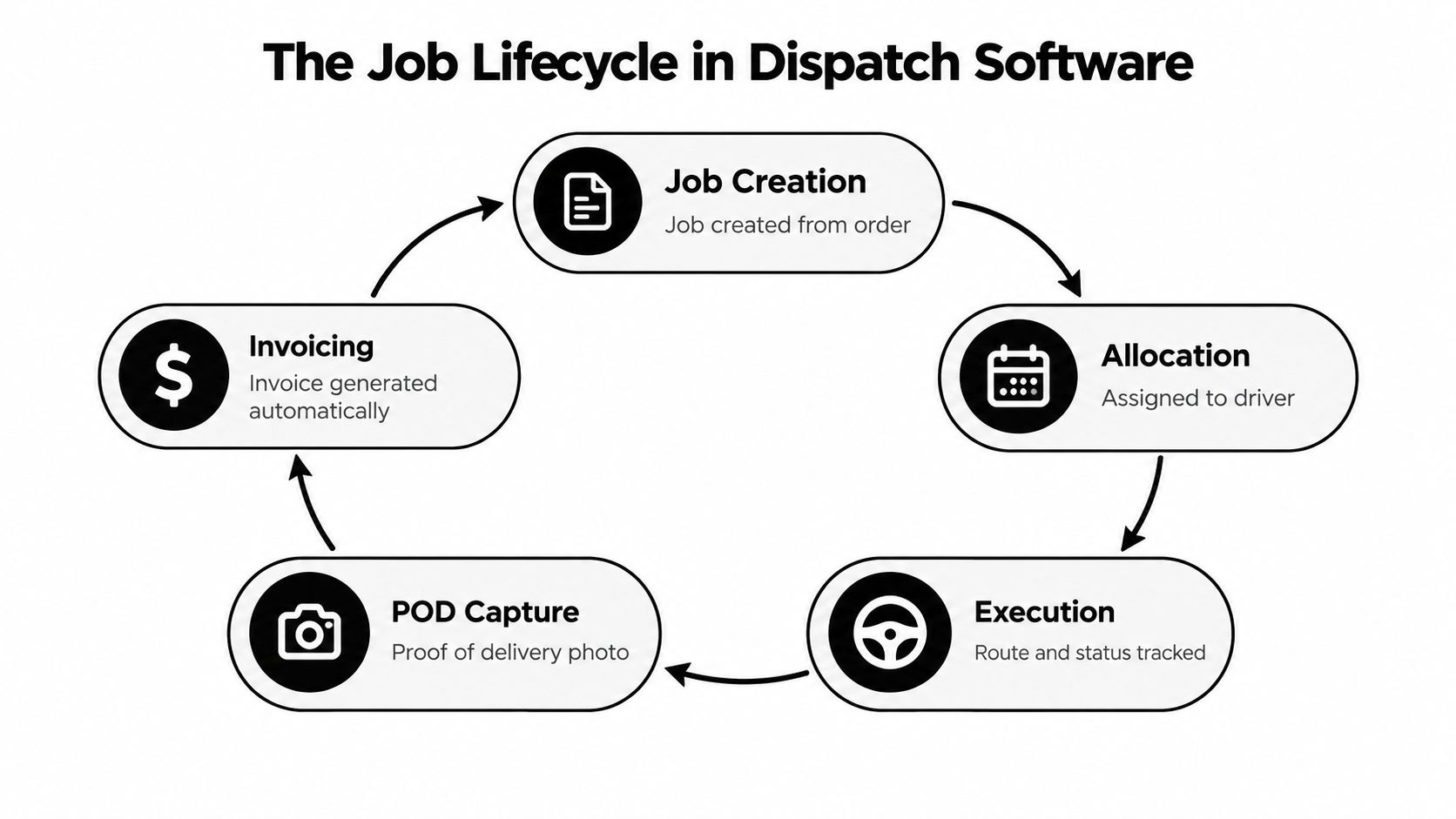
Start with one simple mental model. Treat every transport order as a job file that travels with the work from booking to billing. The file begins with the customer's requirements, gains an allocation and driver briefing, records execution updates, receives delivery evidence and ends with a completed-job check.
That model is more useful than thinking of dispatch software as a map or a driver tracker. The system's purpose is to keep the operational record coherent while people make decisions and handle exceptions.
Start with job intake
The first stage is creating the job from a booking, customer instruction or internal order. For general haulage, that may include collection, delivery, goods, vehicle requirements and timing. For container work, the record may also need a container number, booking reference, site instruction, release detail or other transport reference.
The planner's task is to make the order usable for the next person. A job that contains only a customer name and a date isn't enough if the driver needs a reference number, access instruction or delivery condition. Structured intake also gives finance the information needed to recognise the completed movement later.
Practical AI can help with job intake and document handling. Document automation tools commonly extract details from bills of lading, delivery notes, invoices and related freight paperwork, then pass structured information into a TMS, ERP or billing workflow, as described by FreightMynd's freight document automation explanation. That assistance can reduce rekeying, but it shouldn't be confused with replacing the planner. A person still needs to validate an ambiguous reference, unusual instruction or exception.
Allocate and brief the work
Once the job exists, the planner allocates it to a driver, vehicle or subcontractor according to availability and operational requirements. The driver briefing should contain the details needed to perform the job, including locations, references, timing and special instructions.
For a container move, the difference between “collect box at depot” and a complete briefing is substantial. The driver may need the exact container reference, collection instruction, delivery address, site notes and any paperwork requirement. If the information lives in a separate email, the driver and dispatcher may spend the day resolving avoidable uncertainty.
A jobs grid supports this stage by showing which jobs remain unallocated, which assignments are active and which exceptions require a decision. It doesn't replace judgement. It gives the planner a current board from which to apply that judgement. Teams looking for the wider workflow can review how transport dispatch software connects planning and execution.
Record execution, POD and billing readiness
During execution, the job status should tell the office what has happened and what needs attention. Useful distinctions include delivered, delivered with exception, awaiting POD and ready to invoice. Those labels are more actionable than a single completed checkbox.
Digital proof of delivery works best when the driver captures it at the point of delivery and the system attaches it automatically to the completed transport job. Trax Technologies' AI extractor workflow describes the practical connection between briefing the driver, capturing delivery evidence and using that evidence to control billing. The POD isn't a separate after-the-fact filing exercise. It is part of closing the job.
For freight and logistics paperwork, structured extraction can also pass information into downstream reconciliation or billing systems. Koncile's maritime transport invoice workflow describes batch ingestion, structured output and integration into a TMS, ERP or billing system. In plain terms, the office spends less time copying details from a completed job into an invoice record.
Dispatch software is not automatically a telematics platform, live GPS tracking product, tachograph compliance system, workshop system, warehouse management system or consumer parcel-tracking tool. Those products solve different problems. A transport management workflow can use information from other systems where supported, but its core job is to coordinate the transport order, the people executing it and the evidence needed to close it.
Must Have Features That Keep Small Fleets Moving
A feature belongs on the buying checklist only if it improves a real handoff. The right question isn't “Does the platform have a dashboard?” It's “What does the dispatcher, driver or finance colleague do differently at 10:00 on a busy day?”
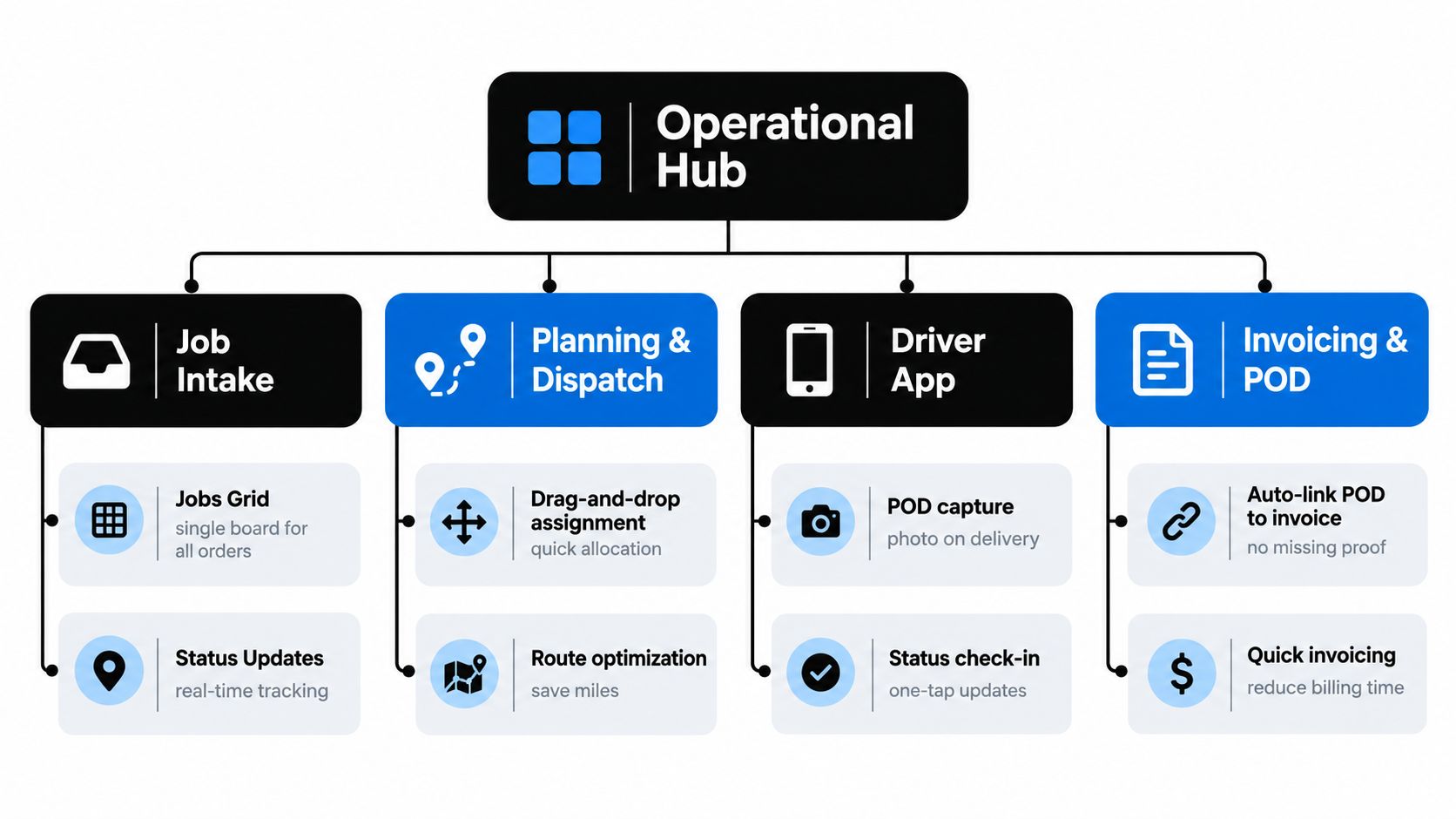
The strongest setup behaves like an operational hub. Job information enters once, planning decisions remain visible, driver instructions are clear, delivery evidence returns to the correct record and finance can verify what is ready to bill.
Intake and the jobs grid
Job intake should turn a booking into an operational record without forcing the planner to rebuild it across several screens. Ask whether the system supports the fields your traffic office uses, including customer references, collection and delivery details, timing requirements, container numbers and special instructions.
The jobs grid is the daily board. It should show assignments, progress and exceptions in one view, so the planner can answer basic questions without opening multiple files. The Logivo jobs grid is relevant to this workflow because it is positioned as a single planning and scheduling view for transport jobs.
A grid is only useful when statuses have clear meanings. “Planned” should not mean “driver briefed,” and “delivered” should not automatically mean “ready to invoice” if the POD is missing or an exception needs review.
Planning, dispatch and driver briefing
Planning is where the office turns orders into workable assignments. A dispatcher needs to see what is unallocated, what is already committed and where a change has created an exception. The software should make it straightforward to update the job and communicate the new instruction.
Driver briefing deserves its own test. Give a driver a realistic container job and ask whether the app or briefing view makes the following obvious:
- Job identity: The customer, locations and transport reference are easy to find.
- Timing: Collection and delivery requirements are clear.
- Container detail: The relevant container or booking reference isn't buried in a note.
- Instructions: Site access, paperwork and exception guidance are visible before departure.
- Completion action: The driver knows how to update status and attach delivery evidence.
A driver app should reduce office calls, not force drivers to duplicate information already held elsewhere. The office still owns planning decisions, and the driver still confirms what happened at the site.
Status, POD and completed-job checks
A status update becomes valuable when it triggers the next office action. “Delivered with exception” tells operations to review the issue, while “awaiting POD” tells the team to follow up on missing evidence. That is more useful than collecting status data for a report nobody uses.
POD capture should support photos, delivery notes and attachments with a clear connection to the job. The traffic office can then check whether the document is legible, whether an exception is recorded and whether the completed movement is commercially complete.
Container operators need a broader document trail than a generic delivery tracker. Gate tickets, scale tickets and timestamps can support or dispute accessorial charges such as detention and chassis days. Koncile's road transport invoice guidance explains why these supporting records matter in road transport documentation. A container-specific workflow should make references and completed-job checks easy to find.
Subcontractors and practical AI
Subcontractor control starts with visibility. The office needs to know which jobs were assigned externally, what instructions were issued, whether the work is complete and whether the supporting evidence has returned. The system shouldn't make subcontracted work disappear into a separate email chain.
AI is most useful when it handles repetitive administration. It can assist with document extraction, job intake and validation, helping staff avoid retyping information from a delivery note or freight document. It shouldn't be sold as an autonomous planner. A small fleet needs better information and fewer avoidable handoffs, while planners remain responsible for allocation, exceptions and customer commitments.
Dispatch Software Versus Legacy TMS and Manual Methods
A spreadsheet and an enterprise TMS can both hold transport data, but they create very different working conditions. The spreadsheet is familiar and flexible, yet it leaves the team responsible for keeping every copy aligned. A legacy TMS may cover broad functions, but the setup can introduce more structure and administration than a small traffic office can absorb.
Modern dispatch software sits between those extremes when it is designed around daily transport execution. It should give the planner a shared jobs grid and connect job completion to POD and invoicing without demanding an unnecessarily large implementation.
| Criteria |
Manual and Spreadsheets |
Legacy Enterprise TMS |
Modern Dispatch Software |
| Daily visibility |
Depends on updates, file ownership and calls |
Available, but may require multiple modules or screens |
A central jobs grid shows work, status and exceptions |
| Handoffs |
Repeated copying between email, paper and files |
Structured, but often broad and configuration-heavy |
One job record can carry planning, briefing, POD and billing checks |
| Driver instructions |
Texts, calls and attachments can fragment details |
Often governed by configured workflows |
Structured briefings can keep references and instructions together |
| POD control |
Paper may arrive late or be difficult to match |
Supported according to the selected modules and setup |
Digital evidence can be attached to the completed job |
| Container references |
Easy to omit or store in separate notes |
May require specialised configuration |
Should be tested against real container and drayage jobs |
| Setup overhead |
Low at first, high as exceptions grow |
Often substantial for smaller teams |
Lower overhead is a useful buying criterion |
| Billing readiness |
Finance manually checks completion and paperwork |
May connect through broader workflows |
Completed-job checks can lead directly to invoice preparation |
| Change handling |
The dispatcher edits several places |
Changes follow configured rules |
The planner updates the shared job record and briefing |
The comparison isn't an argument that every legacy TMS is unsuitable. A carrier with complex compliance, accounting or network requirements may need broader transportation management capabilities. The practical concern is fit. If a two-person office spends more time maintaining the system than controlling transport, the software has become another source of administration.
Manual methods also hide the cost of exception handling. A missed delivery note may lead to a customer query, a second driver call and a delayed invoice. A duplicated reference may force finance to reconcile two records before billing. These problems don't always look like software failures, because the work still gets done, but they consume planner and finance capacity.
Buyer test: Ask the vendor to demonstrate one real booking from intake through driver briefing, delivery evidence, completed-job review and invoice readiness. Don't accept a feature tour that shows each module separately.
For Logivo, the relevant distinction is its documented focus on hauliers and container operators, with a connected workflow covering job planning, driver instructions, POD capture and invoicing. It should still be evaluated against your own job types, document requirements and subcontractor process. Don't assume a jobs grid alone will solve every traffic-office problem.
How to Choose and Implement Dispatch Software Without Disruption
Buying decisions improve when the team starts with a real job rather than a feature catalogue. Choose a recent haulage movement and a container movement that both include normal instructions, a status change and a delivery document. Then ask the vendor to show exactly how those records move through the system.
Selection questions for the traffic office
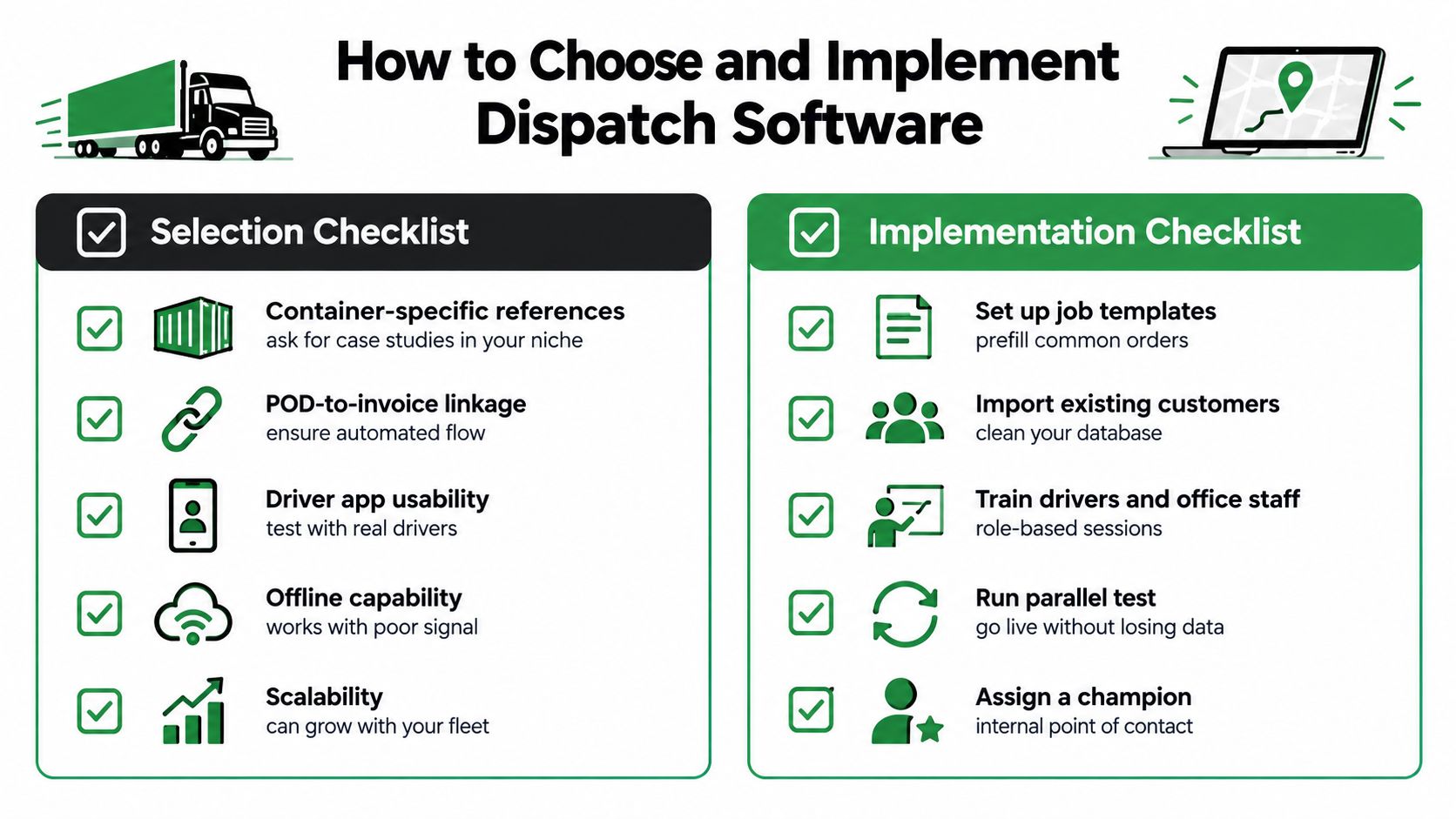
Start with container-specific references. Can the system store and display the container number, booking reference, gate or scale evidence and relevant timing details without hiding them in a general notes field? Can the team distinguish a delivered container from one delivered with an exception?
Test the driver briefing with someone who doesn't normally configure the software. The driver should be able to identify the job, understand the instructions, update progress and submit POD without relying on a dispatcher to explain every screen.
The finance workflow needs equal attention. Ask whether a POD is attached to the correct job automatically, how the team handles missing evidence and what makes a completed job ready for invoicing. Also ask how the platform treats subcontractors, amendments, partial completion and accessorial documentation.
Pricing questions should be operational, not just numerical. Clarify what is included in the plan, which users or roles incur charges, whether driver access is treated differently, what onboarding covers and whether document handling or AI assistance is part of the selected package. Avoid assuming that a low subscription price means low total effort.
A controlled rollout
A phased rollout protects the traffic office from trying to redesign every process at once.
Prepare the data. Clean customer names, locations, references and recurring job details before importing them. Decide which fields are mandatory for haulage and container work.
Configure the jobs grid. Agree the status language used by dispatch and finance. Include states such as planned, allocated, active, delivered with exception, awaiting POD and ready to invoice where they fit the workflow.
Build the driver briefing. Use a small set of realistic jobs. Remove duplicate instructions and make references visible before the driver starts.
Pilot POD capture. Select a limited group of drivers or jobs and check whether photos, delivery notes and exceptions arrive attached to the correct record. Review the evidence at the point of delivery rather than waiting for the end of the day.
Connect the billing check. Finance should define what makes a job billable. The rule may include completed status, POD, rate confirmation and any supporting gate or scale record.
Review exceptions. Hold a short operational review after the pilot. Look for rekeying, missed instructions, unclear statuses and workarounds. Fix those issues before expanding the rollout.
Keep ownership clear
Assign one person in operations to own the jobs grid and one person in finance to own the completed-job check. Drivers need a simple explanation of what they must update and why the information matters. If the system adds duplicate entry, staff will reasonably work around it.
Recent commentary on dispatch technology warns that small fleets should start with one pain point because poor rollout and driver resistance can erase the expected gains, as discussed in guidance on dispatch technology and driver retention. The point isn't to adopt AI because it is available. Start with missing PODs, repeated rekeying, unclear briefings or another visible operational bottleneck.
Measuring ROI and KPIs That Matter in Daily Operations
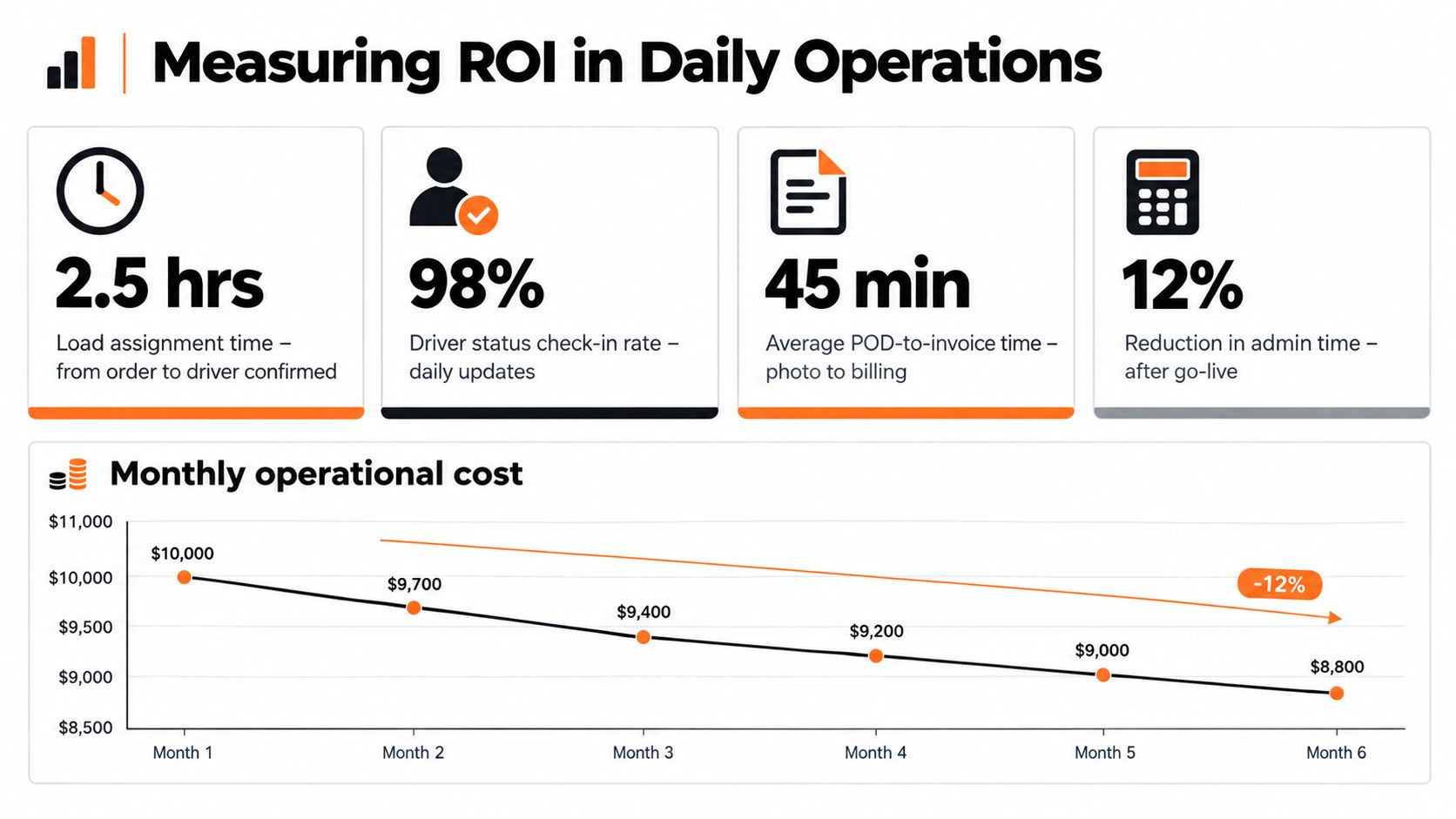
A software project should earn trust through observable workflow measures. Before go-live, record how the office currently handles assignments, status checks, POD collection and invoice preparation. After go-live, compare the same activities using the same definitions.
One benchmark for small fleets found that moving from manual phone-based dispatch to ELD-integrated dispatch software reduced average load assignment time from 12 to 18 minutes to 3 to 6 minutes. The benchmark also describes driver status checks moving from every 1 to 2 hours to real-time or on-demand updates, and supported dispatcher-to-truck ratios increasing from about 15:1 to 30:1 to 40:1, as reported in USTech Automations' 2026 dispatch software benchmark. These are benchmark observations, not guarantees for every operation.
The same source reports deadhead moving from 18% to 24% to 12% to 18%, linking better visibility and faster reallocation with improved asset utilisation. A team should measure its own empty-mile pattern rather than copy the benchmark into a business case.
Build a practical measurement set
Use a small group of measures that correspond to actual handoffs:
- Load assignment time: Record the interval from usable booking information to confirmed driver allocation.
- Status-check effort: Count manual calls and messages required to establish where active jobs stand.
- Dispatcher capacity: Track the number of trucks each dispatcher supports, but interpret it alongside service quality and exception load.
- Deadhead and empty miles: Compare empty movement with completed work and investigate whether poor information caused avoidable repositioning.
- POD turnaround: Measure the time from delivery to a usable document attached to the job.
- Invoice cycle time: Measure the time from completed work and accepted POD to invoice preparation.
- Exception rate: Record missing references, incomplete briefings, rejected PODs and billing queries.
- Container evidence completeness: Check whether gate tickets, scale tickets, timestamps and accessorial references are present when required.
For container transport, the last group is especially important. A job may be physically complete while its commercial record remains incomplete. If detention or chassis-day charges depend on supporting timestamps and tickets, those documents should be checked as part of job completion, not reconstructed later.
Measure adoption as well as speed
A faster workflow isn't useful if drivers avoid it or dispatchers keep parallel spreadsheets. Check whether drivers can find instructions, update status and attach POD without assistance. Ask finance whether the completed-job view reduces queries or moves them into a different queue.
AI adoption is also uneven. One 2026 industry survey reported that 29% of carriers use AI for load acceptance and dispatching, while 72% of fleet executives plan to adopt AI within two years. Yet only 13% of carriers supported fully autonomous AI decision-making inside a TMS, according to Numeo's survey discussion of AI in trucking dispatch. That gap supports a sensible operating principle: use AI for practical assistance, while keeping human oversight central to allocation and exceptions.
Common Pitfalls FAQs and Next Steps for Small Trucking Teams
The most common mistake is treating POD as paperwork that happens after dispatch. If the driver captures evidence at delivery and the office sees it attached to the completed job, finance can check billing readiness while the details are still clear.
Avoid over-customising at the start. Configure the fields and statuses the traffic office needs for normal haulage and container work, then add refinements after the team has used the workflow. Driver adoption also depends on short briefings, clear responsibilities and a process that doesn't require duplicate entry.
Will dispatch software reduce admin fatigue or add another system? It can reduce fatigue when it removes rekeying, missed instructions and repeated exception chasing. AI branding alone won't do that. The practical test is whether drivers and dispatchers complete fewer repetitive steps while retaining clear human control.
How is container work different from generic tracking? Container transport needs a document trail around the movement, not only a location or delivery status. Container references, gate tickets, scale tickets and timestamps may support detention, chassis-day and other accessorial checks, so the job record needs to hold those details.
Does software replace the planner? It shouldn't. A useful system organises the booking, assignment, briefing, status, POD and billing information so the planner can make decisions with fewer gaps. Human judgement remains important when a customer changes an instruction, a site causes a delay or a subcontractor cannot complete the work.
For small trucking teams, the buying decision comes down to one question: can the platform connect the work you already perform, from booking to delivery to billing, without adding a second version of the process?
Logivo provides transport management software for hauliers and container operators, connecting job planning, driver briefings, proof of delivery and invoicing in one workflow. Visit Logivo to review how the jobs grid and connected completed-job process could fit your traffic office, then arrange a conversation or trial around a real haulage or container movement.