AI Transport Management Software for Hauliers
Explore AI transport management software for hauliers and container operators. Learn modules, workflows, ROI, and vendor selection tips for small-mid fleets.
At 07:30 on a Monday, the transport office is already catching up. Friday's bookings are still printed beside the planner's keyboard, container release emails are arriving faster than they can be checked, and a driver's WhatsApp message has added another Felixstowe move to the morning list. On the other desk, paper proof-of-delivery sheets are waiting to be typed into a spreadsheet before anyone can raise an invoice.
That work feels manageable until the same detail appears in three places, an order-taking email, the planner's desktop sheet, and a driver's phone call. A container number is copied incorrectly, a release reference is missed, or a POD doesn't make it back until the next day. The invoice follows later, and the shipper's accounts team asks why the container number on the paperwork doesn't match the booking.
AI transport management software is relevant here for a practical reason. It can assist with intake, document handling, status updates and rekeying inside a connected transport workflow. It isn't a replacement for the planner who understands the road, the customer and the equipment available. It gives that planner a cleaner job record to work from.
Table of Contents
A Typical Monday Morning in a Container Haulier's Office
The first job is usually not planning. It's finding the complete order.
A release email may contain a booking reference in the subject line, a container number in an attachment and a delivery instruction in the body. The planner reads it, enters some of it into a spreadsheet, then calls or messages a driver with the details that appear most urgent. If the job changes, the update may live in the inbox while the old version remains on the desktop sheet.
The office then has several versions of the truth:
- The email: The original customer instruction, release reference and attachments.
- The planner's sheet: The working date, vehicle allocation and job status.
- The driver's phone: The latest verbal clarification, often without a matching office record.
- The paperwork pile: The evidence that the work was completed, but not yet connected to billing.
By Tuesday, the PODs may still be waiting to be typed. By Thursday, invoices are being raised from memory or from a spreadsheet that doesn't include every surcharge and exception. On Friday, the shipper's accounts team queries a mismatch between the container number and the release reference. The planner then searches old emails, checks the driver's message and looks for a photograph of the signed sheet.
Practical rule: If the office has to search three places to answer a customer query, the job record isn't complete enough.
A connected TMS changes the sequence. The booking becomes an order, the order becomes a job on the jobs grid, the driver receives the briefing, and the POD returns to that same job. Finance can check the completed work without waiting for someone to retype the delivery details. AI can help read incoming information or flag a discrepancy, but the office still controls the operational decision.
What AI Transport Management Software Actually Is
A Transport Management System, or TMS, is a shared workspace for orders, jobs, drivers, documents and invoices. In operator terms, it means the container number, collection details, delivery requirements, driver instructions and completion evidence stay attached to a job number instead of being copied between email, spreadsheets and messaging apps. This plain-English explanation of transport management software covers the wider role of a TMS.
AI sits inside that workspace as practical assistance. It doesn't need to dispatch a truck by itself to be useful. It can help extract information from an emailed booking confirmation, identify fields in a document, prepare a driver briefing from the jobs grid or highlight a mismatch before the job reaches invoicing.
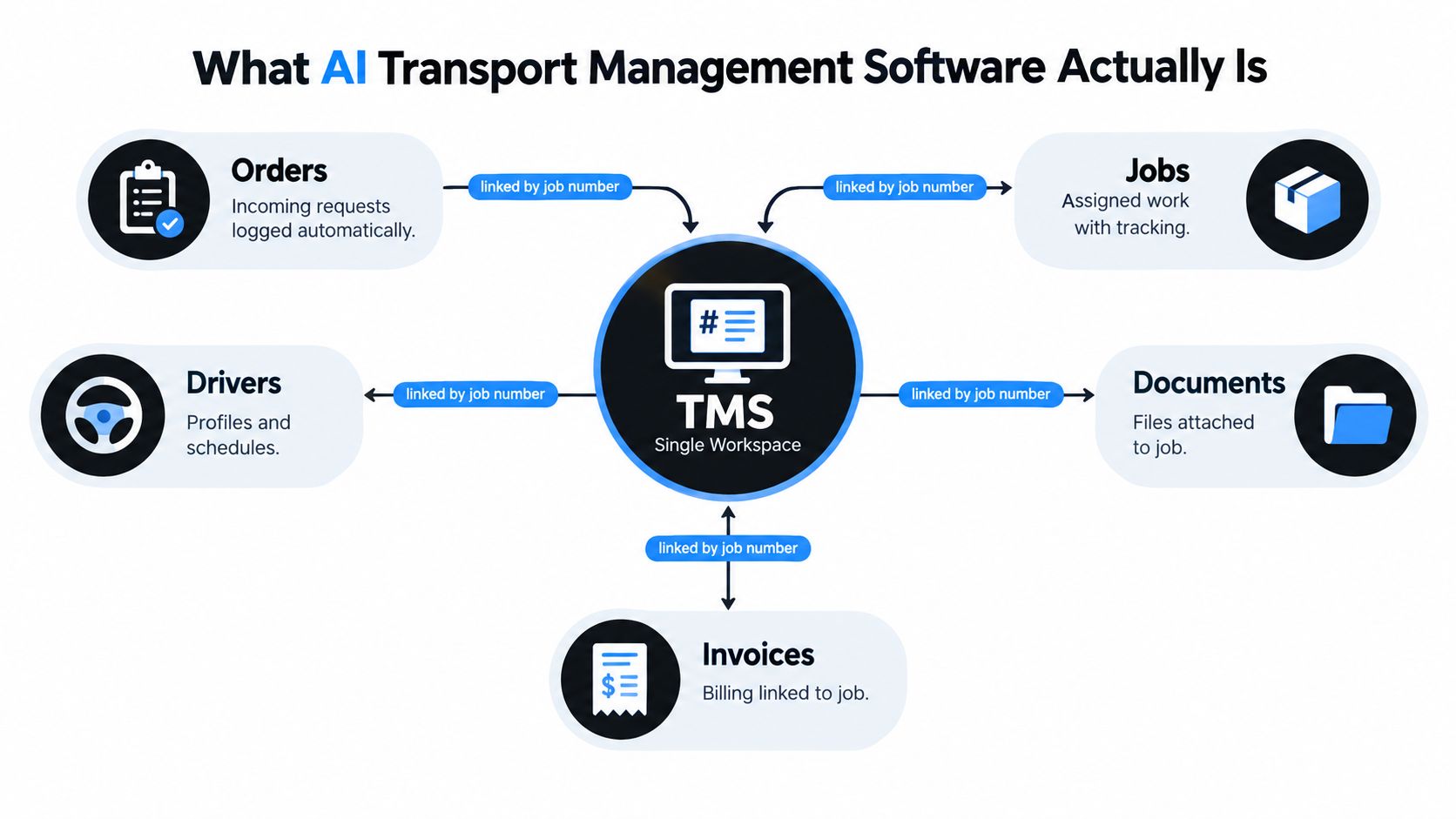
Where assistance fits in the jobs grid
A useful workflow starts with the incoming instruction. AI can extract a container release reference, pickup point, delivery point and other job fields from the source document. A planner checks the proposed record, corrects anything unclear and confirms the order.
The jobs grid then becomes the operational control point. It shows what has been booked, planned, dispatched and completed. AI may draft a driver briefing from the confirmed job details, but the planner still decides which driver takes the work. That distinction matters in haulage, where availability, customer relationships, equipment and practical route knowledge can't be reduced to a generated suggestion.
At completion, the driver uploads a POD image, signature, notes and relevant job evidence. Document understanding can classify the file and extract fields, while the system flags missing or inconsistent information for review. freight OCR accuracy depends heavily on document quality. Typed carrier invoices can reach 97–99% field-level OCR accuracy, while handwritten BOLs or faxed PODs may fall to 60–75%, so raw OCR shouldn't be trusted without validation.
The readiness test
Small operators often start with the AI feature before fixing the input. That reverses the sensible order. AI needs consistent container references, a usable jobs grid and digitised PODs to produce dependable assistance.
A connected workflow comes first. Once the job data is attached correctly, AI can reduce rekeying, suggest a draft and identify an exception. It can't turn incomplete source information into a reliable invoice without someone checking the gap.
Core Modules in a Connected Transport Workflow
A connected workflow follows the job in execution order. Each module hands usable information to the next, rather than creating a fresh administrative task.
- Order intake receives email instructions, EDI messages from shipping lines or manual entries. The order header should hold the container number, release reference, pickup, drop-off, customer and agreed requirements.
- The jobs grid turns that order into planned work. The dispatcher can view jobs by date, vehicle or status, moving them from booked to planned, dispatched and completed.
- Dispatch and driver briefing sends the confirmed work to the driver. The instruction should include the reference details, collection and delivery information, timing requirements and any notes that affect execution.
- Digital POD brings the completed job back into the record. A driver can capture a signature, photograph, note, timestamp and exception detail at the stop.
- Invoicing uses the completed job and POD to support billing. The office can review chargeable items, check exceptions and avoid retyping information already held against the order.
- Container workflows add the details that general haulage often doesn't need, such as empty returns, depot gate-in references, demurrage exposure and intermodal hand-offs.
| Module |
Input |
Output handed to next step |
| Order intake |
Booking email, EDI instruction or manual order |
Confirmed order header with references and locations |
| Jobs grid |
Confirmed order |
Planned job, assigned date, vehicle and status |
| Dispatch |
Planned job and driver details |
Driver briefing and allocated work |
| Digital POD |
Driver completion evidence |
Signed record, images, notes and exceptions |
| Invoicing |
Completed job and POD |
Reviewed chargeable job ready for billing |
| Container workflow |
Release, depot and hand-off details |
Container-specific status and supporting references |
The important test isn't whether every module exists as a separate menu item. It's whether the original container number and release reference remain attached when the job reaches billing. This guide to transport management system modules is useful when comparing the functions different platforms group together.
A TMS should also support communication without scattering updates across personal inboxes. Customer updates can be based on the job status and completion record, while subcontractor work can be assigned with the same reference structure as company-operated work. The office still needs to review the outcome, especially where a subcontractor returns incomplete paperwork or reports an exception.
Connected Workflows Versus Spreadsheets and Paper PODs
Spreadsheets aren't automatically bad. They give a small office flexibility, and a capable planner can manage a surprising amount of work with them. The problem starts when the spreadsheet becomes the planning board, document register, driver communication log and invoicing source at the same time.
Paper PODs create a similar weakness. They provide evidence at the delivery point, but the office still has to receive, interpret, file and re-enter that evidence. A completed delivery therefore remains administratively open until somebody handles the paper.
| Operational outcome |
Spreadsheets + paper PODs |
Connected TMS workflow |
| Order intake turnaround |
Planner reads, copies and checks information manually |
Order details are captured into a shared job record |
| Dispatch clarity |
Latest instruction may sit in a call, email or message |
Driver receives the confirmed briefing linked to the job |
| POD return speed |
Paper waits for collection, scanning or typing |
Driver uploads completion evidence to the job |
| Query handling |
Staff search email, sheets and paperwork |
Staff open the job record and review its history |
| Invoice posting |
Finance waits for paperwork and rekeys details |
Completed job and POD support the billing review |
AI doesn't solve a disconnected process. If the container number is missing from the order, the driver sends a separate photo and the POD is stored in a folder with no job reference, an AI tool has limited context. It may read a document, but it can't reliably determine which instruction should control the invoice.
The practical comparison is therefore not “manual versus AI.” It's fragmented workflow versus connected workflow, with AI assisting only where the connected record gives it enough information to work safely.
Two Daily Scenarios for General Haulage and Container Drayage
A general haulage job and a container move use the same basic sequence, but the information attached to the job differs.
For palletised freight, the office receives the customer order and checks the collection and delivery details. The planner allocates the work on the jobs grid, confirms the vehicle and sends the driver briefing. The driver updates the job during execution, captures the POD at delivery and records any shortage or damage note. Once the POD is attached, finance can check the completed job and prepare the invoice without waiting for a separate paperwork run.
AI's role is quiet. It may extract fields from the incoming order, draft the briefing and identify a missing delivery reference. The dispatcher remains responsible for the allocation and for deciding whether an exception needs a customer call.
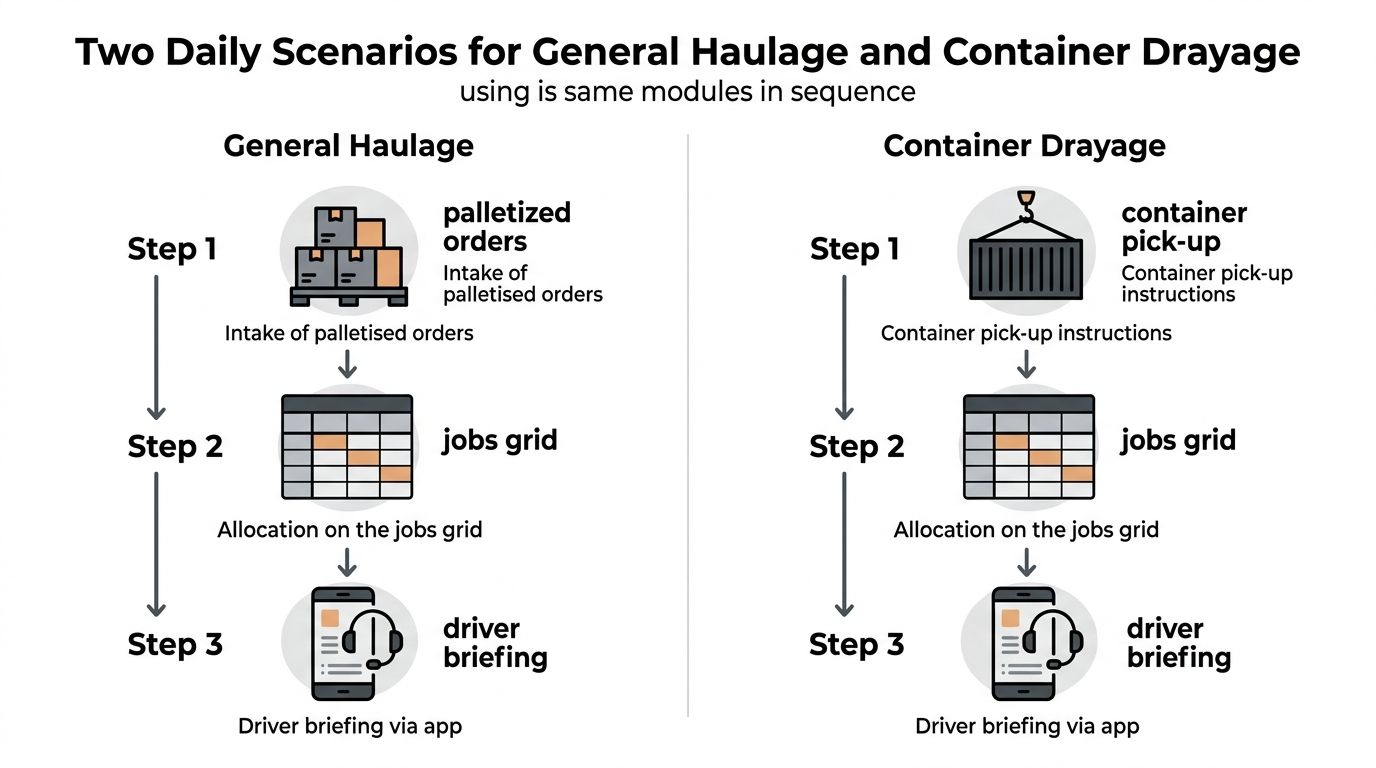
The container move
A drayage job starts with a booking reference and release information. The planner checks the container number, port or terminal slot, pickup instruction and delivery location. Before dispatch, the driver briefing needs the details that prevent avoidable calls, including the reference to present, the chassis requirement and any empty-return instruction.
At pickup, the container number must be captured accurately. At delivery, the driver records the completed movement and uploads the POD or relevant delivery evidence. If the POD slips, the office may not have the evidence needed to close the job, answer the customer or assess demurrage exposure.
The jobs grid gives the planner one place to check which moves are booked, dispatched, delayed or complete. It doesn't provide live vehicle GPS or replace fleet telematics. It manages the transport job and its documents, not the vehicle's mechanical condition, tachograph compliance, warehouse stock or consumer parcel-tracking experience.
Operational Benefits and a Realistic Way to Measure ROI
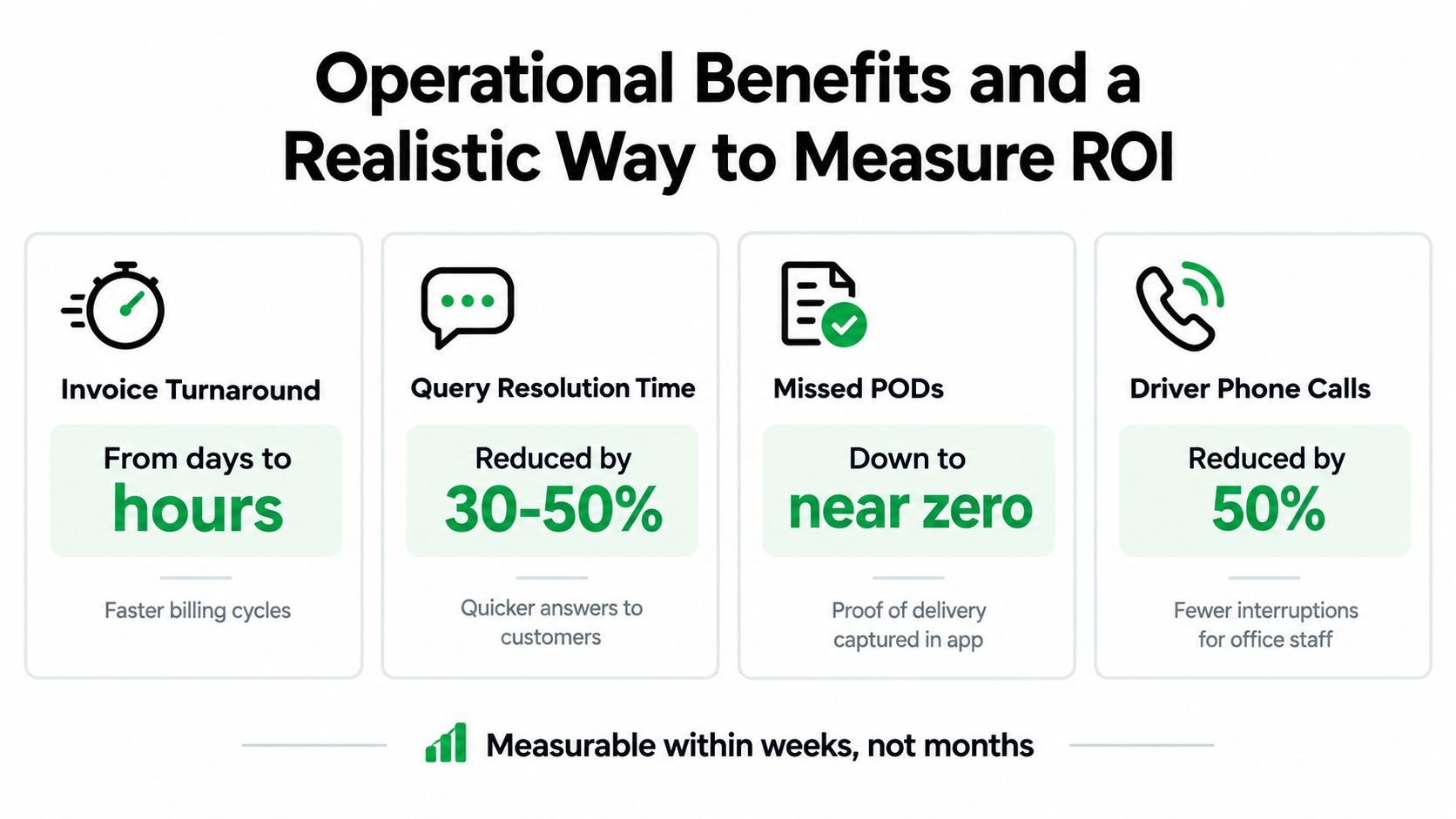
The first return from AI transport management software is usually administrative control, not autonomous planning. A small haulier can measure whether jobs move from booking to billing with fewer interruptions and less rekeying.
Track a baseline before changing the workflow. Use the same job types after rollout, then compare the process rather than relying on a broad claim about efficiency.
- Invoice turnaround: Record when a job is completed and when the invoice is ready for review.
- Query resolution: Note how long staff need to answer a customer question about a reference, surcharge or POD.
- Missing PODs: Count jobs that remain open because delivery evidence hasn't reached the office.
- Driver calls: Record calls caused by unclear instructions, missing references or status questions.
- Weekend catch-up: Log time spent sorting paperwork, updating spreadsheets and preparing delayed invoices.
The value can be visible within the office routine. If a planner no longer searches separate folders for a signed POD, or finance can see why a job is incomplete without asking dispatch, the workflow has improved even before advanced AI is introduced.
What the market says about readiness
The commercial case needs to include capability and data quality. A 2026 transportation technology investment study found that 78% of surveyed organisations planned to increase transportation management technology investment in 2026, compared with 53% in 2017. Yet only 19% of shippers and 15% of logistics service providers were using AI at scale.
The same study identified data quality as the leading barrier, cited by 45% of LSPs and 33% of shippers, with integration complexity cited by 38% and 39% respectively. Another logistics AI adoption analysis identifies unclear ROI and internal capability gaps as a concern for roughly 40% of shipper and LSP respondents. That's why consolidation is a more credible first milestone than promising a fully automated transport office.
For wider guidance on connecting operational improvements to business value, The Speed to Lead Bible overview offers a useful framework for measuring response and process speed without confusing activity with commercial results. For a transport-specific view, see these transport management system benefits.
Vendor Selection Checklist and Migration Tips for Small Operators
A vendor demonstration should use a real job, not a polished sample. Ask the supplier to show how an emailed instruction becomes a job, how a planner changes the allocation, how a driver receives the briefing, and how the POD reaches the billing queue.
Score the practical criteria below before discussing advanced AI.
| Criterion |
Weight |
Score (1–5) |
Notes |
| Container-specific workflows |
High |
|
Check references, empty returns and container status fields |
| Jobs grid and digital POD |
High |
|
Test planning, status changes and driver uploads |
| Invoicing automation |
High |
|
Ask about completed-job checks, factoring and quick-pay links |
| Driver app and offline mode |
High |
|
Confirm what happens with weak signal at a depot or delivery point |
| Open API |
Medium |
|
Check possible connections to WMS or port systems |
| Transparent pricing |
High |
|
Clarify per-truck, per-user and setup charges |
| UK and EU references |
Medium |
|
Speak with operators using comparable workflows |
| AI clarity |
High |
|
Require a clear explanation of inputs, review steps and limitations |
Look closely at the commercial terms. Long onboarding contracts, opaque AI language and essential modules sold only as bolt-ons can create cost and friction before the office has proved the workflow.
A controlled migration
Clean the customer list, rate tables, location records and container reference conventions before importing them. Decide which field is authoritative when the same customer or location appears under different names. Poor source data will produce a faster version of the same confusion.
Start with a narrow process, preferably digital POD followed by invoicing. Train drivers during a defined operating window, keep a clear fallback for exceptions and ask the office to use the new job record consistently rather than maintaining a parallel spreadsheet indefinitely.
A 30-day pilot with two trucks can expose missing fields, unclear instructions and driver usability problems before fleet cut-over. Use real work, including a difficult delivery and an incomplete document, not only straightforward jobs. The point of the pilot is to test how the system behaves when the office is busy.
Bringing It Together and Your Next Practical Step
AI inside a TMS is most useful when it stays close to the work already done by a transport office. It can assist with job intake, document extraction, briefing drafts, POD review and reduced rekeying. It shouldn't be presented as autonomous dispatch, and it won't compensate for inconsistent references or a jobs grid that nobody keeps current.
The sensible starting point is a connected operational record. Put the order, allocation, driver instruction, status, POD and billing check against one job number. Then measure the changes that matter to a small operator, such as POD turnaround, invoice preparation time, unresolved queries and the number of days sales remain outstanding.
Run a two-truck pilot for 30 days using real general haulage or container work. Agree the measures before starting, review the results with dispatch and finance, and only then decide whether broader automation is justified. A low-commitment trial or discovery call should let you test the workflow without committing to a large systems project.
Logivo provides a connected transport management workflow for hauliers and container operators, covering job planning, driver briefings, digital POD capture and invoicing support, with practical AI assistance for routine intake and document handling. Visit Logivo to review the platform and arrange a trial or discovery conversation around your own jobs.