AI Job Intake for Transport How to Build It Right
Learn AI job intake for transport step by step — map workflows, extract data, connect jobs grid to POD and invoicing with practical AI.
A booking arrives by email, the rate sits in a spreadsheet, the container details are buried in a PDF, and a driver is waiting for instructions before the planner has finished rekeying the job. By the time the signed proof of delivery reaches the office, finance is still trying to match it to the right load. That's the reality behind many conversations about AI job intake for transport. The difficult part isn't creating another automation layer. It's keeping the booking, job record, dispatch decision, delivery evidence and invoice connected.
AI can help turn transport instructions into a draft job, but the planner still owns the operational decision. The useful design is simple: capture information once, validate the fields that matter, send approved details to the driver, then attach completion evidence to the same job. A connected TMS gives the traffic office one place to manage that handoff instead of asking people to reconcile inboxes, spreadsheets and paper later.
Table of Contents
Why AI Job Intake Matters in the Traffic Office
A typical morning starts with several versions of the same job. A customer emails a booking, an attachment contains the collection and delivery points, a message adds a timing change, and a spreadsheet holds the rate. Someone copies the details into a planning sheet, then someone else enters them into the TMS. If the container number is mistyped or a depot reference is missed, the error may not appear until the driver is at the gate.
The cost isn't limited to rekeying. Planners lose time checking which instruction is current, dispatchers brief drivers from incomplete information, and finance waits for a POD that can't be matched confidently to the correct job. In container transport, a missing container reference, depot code or delivery instruction can affect execution and the paperwork needed to bill.

AI should prepare the job, not approve the movement
A sensible intake process uses AI to read emails, PDFs, images, spreadsheets, CSV files, XML or plain text, then create a structured draft. The draft can contain the customer, job reference, dates, stops, addresses, load information, container details, pricing, notes and driver instructions. A planner checks the draft against the source instruction before it enters the live planning workflow.
That distinction matters. AI-assisted intake reduces manual rekeying and highlights missing information, but it shouldn't replace the person who understands the customer's operating rules, vehicle availability, access restrictions or commercial exposure. The planner remains responsible for approving what gets dispatched.
Practical rule: Automate data preparation, not accountability.
Adoption is still developing. A 2026 transportation and logistics survey found that only 19% of shippers and 15% of logistics service providers report using AI at scale. Data quality and integration complexity were the largest barriers, with 45% of LSPs and 33% of shippers citing data quality, and 38% of LSPs and 39% of shippers citing integration complexity. That's a useful warning for operators comparing tools. The first priority should be a dependable handoff into the transport workflow, not a broad automation programme.
Teams assessing intake can also benefit from practical guidance on how boosts process efficiency, particularly when deciding which repetitive handoffs to remove first. For transport, the strongest starting point is usually the movement from booking to an approved job record.
Map Your Current Intake Workflow and Required Data
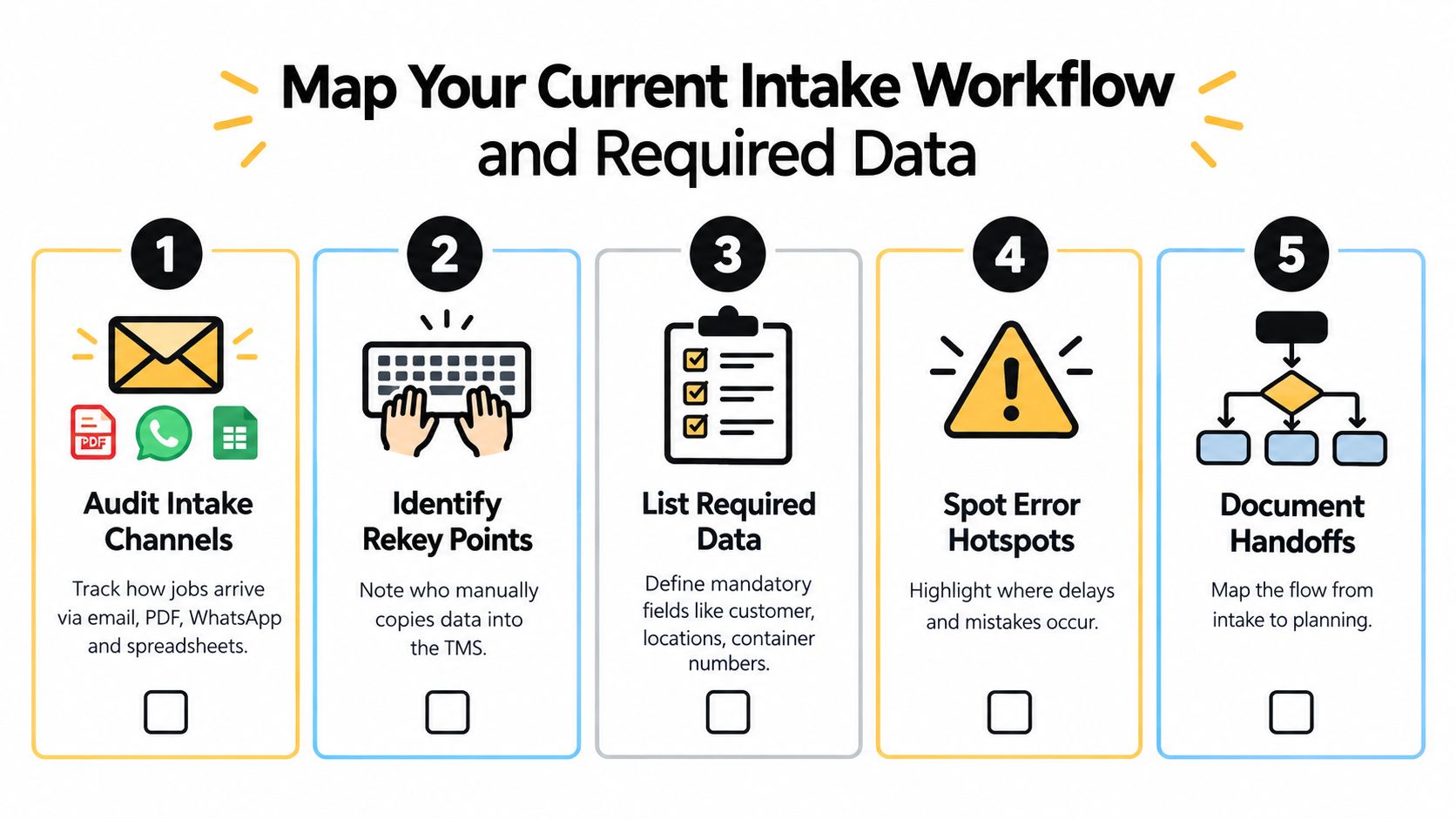
Start with the process you run, not the process shown in a software demonstration. Pick a representative working day and follow several jobs from the first customer instruction to the point where a planner marks them ready for dispatch. Record every channel, manual copy and approval.
Find where information enters
Create an intake register with one row per job. Record whether the instruction arrived through email, PDF, WhatsApp, spreadsheet, CSV, XML or plain text. Note whether an attachment followed the original message, whether the customer sent a correction, and which version the planner treated as authoritative.
Then identify each rekey point:
- Initial capture: Who reads the booking and creates the job?
- Planning entry: Which fields are copied into the TMS or jobs grid?
- Driver briefing: Who rewrites the instructions for the driver?
- Completion evidence: Who links the POD, delivery note or attachment to the job?
- Billing preparation: Who checks the job before an invoice draft is raised?
This exercise often reveals that the same reference is entered several times by different people. It also shows where an AI draft could remove typing without removing review.
Define a minimum data standard
For general haulage, the mandatory set will normally include the customer, job reference, collection location, delivery location, requested dates or time windows, load information, rates and special instructions. For container transport and drayage, add the container number, ISO code, collection and delivery depot codes, release or booking references, and any handling instructions that affect execution.
Separate dispatch-blocking fields from information that can be completed later. A missing driver note may require clarification, but a missing delivery address or container number should stop approval until the planner resolves it. This prevents a draft from looking complete merely because it contains a large amount of extracted text.
Measure fields, not characters
Character accuracy can look impressive while the job remains unusable. The operational question is whether the extracted value is correct as a complete field. A single incorrect container number, port code, seal number or freight term can disrupt dispatch, exception handling or invoicing.
Evidence from logistics document testing shows why this distinction matters. On clean, machine-printed ocean bills of lading, eight of nine tested tools exceeded 90% field-level accuracy on standard fields, while handwritten seal numbers caused a sharp decline. Four tools fell below 50% on handwritten seal numbers, and only three stayed above 80% on handwritten POD annotations. The results are detailed in this logistics document extraction comparison.
Your completed map should include three outputs:
- A channel list showing how bookings and changes arrive.
- A field dictionary defining required, optional and dispatch-blocking data.
- An exception list showing where a human must review before planning or billing.
Without these definitions, AI intake moves inconsistent work into a faster-looking queue.
Choose Lightweight AI Extraction That Fits Haulage Work
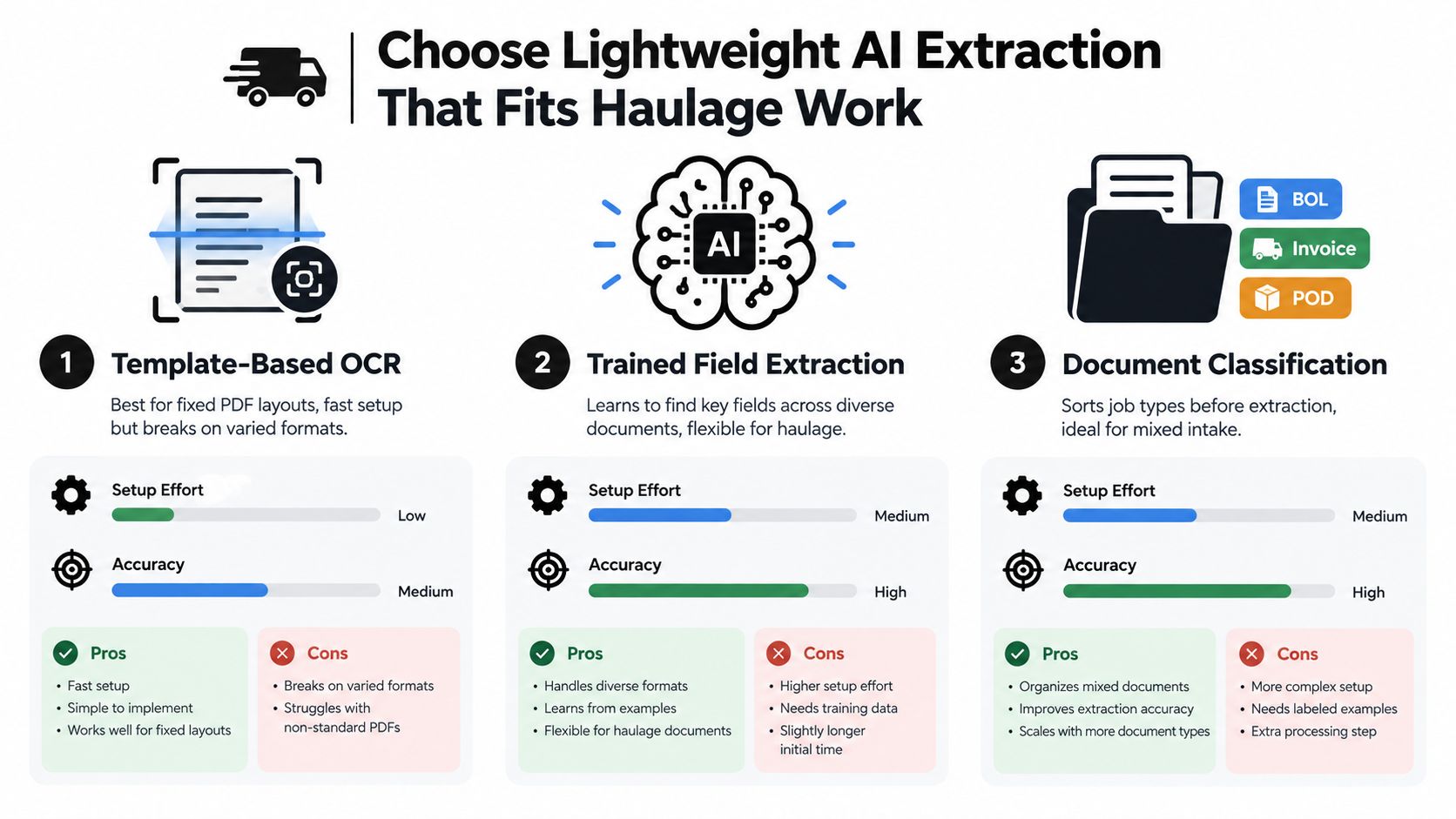
The right extraction method depends on the paperwork, not on how the product sounds. A fixed customer invoice can work well with a template. A mixed inbox containing bookings, amendments, delivery notes and driver photographs needs classification before extraction. Handwritten evidence needs a review path from the start.
Compare the practical options
Template-based OCR suits a stable PDF layout from the same customer. It's quick to configure and can capture predictable labels, references and totals, but it becomes fragile when customers change their forms or place the same value in a different position.
Trained field extraction looks for the meaning of a field across different layouts. It's more suitable when haulage instructions vary between shippers and when “delivery reference”, “booking number” or “container reference” appears in different places. The trade-off is that the operator must define the fields and monitor corrections.
Document classification followed by extraction is useful for a mixed intake queue. The system first identifies whether a file is a booking, invoice, POD, delivery note or another document, then applies the relevant field set. That reduces the risk of using an invoice template against a POD or treating a driver annotation as a clean machine-printed value.
Set confidence rules before live use
A confidence score is only useful when it triggers a defined action. High-confidence customer and address fields can move into a planner review queue. A low-confidence container number, total, delivery reference or handwritten seal number should be highlighted for confirmation. Missing mandatory data should create an exception rather than a blank value that appears valid.
Independent logistics OCR guidance places real-world field accuracy for freight invoices and semi-structured transport paperwork at roughly 85% to 99%, depending on document quality, layout consistency and training data. Structured invoices can reach 95% to 99% out of the box, while handwritten or highly variable formats typically fall to 70% to 85% and need human-in-the-loop review, as described in this guide to AI OCR accuracy for logistics invoices.
Source quality deserves its own control. Clean digital PDFs usually give extraction a better starting point than fax copies, skewed scans, stamps or faint text. If the original document is poor, don't ask the model to compensate for missing visual information. Route it to a person, request a clearer copy or capture the value through a structured form.
A useful implementation keeps three stages separate:
- Pre-classification: Decide what document or message type has arrived.
- Field extraction: Populate the fields relevant to that document class.
- Human review: Confirm low-confidence or commercially important values.
This AI document extraction workflow is most useful when it reduces typing while preserving a visible approval step. Full automation on weak scans doesn't remove work. It creates corrections later, often when the vehicle, customer or invoice is already waiting.
Connect AI Drafts to the Jobs Grid and Driver Briefing
An extracted draft has no operational value until the traffic office can see it alongside the rest of the work. The planner needs to know whether the job is unallocated, ready for assignment, in progress, delayed or awaiting completion evidence. That's why the jobs grid should become the review point, not a separate AI inbox that nobody owns.
Use a clear approval sequence
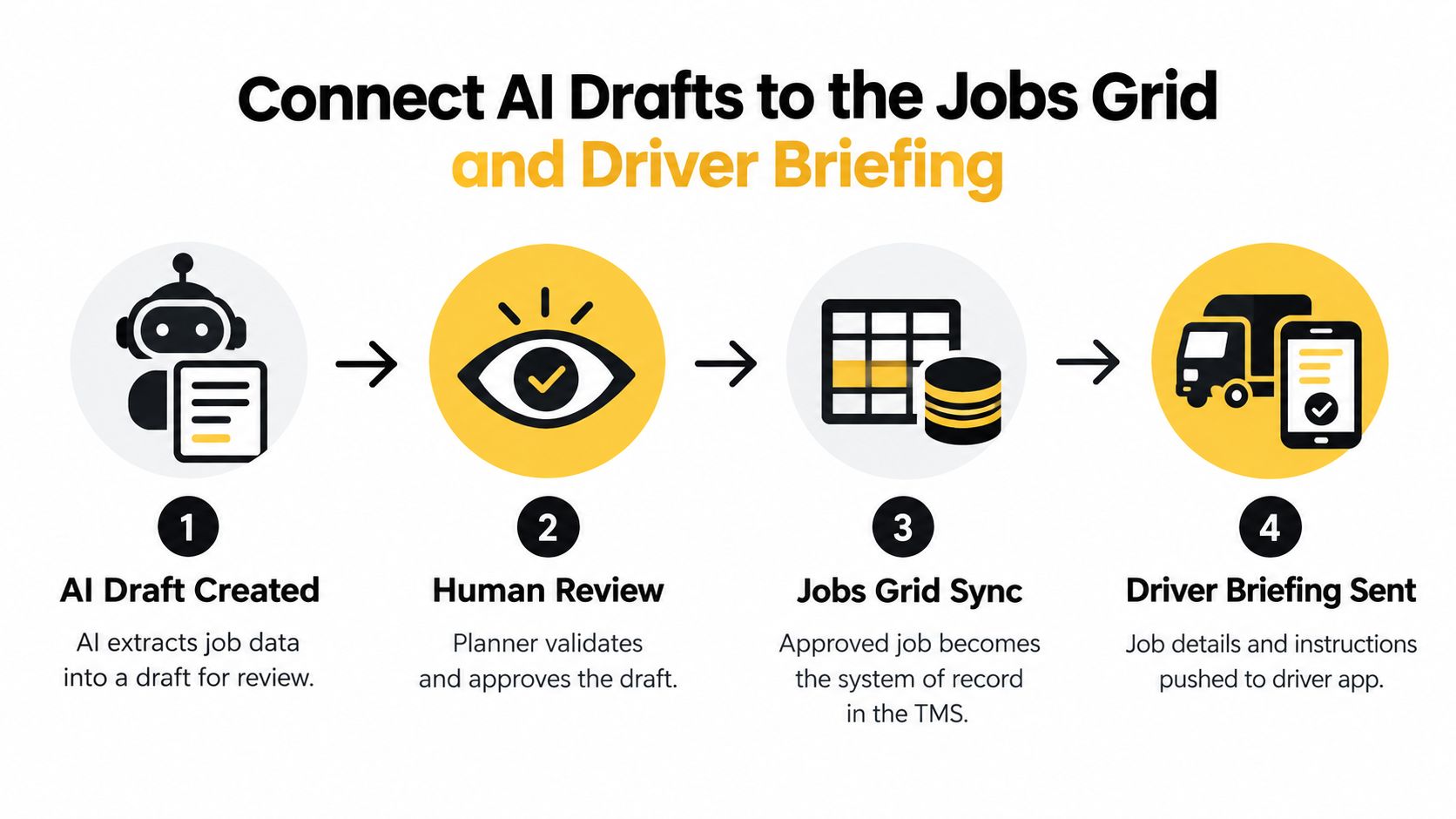
The handoff should follow four states:
- AI draft created: The source instruction is converted into proposed customer, locations, dates, references, load details, rates, notes and instructions.
- Planner review: The planner compares the proposed values with the booking, resolves missing or conflicting data and approves the job.
- Jobs grid synchronised: The approved record becomes the operational version in the TMS, available for allocation and status tracking.
- Driver briefing sent: The driver receives the job-specific details needed to complete the movement.
The Logivo jobs grid is relevant here because the grid should hold the working truth for dispatch, rather than forcing planners to switch between extracted documents and a separate scheduling view. The system of record needs customer details, collection and delivery locations, vehicle assignment, planned references, rates and special instructions. If an instruction changes, update the job record and issue the corrected briefing from that record.
Give drivers only what execution requires
A driver briefing shouldn't reproduce the entire customer email chain. It should provide the collection and delivery details, timing requirements, references, container information, special instructions and the evidence expected at completion. The driver can then report progress against the same job rather than sending a separate message that someone must interpret later.
A practical TMS workflow keeps the job open or pending until the required evidence is accepted. Completion then moves the job to completed, giving dispatch and finance a shared signal that the movement has finished. This approach is described in the transport-management workflow for digital proof of delivery.
The boundary with other systems should stay clear. A transport TMS manages jobs, planning, dispatch, driver communication, POD and invoicing. It isn't fleet telematics, live vehicle GPS, tachograph compliance software, workshop management, warehouse management or consumer parcel tracking. Keeping those responsibilities separate prevents buyers from expecting an intake workflow to solve problems it wasn't designed to address.
The following video provides a visual explanation of how a connected transport workflow can support the operational handoff:
Validate Exceptions and Keep Human in the Loop
The difficult jobs aren't the clean ones. They're the bookings with an incomplete address, a driver note in another language, two conflicting delivery windows, an unclear accessorial or a handwritten POD that doesn't clearly show who received the goods. A reliable intake process treats these conditions as reviewable exceptions rather than forcing the system to invent certainty.
Decide what can block dispatch
Create a validation policy that answers three questions for every important field:
- What does a valid value look like?
- Can the planner correct it from the source instruction?
- Who owns the decision when the source remains unclear?
Container number, ISO code, collection and delivery depot codes, delivery location, customer reference and timing requirements may block dispatch when they affect the movement. A spelling variation in a non-critical note may not. The policy should reflect the consequences of the error, not the confidence score alone.
Multilingual and inconsistent inputs need the same treatment. Extract the proposed value, preserve the original document, and show the planner where it came from. Don't normalise a depot name or translate a driver instruction if that could change the meaning of the work.
Make POD review specific
Before an invoice draft is created, the office should be able to confirm the order or job reference, container number and ISO code, collection and delivery depot codes, delivery date and timestamp, consignee name, receiving person, and a signature image. If the receiver refuses to sign, record the reason instead of leaving the signature field empty.
The POD-to-invoice automation process should route uncertainty to a named reviewer. That reviewer might sit in operations for execution questions or finance for billing rules, but ownership must be explicit. Otherwise, “needs checking” becomes a queue with no accountable person.
A human-in-the-loop process works when review is narrow, named and triggered by a real exception.
Keep corrections useful. When a planner fixes a container number or changes a field classification, retain the correction as feedback for future extraction rules or model tuning. Review should improve the intake process over time, not remain a permanent second data-entry exercise.
The same control applies to subcontractors. If a subcontractor returns a POD through email or a mobile upload, the document must still attach to the correct job, and the completion check must use the same required evidence. A different carrier shouldn't mean a different standard for billing readiness.
Roll Out Change and Measure Time to Invoice Gains
Rollout succeeds when each role understands the handoff. Planners approve drafts and resolve operational exceptions. Dispatchers allocate work and monitor status. Drivers receive clear job instructions and capture completion evidence. Finance checks the accepted POD and commercial fields before invoicing. Nobody needs to believe that AI replaces planners. The value comes from removing repetitive copying so experienced staff can focus on decisions.
Start with one customer lane or one document family. Choose work with a recognisable booking pattern, a manageable exception profile and a clear owner in the traffic office. Keep the existing process available while the team compares the draft with the original instruction, then record the corrections rather than relying on informal feedback.
Measure the chain, not just extraction
Extraction accuracy is only one operational measure. Track:
- Booking to approved job: How long does it take for a usable draft to become ready for planning?
- Approved job to briefing: How quickly does the driver receive the final instructions?
- Delivery to indexed POD: How long after delivery does the evidence attach to the correct load?
- POD to invoice draft: How quickly can finance begin billing after the document is accepted?
- Exception ownership: How many jobs wait because nobody has been assigned to resolve uncertainty?
- Billing disputes: Which missing fields or documents cause customers to challenge an invoice?
The downstream measure matters because intake quality affects cash flow. A connected POD workflow can move a load from delivery to billing on the same day: the driver completes the delivery, captures or uploads the signed POD, the document is indexed to the correct load using TMS data, the back office is notified immediately, and billing can begin instead of waiting seven to ten days, as described in this proof-of-delivery billing workflow.
Make the evidence standard visible
Put the completion checklist where the person doing the work can use it. Drivers need to know what evidence to capture. Planners need to see which jobs are awaiting proof. Finance needs a reliable signal that the record is ready for an invoice draft.
The wider market opportunity needs a practical response. A logistics market overview reported that the global AI-in-logistics market was valued at $26.3 billion in 2025 and projected to reach nearly $708 billion by 2034, implying a 44% CAGR over the forecast period. The same source reported that almost 19% of logistics and supply chain companies had not started generative AI initiatives, reinforcing that operators don't need to begin with an ambitious transformation programme. They need a controlled workflow that solves a visible office problem, then expands when the evidence supports it, as outlined in this logistics AI market overview.
For a haulage or container operation, the practical test is straightforward. Can the team receive a booking, approve a structured job, brief the driver, capture the POD, resolve exceptions and prepare the invoice without rekeying the same information at every stage? If not, improve the handoff before adding more automation.
Logivo provides a connected transport workflow for hauliers and container operators, covering AI-assisted job intake, planning, driver briefing, digital POD capture and invoice preparation in the same operational record. Visit Logivo to review the workflow and decide whether it fits a live lane or document process in your traffic office.